AI Coding Agents for Enterprise Teams: What to Decide Before the First Seat

AI coding agents for enterprise teams read files, run commands and change code on company machines. So the rollout is a permissions decision, not a software purchase. Before the first seat, answer five questions: what it may touch, who sets the rules, where your data goes, how you see what it did, and what it knows about your work.
AI coding agents for enterprise teams: the tool is the easy part
On a Tuesday, one developer installs an AI coding agent. By Friday, three teams use it. Nobody decided a thing.
That is not a scare story. When one AI lab asked its own staff how they used its coding agent, lawyers had built phone tree systems. Marketers were making hundreds of ad variations in seconds.
An AI coding agent is software that reads files, runs commands and changes code to finish a task you describe in plain words. Anyone with files and chores will pick one up.
So, everyone. This guide is for the person who has to make that safe for a whole team, in about an afternoon.
Why is a coding agent riskier than a chatbot?
A coding agent is riskier because it acts on the machine. A chatbot only sees what you paste into it.
With a chatbot, the risk is what an employee types. With an agent, the risk is what the agent may do.
One is a typing problem. The other is a permissions problem.
The agent also reads things nobody on your team wrote. Chip Huyen's AI Engineering calls one version passive phishing: someone plants harmful code in a public repository and waits for an AI assistant to suggest it.
Security groups call the wider problem prompt injection. Hidden text in a file or web page changes what the model does.
Huyen's fix is plain. Run generated code on a separate, isolated machine, so any damage stays in that box.
So the first job is not a prompt workshop. It is deciding what the tool may touch.
Prompts ask. Settings decide. Our guide to what an agent harness is explains why.

A chatbot sees what you paste; a coding agent sees the whole machine
| Chat assistant | AI coding agent |
|---|---|
| Sees what you paste in | Sees every file it can open |
| Writes text back | Runs commands and edits files |
| Risk: what someone types | Risk: what it is allowed to do |
| Control: a usage policy | Control: settings the software enforces |
| Reads little you did not choose | Reads code and pages nobody on your team wrote |
Our comparison. Hidden-instruction risk: OWASP LLM01:2025 Prompt Injection; Chip Huyen, AI Engineering.
The AI security standard names the risk: files and web pages can carry instructions
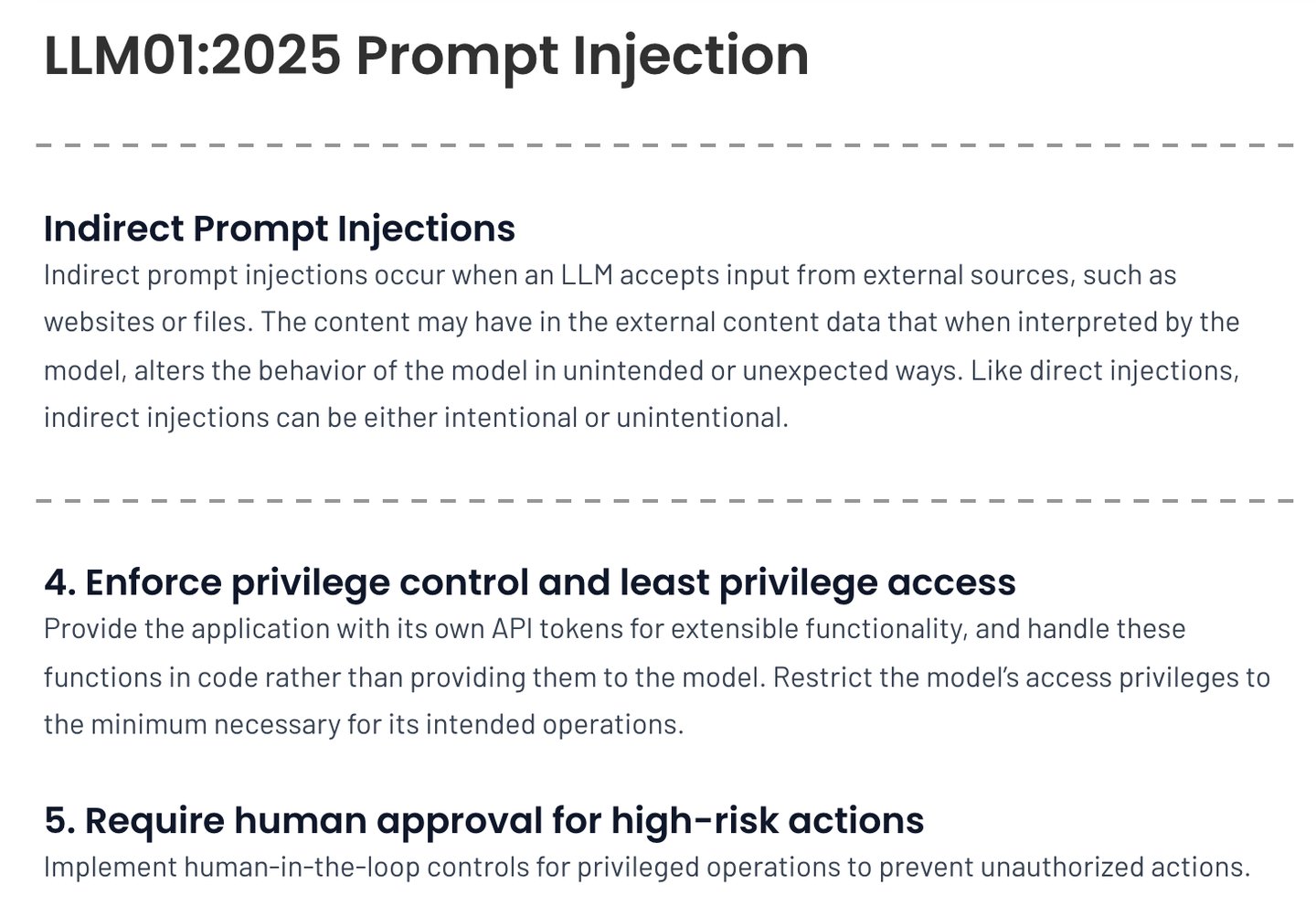
- A coding agent reads hundreds of these a day.
- Text nobody on your team wrote can steer the agent.
- This is question 1 of the audit: what can it touch?
- Changes to live systems wait for a person.
Screenshot of the OWASP Gen AI Security Project page LLM01:2025 Prompt Injection, taken 2026-10-18
The Harness Audit is five written questions answered before an AI coding agent reaches a second team: what can it touch (deny list first), who sets the rules (central settings no laptop can override), where does the data go (provider, retention, training terms), can we see what it did (usage, cost and tool activity in your monitoring), and what does it know about us (a shared instruction file a new hire can follow). One named owner signs it. Then hand the agent extraneous work first, train it as a new skill with one short course, and widen in rings only while three rates hold: agent changes reverted, changes sent back in review, and incidents traced to agent code.
The Harness Audit: five questions before the first seat
The Harness Audit is five questions you answer in writing before an AI coding agent reaches a second team. Each answer names a setting, an owner and a date.
1. What can it touch? List the folders, commands and systems it may use, and write the deny list first: secrets, live systems, customer data.
That follows the old security rule of least privilege: give each tool only the access its job needs.
2. Who sets the rules? Rules belong in central settings that one laptop cannot override.
If every person sets their own, you have a suggestion, not a policy.
The Accelerate research team found that letting teams pick their own tools helped delivery. It also backed one standard platform underneath. Our reading: let people choose how they work, but set the guardrails once, for everyone.
3. Where does the data go? Name the provider that processes your code, how long it keeps it, and whether it may train on it.
Business and personal plans often differ, so check which one each person is on.
4. Can we see what it did? Usage, cost and tool activity should flow into the monitoring you already run.
A log nobody can read is the same as no log.
5. What does it know about us? A shared instruction file tells every run your standards, your no-go zones and how you test.
We build ours as source-of-truth skills.
John Berryman and Albert Ziegler say it best in Prompt Engineering for LLMs. Models will get smarter, but they will never be psychic.
How do you test that file? Borrow the check Team Topologies uses for internal platforms: how easily can a new hire get going with it? If a new person cannot follow it, the agent will guess too.
Then one named person signs the page. No signature, no second team.
Five questions, each answered with a setting, an owner and a date
| Question | A good answer | Red flag |
|---|---|---|
| What can it touch? | A written deny list: secrets, live systems, customer data | "It only touches what we ask it to" |
| Who sets the rules? | Central settings that no laptop can override | Each person sets their own |
| Where does the data go? | Named provider, retention period and training terms, per plan | "Probably the usual terms" |
| Can we see what it did? | Usage, cost and tool activity in the monitoring you run | A monthly invoice and nothing else |
| What does it know about us? | A shared instruction file a new hire can follow | Everyone pastes their own notes |
The Harness Audit, our framework. One named owner signs the finished page.
A rule in a document asks; a rule in central settings decides
| Rule in a policy document | Rule in central settings |
|---|---|
| "Never open the secrets folder" | The secrets folder is on the deny list |
| Each person remembers it | Every machine gets it automatically |
| One laptop can ignore it | No laptop can override it |
| Breaks are found by accident | Blocked actions show up in the log |
Our comparison. Standard platform with team tool choice: Forsgren, Humble and Kim, Accelerate.
The whole audit fits on one signed page
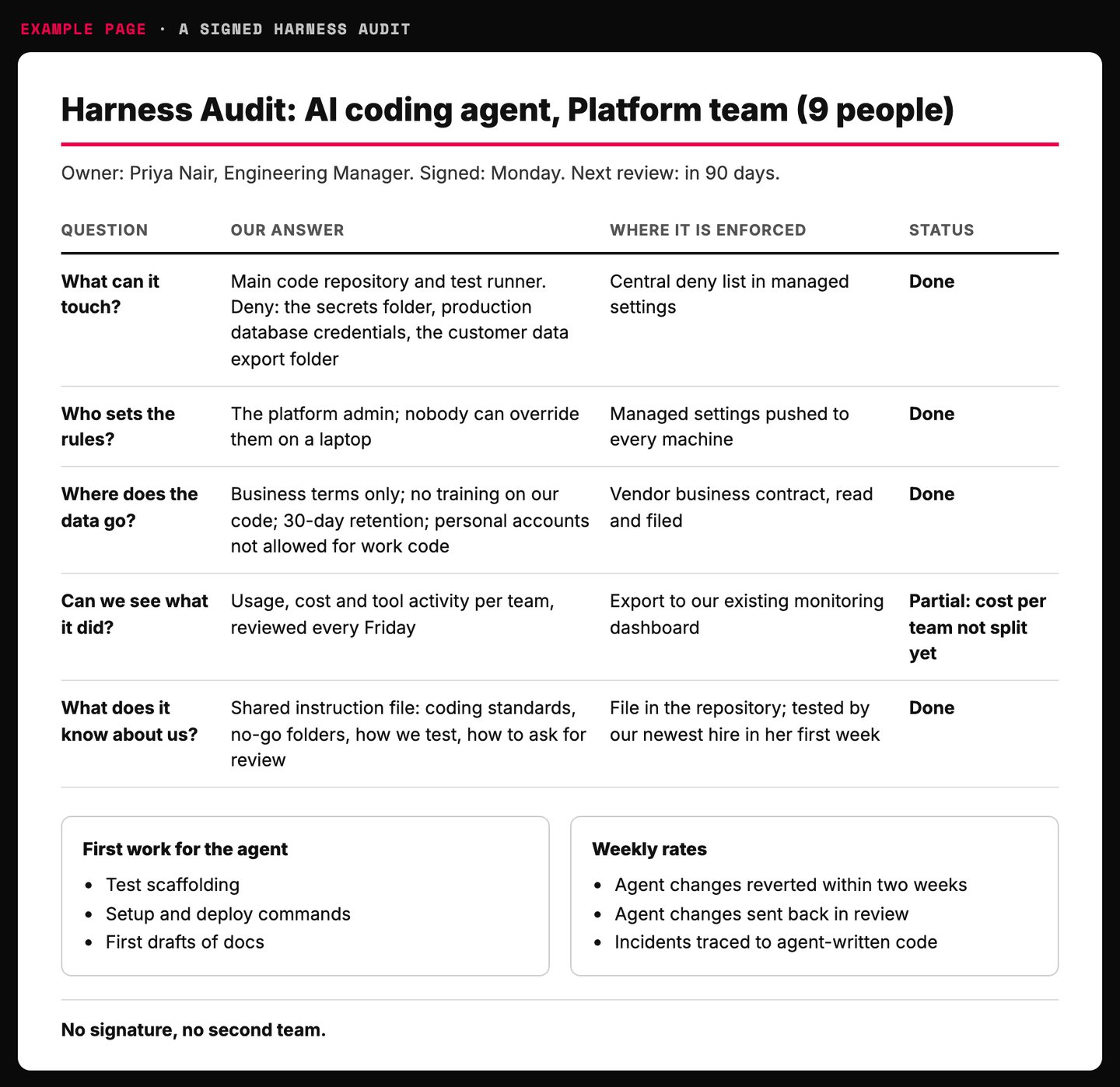
- One named owner signs the page.
- Write the deny list first.
- Central settings, not personal ones.
- An honest partial beats a fake done.
- If a new hire can follow it, the agent can too.
Example page built for this article with a made-up brand
Give the agent your team's boring work first
Start with the work that wastes your team's attention, not the work that needs it. Matthew Skelton and Manuel Pais borrow a useful split for this from the psychologist John Sweller.
Cognitive load is the mental effort a task takes. Sweller sorts it into three kinds.
Intrinsic load is the hard core of the job, like knowing the language. Extraneous load is the setup around it, like remembering how to deploy something again. Germane load is the thinking that adds value, like how two systems should fit.
Their advice is to shrink the first with training, remove the second, often by automating it, and leave room for the third.
Our reading: that is a job description for an agent. Hand it the extraneous work, like setup steps, test scaffolding, renames and first drafts of docs. Keep the germane work with people.
The split works outside engineering too. An analyst's extraneous load is reformatting exports, not deciding what the numbers mean.
There is a bonus. Extraneous work is cheap to check.
A bad rename breaks a test in seconds. A bad design choice hides for months.
Hand the agent extraneous load first and keep germane work with people
| Task | Load type | Who takes it |
|---|---|---|
| Remembering deploy and setup commands | Extraneous | Agent |
| Writing test scaffolding | Extraneous | Agent drafts, a person reviews |
| Reformatting a weekly data export | Extraneous | Agent |
| Learning the language or the tools | Intrinsic | Training and pairing |
| Deciding how two systems should fit | Germane | People |
| Deciding what the numbers mean | Germane | People |
Load types: John Sweller, as used in Skelton and Pais, Team Topologies. The task examples and the agent mapping are ours.
Give the agent more only after the rung below runs clean
- Read and explain Walk through unfamiliar code or a folder. Changes nothing.
- Draft for review Tests, docs and scripts that a person reads before use.
- Change with approval Edits code, and a person approves every change.
- Routine changes, reviewed after Renames and updates that tests catch fast.
- Never, at any rung Secrets, live systems and customer data stay off limits.
Our default order for a team rollout.
Train people like it is a new skill, because it is
Rolling out an agent is a training project dressed up as a software purchase. Most companies skip the training and wonder why usage stalls.
Andy Grove ran the math in High Output Management. A department with 10 percent turnover and 10 percent growth must teach 20 percent of its people the basics every year.
Teaching a new skill to everyone in one year is five times that job. Grove priced a new one-day course for middle managers at over a million dollars, just in their time.
Who should teach it? Grove says the manager. Not an outside trainer.
Training has to match how the work is really done here.
His first course is small on purpose. Three or four lessons on the most urgent topic, with only the first one written before you start.
Teach the first run to your strongest people. Expect it to be rough. They will fix it for the second run.
Budget real hours too. The Team Topologies authors write that, in their experience, the effort of learning a new capability gets underestimated by ten to fifteen times.
A login is not a skill.
Teaching everyone a new skill is five times the yearly new-hire job
Share of a department to train in one year, Grove's example of 10% turnover plus 10% growth
- New-hire basics 20
- New skill for everyone 100
Source: Andy Grove, High Output Management. 20% = 10% turnover + 10% growth; a new skill for all staff in a year is five times that.
Build the first course small and let your best people break it
- 1. List what people need Ask them. They will name gaps you missed.
- 2. Pick the most urgent topic Three or four lessons, no more.
- 3. Outline it, write lesson one, set a date Write lesson two after you teach lesson one.
- 4. Teach the first run to your strongest people Expect it to be rough. They will fix it.
- 5. Train more teachers if many teams need it The manager teaches first, then hands it on.
Adapted from Andy Grove, High Output Management. Applying it to an AI coding agent rollout is our reading.
How do you know an AI coding agent rollout is working?
You know it works when output per person holds or rises as more people join. Seat counts and logins cannot tell you that.
The Accelerate data shows why the shape matters. Among teams that deployed at least daily, low performers deployed less per developer as the team grew. High performers deployed more.
Our reading for agents: chart changes shipped per person each week as every new group joins. If that line sags, the rollout is adding noise, not output.
Next, measure acceptance, then what happens after it. The team behind an early AI code-completion tool tracked how often people accepted a suggestion, and whether they went back and changed it later.
Of all the measures, acceptance matched the gains users reported best. Cheap signal, good signal.
Then add rates that flag breakage. Lean Analytics tells how Etsy, after moving to continuous deployment, watched logins and checkouts per second against errors.
It also counted "screwed users", people who saw an error. Every number was a rate, built to show a break fast.
Our three rates for an agent rollout: agent changes reverted within two weeks, changes sent back in review, and incidents traced to agent-written code. Per team, per week.
For the four delivery numbers behind all of this, see our AI SDLC guide. For grading the agent's work itself, see how to evaluate AI agents.
Seats and logins say nothing; output per person as the team grows says a lot
| Vanity number | Number that tells you something |
|---|---|
| Seats bought | Changes shipped per person as each group joins |
| Logins per week | Share of agent changes still in place after two weeks |
| Lines of code the AI wrote | Agent changes sent back in review |
| "It feels faster" | Incidents traced to agent-written code |
Our comparison, built on Accelerate (deploys per developer as teams grow) and Prompt Engineering for LLMs (acceptance plus later edits).
Three weekly rates, each built to show a break fast
| Rate, per team per week | What it catches | What to do if it rises |
|---|---|---|
| Agent changes reverted within two weeks | Work that looked done and was not | Shrink the tasks and tighten review |
| Agent changes sent back in review | Missing context or a weak instruction file | Fix the shared instructions |
| Incidents traced to agent-written code | Gaps in tests or in the deny list | Pause the ring and audit again |
Our rates. Rate-based dashboards to catch breakage: Etsy, as told in Croll and Yoskovitz, Lean Analytics.
Roll it out in rings, with a switch for each one
The fastest way to fail is to give everyone seats on the same day.
How to roll out an AI coding agent badly in four easy steps:
1) Buy seats for the whole company on Monday. Momentum.
2) Put the rules in a slide deck. Nobody opens slide decks, so they never get in the way.
3) Report logins to the board as adoption. Hell, call it transformation.
4) Ban it after the first scare. Watch the usage move to personal accounts.
That is not a rollout. It is a raffle.
Lean Analytics describes a better habit at Rally. Features were switched on for bigger and bigger groups of customers, and each group could be switched off again.
Do the same with the agent. One team, then a few, then everyone, and a way to switch any group off in minutes.
Each ring waits for the three rates to hold. The step-by-step version is Prove, Transfer, Scale in our AI SDLC guide.
Widen one ring at a time, and only while the three rates hold
- One team Ring 1 Audit signed, deny list set, rates start on day one.
- Two or three teams Ring 2 The first team's notes become the shared instruction file.
- Every team that wants it Ring 3 Same settings for all, set centrally.
- A switch Any ring Any group can be turned off in minutes if a rate jumps.
Our default. Switching features on for larger and larger groups: Rally, as told in Croll and Yoskovitz, Lean Analytics.
"Our people are already using it"
Then you are not starting a rollout. You are auditing one.
Do not answer with a ban. Bans do not stop usage. They hide it on personal accounts, a pattern we cover in shadow AI guardrails.
Run the Harness Audit on what already exists. Ask the people using it what they use it for and what it got wrong. They ran your pilot for free.
Then fix the two answers that matter most, in a day: the deny list and where the data goes.
Be honest about what controls do. They shrink what can go wrong. They do not make the output right, so a person still reviews the code.
"It said the tests passed" is not evidence. It is a sentence.
Last, name one owner with the power to say yes and no. Our guide on who should own AI covers how to pick them, and the rules belong in your AI governance framework.
Audit what already exists in one week, without a ban
- 1. Ask the people using it What they use it for, and what it got wrong.
- 2. Set the deny list centrally Secrets, live systems and customer data first.
- 3. Fix where the data goes Move everyone onto business terms you have read.
- 4. Turn on usage export Cost and tool activity into the monitoring you run.
- 5. Name one owner One person who can say yes and no.
Our order, using the Harness Audit questions.
Where today's tools keep these settings
Product names and menus change every few months. The five questions do not.
The dated box below shows where the answers sat in one leading coding agent's documentation when we last checked. Its permissions page, settings page and data usage page are the three to reread every quarter.
Monitoring usually runs on OpenTelemetry, an open standard most monitoring tools already accept. The vendor's monitoring page lists what gets exported.
Cost is its own fight, and we cover it in controlling AI token spend. Keep the instruction files as plain files you own, so a switch of vendors keeps the knowledge, as in our model-agnostic strategy.
Run the Harness Audit with one prompt
The prompt below runs the whole audit on any AI coding agent your team uses or plans to buy. Paste it into your preferred AI and answer eight short questions.
It never guesses facts about your setup. An unknown answer counts as a missing control, which is exactly how an auditor would count it.
Paste into your preferred AI. It asks eight short questions, then marks each control done, partial or missing and tells you what to fix first.
Act as an AI rollout reviewer. Run a Harness Audit on one AI coding agent before it reaches more people.

Ask me one question at a time, with the example:
1. Which teams use it now, and how many people? (Example: 2 engineering teams, 14 people, plus 3 analysts)
2. What can it read, run and change? (Example: the main code repository and the test runner, no live systems)
3. What is on the deny list, and where is it enforced? (Example: the secrets folder and production keys, set on each laptop)
4. Who sets the rules: a central admin, or each person? (Example: each person)
5. Which provider processes our code, how long is it kept, and may it be used for training? (Example: not sure)
6. What can we see about usage, cost and tool activity, and where? (Example: a monthly invoice only)
7. What shared instructions does every run start with? (Example: none)
8. Who owns the rollout, by name? (Example: nobody yet)

Rules:
- A rule counts only if software enforces it. A line in a prompt or a policy document is not a control.
- Central settings beat personal ones. If a person can override a rule, mark it partial.
- If I do not know an answer, mark it unknown and treat it as missing. Never guess facts about my setup.
- Data terms and settings change. If you can browse, check the provider's current data usage and settings pages, then say what you found and the date. If you cannot, tell me exactly what to look up.
- Hand the agent setup chores, test scaffolding and first drafts first. Keep design decisions, live systems and customer data with people.
- Judge success by changes shipped per person as more people join, the share of agent changes later reverted, and changes sent back in review. Never by seats or logins.

Answer in this format:
Audit: touch / rules / data / visibility / knowledge, each marked done, partial or missing, with one line why
Deny list to set today: up to five items
First work to hand over: three tasks
Training plan: one short course of three or four lessons, who teaches it, and which people get the first run
Three rates to track weekly, per team
Owner: the name, or "assign one before widening"
Next three actions: 1. 2. 3.
What to do this week
1. Run the prompt on the agent your people already use. Fix the deny list and the data terms first.
2. Write the shared instruction file, then test it on your newest hire.
3. Pick one team, give the agent its extraneous work, and start the three rates on Monday.
Back to that Tuesday install. By Friday, three teams could be using it under rules someone actually decided.
Set the guardrails before the traffic, not after the crash.

Filip Kovacevic is the founder of Anar Agency in Phoenix. He spent five years running SEO, Meta ads, email, and content for medical practices across the United States, and now does the same work for healthcare, home-service, legal, and professional-service businesses, alongside AI implementation. More from Filip →
Talk it through in 15 minutes
Bring one question from this article. We will tell you what we would do, whether or not you hire us.
Book a 15-Min Chat →