The Audit Lead Magnet: A Free Ad Audit That Shows the Gaps

An audit lead magnet is a free report built on one prospect's own marketing. For an ad audit, you pull every ad they run today from Meta's public Ad Library. Then you tag each ad by what it says and show which selling reasons they never use.
The gaps start the sales talk.
What is an audit lead magnet?
A prospect downloads your free guide. Ten tips for better Facebook ads. They never open it.
Why would they? It is written for everybody, so it feels written for nobody.
Now picture a different freebie. One page about their own ads, with red boxes on the selling reasons they never use. Which one gets read?
We think the second one does. That is the whole idea behind an audit lead magnet.
An audit lead magnet is a free report built on one prospect's own marketing. It does the job every lead generation offer does: trade something useful for a conversation.
The free line is the point where you stop giving and start charging. A custom audit used to sit on the paid side. A skilled person needed hours to do one.
AI now does most of the sorting. So the audit can move to the free side. The fix stays paid.
One warning before you build. This is a bet, not a proven funnel.
We have no numbers yet on how many audits turn into clients. Nothing in this guide pretends otherwise. The table below says what is proven and what is not.
A generic PDF is about everybody. A custom audit is about them.
| Generic PDF | Custom audit |
|---|---|
| Same file for every lead | Built from one prospect's live ads |
| Advice they must apply themselves | Their own gaps, marked in red |
| Cheap to make, easy to ignore | Used to take hours; AI now does most of the sorting |
| Ends with a download | Ends with one question: want the fix? |
Our comparison
What is proven here, and what is still a bet
| Claim | How sure |
|---|---|
| Meta's Ad Library shows every active ad, and anyone can search it | Meta's own help page says so |
| AI can tag ads by awareness level and angle | Only after you check its tags against yours |
| A custom audit closes clients more easily than a PDF | Untested. No conversion data yet |
| One angle list fits every business | No. Build one per niche |
Meta Business Help Center, About the Meta Ad Library, read 2026-10-17; the rest is our assessment
Step 1: Pull every active ad from one input
Ask the prospect for one thing: the name of the Facebook Page they advertise from. Nothing else. Every extra form field is one more reason to quit.
Then open Meta's Ad Library. Meta says it holds all active ads running across its apps, and that anyone can search it (Meta's help page).
Pick the country and search the Page name. Two Pages with the same name? Open each one and match it to their website.
The library also shows when a Page was created and any name changes. A quick look confirms you have the right business.
Then copy the text of each active ad, plus a short note on its image or video.
Big advertiser? Many of their ads share the same text with a new picture. Group those.
Tag each unique message once. Ten ads that say the same thing count as one message.
Know what you cannot see. For a regular ad outside the EU and UK, the library shows the ad itself, the Page and the start date. It shows no spend, no reach and no results.
Ads that stopped running are gone too. So your audit reads what they say today, not how they perform. Say that on the report.
No active ads at all? Then there is nothing to audit. This is the wrong freebie for that prospect.
Pull the ads in five moves, with no access to their account
- Ask for one thing The name of the Facebook Page they advertise from.
- Open the Ad Library Pick the country and search the Page name.
- Copy each active ad The text, plus a short note on the image or video.
- Group repeats Ads with the same text count as one message.
- Note the blind spots Write down what the library cannot show: spend, reach, results.
Method from this article
For a regular ad, the library shows the words, not the results
| Detail | Regular ad, not delivered to the EU or UK |
|---|---|
| The ad itself (text, image, video) | Shown |
| Page the ad ran from | Shown |
| Date the ad started | Shown |
| Ads that stopped running | Not kept |
| Amount spent | Not shown |
| Reach | Not shown |
Meta Business Help Center, About the Meta Ad Library, read 2026-10-17
Every active ad is public, but a regular ad shows no spend and no history
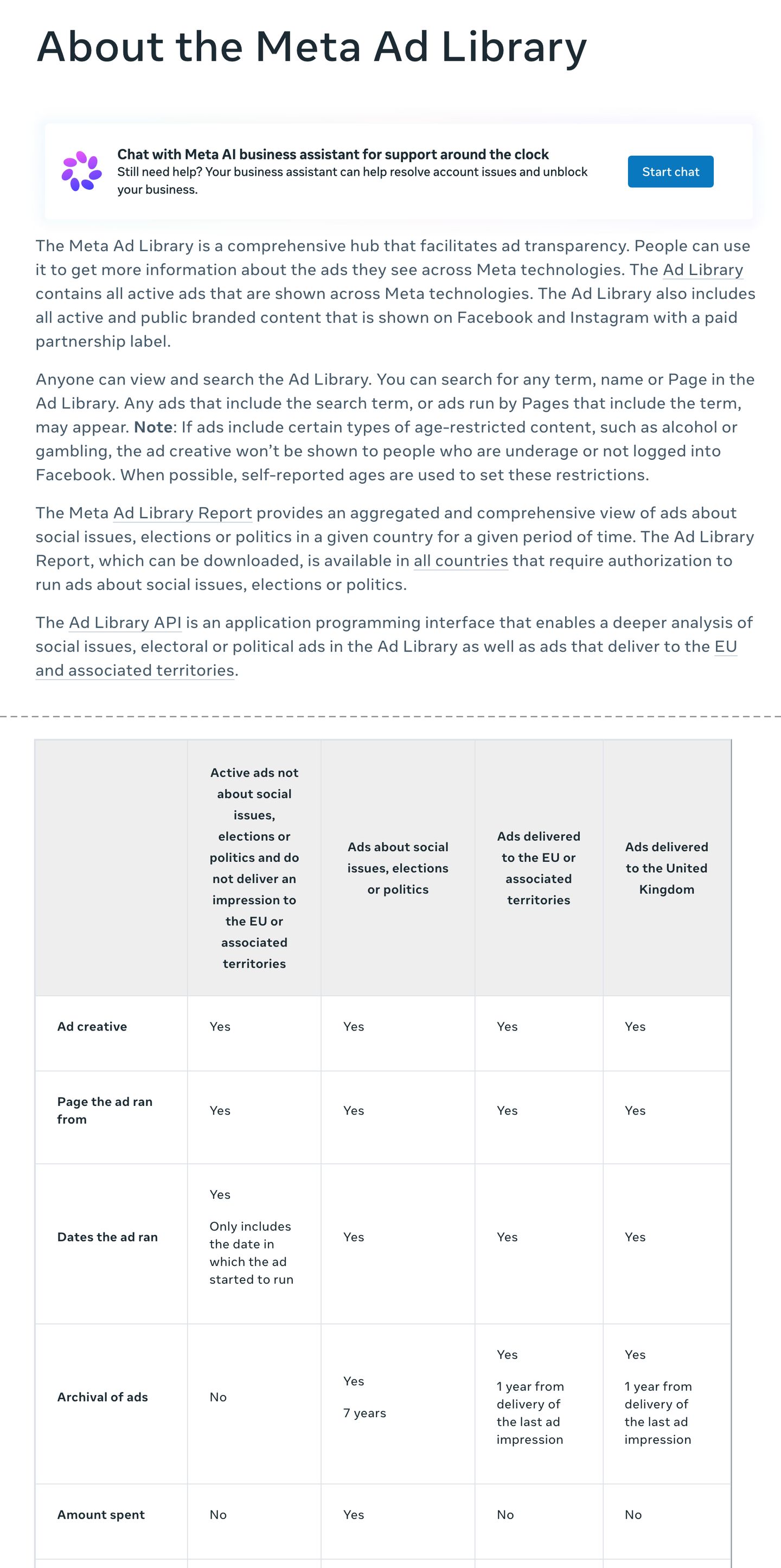
- Every active ad is here. That is your data source.
- No access to the prospect's account needed.
- The API is described for political ads and ads that reach the EU, not regular US-only ads.
- Regular ads vanish when they stop. Audit what runs today.
- No spend shown. Your audit reads the words, not the results.
Screenshot of Meta Business Help Center, About the Meta Ad Library, taken 2026-10-17. Two parts of the page joined at the dashed line.
AI moved the free line: a custom audit used to be paid work, and now it can be the free thing that starts the sales talk. Ask for one input, the prospect's Facebook Page. Pull every active ad from Meta's public Ad Library.
Tag each ad by awareness level and by angle, against an angle list built for the niche. Show covered angles in green, missing ones in red, and angles that do not suit the brand as 'not a fit'. Put the grid first and one question last.
Do the first audits by hand, and automate the tagging only once it matches yours. The fix stays paid. The whole thing is a bet until your own replies prove it.
Step 2: Tag each ad by how much the viewer already knows
Tag every ad by awareness level: how much the viewer already knows about their problem and the fix. The five levels come from Eugene Schwartz's book Breakthrough Advertising.
Unaware people do not know they have the problem. Problem-aware people feel it but know no fix. Solution-aware people know fixes exist.
Product-aware people know this product. Most-aware people just need the deal.
For example, take workout clothes. "Your knees ache after every run" speaks to problem-aware people. "20% off our leggings this week" speaks to most-aware people.
Both are fine ads. They just talk to different people.
What are you looking for? A pile-up of ads on one level. If every ad talks to people who already know the brand, nobody new is invited in.
Is one ad ever two levels? Sometimes. Tag the level of the first line, because the first line decides who stops scrolling.
Our guide to moving an unaware market covers each level in depth.
Tag every ad on five awareness levels, then look for the pile-up
- Unaware Does not know the problem exists.
- Problem aware Feels the problem, knows no fix.
- Solution aware Knows fixes exist, not this one.
- Product aware Knows this product, has not bought.
- Most aware Wants it. Just needs the deal.
Levels from Eugene Schwartz, Breakthrough Advertising; short definitions ours
Step 3: Tag each ad by angle, then mark what is missing
Tag every ad by angle. An angle is the reason an ad gives someone to buy: a price, a feature, a feeling, proof from other buyers.
Build the angle list for the niche before you read the ads. Otherwise you only list what they already do.
Where does the list come from? Read three competitors' active ads in the same library. Write down every reason to buy they use, plus the reasons buyers give in reviews.
Eight angles is a good size. Fewer and the grid looks thin. More and nobody reads it.
For example, a sample report for a clothing brand used eight angles. The brand's ads covered three: a price promo, a product feature and a lifestyle picture.
Five never showed up: seasonal timing, social proof, fabric, size range and sustainability. Five red boxes. No pitch needed yet.
Then build the grid. Green for covered, red for missing. It is a plain gap analysis: where they are against where they could be.
Score every prospect against the same list. Experts who review websites use a fixed list the same way, called a heuristic evaluation. It makes the grid a comparison, not your opinion.
One honest rule. A missing angle is not always a mistake.
A brand that cannot prove it is eco-friendly should not run a sustainability ad. Mark that box 'not a fit', not red. A red box means one thing: this would fit you, and you are not using it.
For the kinds of proof that fill a social proof box, see our proof grid. For why more angles means more ads, see creative volume for Meta ads.
Example: a sample clothing brand used 3 of 8 angles
| Angle | In their ads? |
|---|---|
| Price promo | Covered |
| Product feature | Covered |
| Lifestyle picture | Covered |
| Seasonal timing | Missing |
| Social proof | Missing |
| Fabric | Missing |
| Size range | Missing |
| Sustainability | Missing |
Example: angle list from a demo audit report built as a design file, not real ad data
Example: five angles the brand never tried
- angles covered 3
- angles missing 5
- angles on the niche list 8
Example: angle list from a demo audit report built as a design file, not real ad data
Step 4: Show the gaps first and ask last
Lay the report out in one order. The grid goes on top.
Under it, a short note on how you scored it. Then one line that asks for the work.
The order matters. A report that opens with a pitch reads like an ad. A report that opens with their own red boxes reads like news about them.
Why would a free report get replies at all? Part of it is reciprocity: people feel pulled to return a favor. A favor built for them feels bigger than one built for everybody.
Then the call to action. One line at the bottom: want us to make ads for the red boxes?
No countdown timer. No fake deadline. Sign it with a real name, so they know a person read their ads.
Keep the green boxes in. Real praise makes the red ones believable.
Some prospects will fix two boxes themselves and never call. Fine. The report still showed them you know the work.
A good quiz works the same way, as in our guide to quiz funnels that make the visitor feel the problem. People believe the gap they find on their own. For an audit of the landing page instead, start with a conversion-first audit.
Put the gap grid on top and the ask at the very bottom
- Their name and the pull date Shows it was built for them, today.
- The gap grid Green covered, red missing, grey not a fit.
- The awareness pile-up One line on which level most ads talk to.
- How you scored it Three lines: the angle list and the five levels.
- What the library cannot show Spend, reach, results and past ads.
- One question Want us to make ads for the red boxes?
Report order from this article
Grid on top, blind spots named, one question at the very bottom
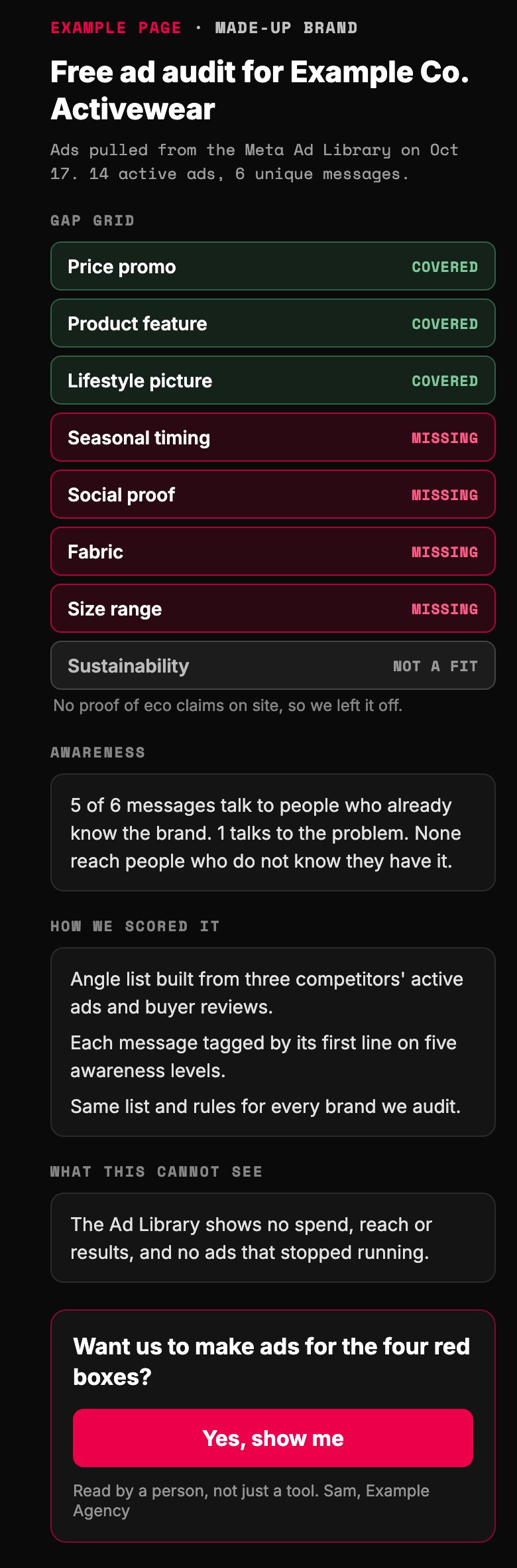
- Built for them, from today's ads. Say where the data came from.
- Red means it fits them and they are not using it.
- If they cannot back an angle up, it is not a gap. Mark it grey.
- Name the blind spots. The audit reads words, not results.
- One question, at the very bottom. No timer, no fake deadline.
Example page built for this article with a made-up brand. Brand, agency, signer and counts are invented.
Do the first audits by hand, then automate the tagging
Before you automate anything, ask what you would do if you did it by hand. AI does what a person can do, faster. It does not know what good looks like until you show it.
The order is simple. Research how others already sell audits.
Do a few by hand. Then build the tool.
Tag your first prospect's ads yourself. Then have your preferred AI tag the same ads without seeing yours. Compare the two.
Where you disagree, one of your definitions is too vague. Tighten it and run it again. Researchers call this inter-rater reliability: two raters, same rules, same answers.
It is basic content analysis, with a machine as the second reader. Automate the tagging once its tags match yours. A person still reads every report before it goes out.
How to turn a free audit into spam in four easy steps. Step one: send it to people who never asked. Step two: score every box red, even the ones that do not fit.
Step three: open with the pitch. Step four: invent a dollar figure for what the gaps cost them. That is a damn expensive way to get ignored.
Three places this goes wrong, with the fix for each, are in the table below. For the wider question of where AI belongs in your system, see the marketing engineering audit.

Research, do it by hand, compare, then automate
- Research See how others already sell audits.
- By hand Tag one prospect's ads yourself.
- Compare AI tags the same ads blind. Find the gaps.
- Automate Only the tagging that matches yours.
Method from this article
Three places a free audit goes wrong, and the fix for each
| Symptom | Cause | Fix |
|---|---|---|
| Every ad comes back 'product aware' | The AI has no definitions | Paste the five definitions into the prompt |
| The grid is all red and nobody replies | Angles that do not fit got scored red | Mark them 'not a fit' and keep the real green boxes |
| You want to automate on day one | No hand-tagged audit to check against | Tag one prospect yourself first, then compare |
Our rules
Only one box on the grid should turn red
- Red: a real gap It fits them and they are not using it.
- Green: keep it It fits and they already run it.
- Not a fit: leave it off Wrong buyer, or they could not back it up.
- Ask a question They run it, but can they prove it?
Our rule
Is the Ad Library API worth it for an audit tool?
Not for a first version. Meta's help page describes the API as covering two kinds of ads: ads about social issues, elections or politics, and ads that deliver to the EU.
The EU part exists because of a law, the Digital Services Act. A local gym running regular ads only in the US fits neither group.
For that gym, the Ad Library website is your data source. Copy by hand. It is slow, and it is honest.
Is copying by hand too slow to scale? For a first version, slow is the point. You learn what the tool should do while you copy.
So who should build on the API? Anyone auditing advertisers who reach EU buyers. Read Meta's current API rules before you plan that build.
Want to use the library to find prospects instead? That is a different job. Our outbound signal engine covers it.
For US-only regular ads, build on the website, not the API
| Question | Ad Library website | Ad Library API |
|---|---|---|
| Regular ads not delivered to the EU or UK | Yes, while active | Not in Meta's description |
| Ads about social issues, elections or politics | Yes | Yes |
| Ads delivered to the EU | Yes | Yes |
| Setup to read ads | None | Meta's API access steps |
Meta Business Help Center, About the Meta Ad Library, read 2026-10-17
Run it with AI
The prompt below runs steps two to four for you. Paste it into your preferred AI, then paste the ad texts you copied. It asks before it guesses.
This week: first, pick one prospect who asked for feedback. Second, copy their active ads and run the prompt. Third, check every tag yourself before you send it.
Then watch the reply. Do they ask about the red boxes?
That reply is your first real data point. It is the only kind that counts.
Want a second pair of eyes on your first report? Send it to us before it goes out.
A generic PDF tells everybody something. An audit tells one person something true.
Give away the mirror. Charge for the makeover.
Paste into your preferred AI. It asks what the business sells, what you sell and for their ad texts, then returns a gap grid, an awareness count and three ad ideas.
Act as a careful ad analyst. Build a free gap audit of one business's active Meta ads, using only the ad texts I paste and the rules below. Never invent a number, a result or a claim. If something is missing, ask me.

Ask one at a time, with the example, and wait:
1. What the business sells, and to whom. (Example: workout clothes for women over 40)
2. What I sell. (Example: ad creative for clothing brands)
3. Their active ads, copied from the Meta Ad Library: the text of each, plus a short note on the image or video. (Example: Ad 1: '20% off all leggings this week' / photo of leggings)

Rules:
- Group ads with the same text. Tag each unique message once.
- Tag the awareness level of each ad from its first line: unaware (does not know the problem), problem aware (feels it, knows no fix), solution aware (knows fixes exist), product aware (knows this product), most aware (just needs the deal).
- Before tagging angles, propose 8 angles that fit this niche. An angle is the reason the ad gives to buy. Starter list: price or offer, product feature, outcome or lifestyle, proof from other buyers, seasonal timing, an objection answered, comparison, the story behind the brand. Let me edit the list.
- Mark each angle Covered, Missing, or Not a fit (it does not suit their buyer, or they could not back it up). Ask me when unsure.
- The Ad Library does not show spend, reach, results or past ads. Never guess them.

Output, in this order:
GAP GRID: angle | status | example ad
AWARENESS: ads per level, then one line on where they pile up
THREE IDEAS: a first line for a new ad on each of the three best Missing angles. No fake urgency, no claim the business cannot prove.
HOW THIS WAS SCORED: three lines
WHAT THIS CANNOT SEE: one line
ONE QUESTION: one line offering to make ads for the Missing angles
Then list every tag you were unsure about, so I can check it.

Filip Kovacevic is the founder of Anar Agency in Phoenix. He spent five years running SEO, Meta ads, email, and content for medical practices across the United States, and now does the same work for healthcare, home-service, legal, and professional-service businesses, alongside AI implementation. More from Filip →
Talk it through in 15 minutes
Bring one question from this article. We will tell you what we would do, whether or not you hire us.
Book a 15-Min Chat →