Email Promotion Calendar: A Reason Every Month, a Launch on Payday

An email promotion calendar is a plan for the year's sales emails. For each month, write the problem your buyer will face and the product that solves it. Run each promo over four days: Thursday early access for repeat buyers, a Friday launch on payday, a Sunday night end, and one Monday extension only for people who clicked.
An email promotion calendar gives each month a reason and each sale a schedule
Picture a sale email that goes out on a Tuesday. Why Tuesday? That is the day the email was finished.
The sale ends Thursday. Then Friday comes, and a big share of the list gets paid.
The offer was right. The day was wrong.
An email promotion calendar fixes that. It is a plan for the year: what you promote each month, why that month, and which days the sale runs.
Our version is the Payday Calendar. The Payday Calendar is a twelve-row plan that gives each month a reason to buy, then runs every promo on a four-day schedule built around when buyers have money.
This guide is for businesses with an email list and more than one thing to sell. No list yet? Start with follow-up that gives before it asks.
A promo calendar moves sales to the days buyers can say yes
| Random promos | Payday Calendar |
|---|---|
| Sent when the email is ready | Sent when buyers have money |
| Same blast to everyone | Repeat buyers first, clickers last |
| Theme picked the night before | Twelve reasons picked a year ahead |
| Deadline moves when sales are slow | One planned extension, then it ends |
Our comparison.
Give each month one reason to buy: the problem it brings
Every month hands your customer a new problem. January brings tight budgets. July brings heat.
Your job is to match each problem to one product you sell. That match is the reason for the promo.
Start with your front-door product. That is the one product that brings in new customers at the lowest cost.
Not sure which one it is? Run ads on a few products. Keep the one with the cheapest new customer.
Everything else is the catalog: the things the same customer will want later. Selling them is called cross-selling. More on picking the front door in straight-to-quiz lead gen and the catalog model.
Now build a messaging matrix. It is a table with one row per month and three columns: the problem, the product that solves it, and the content style that carries it.
Content styles stay simple: quick tips, common mistakes, a how-to or a customer story.
Then pick rows by your goal. Want more subscriptions? Lead with the months whose problem your subscription solves.
Order matters too. A customer who joins in January gets January's problem solved first, and February's promo builds on it. Someone who joins in April hears about your front-door product first.
Do not guess the months. Line up two or three years of your sales by month, and the peaks show you when each problem hits.
Then check Google Trends for the problems you solve. It shows how search interest rises and falls across the year.
Interest starts climbing a few weeks before your sales peak? That gap is your launch window.
Example: one problem, one product and one content style for each month
| Month | The buyer's problem | The product | Content style |
|---|---|---|---|
| January | Cutting the cafe habit to save money | Monthly beans subscription | Quick tips |
| February | A Valentine's gift that is not flowers | Gift box | Common mistakes |
| May | A Mother's Day gift she will use | Mug and beans bundle | Customer story |
| July | Too hot for hot coffee | Cold brew kit | How-to |
| September | Back to early mornings | Monthly beans subscription | Quick tips |
| November | Gifts for the whole list | Gift boxes | Common mistakes |
Made-up example: a small online coffee roaster. The method is ours.
A free Google page shows the months your buyers start searching
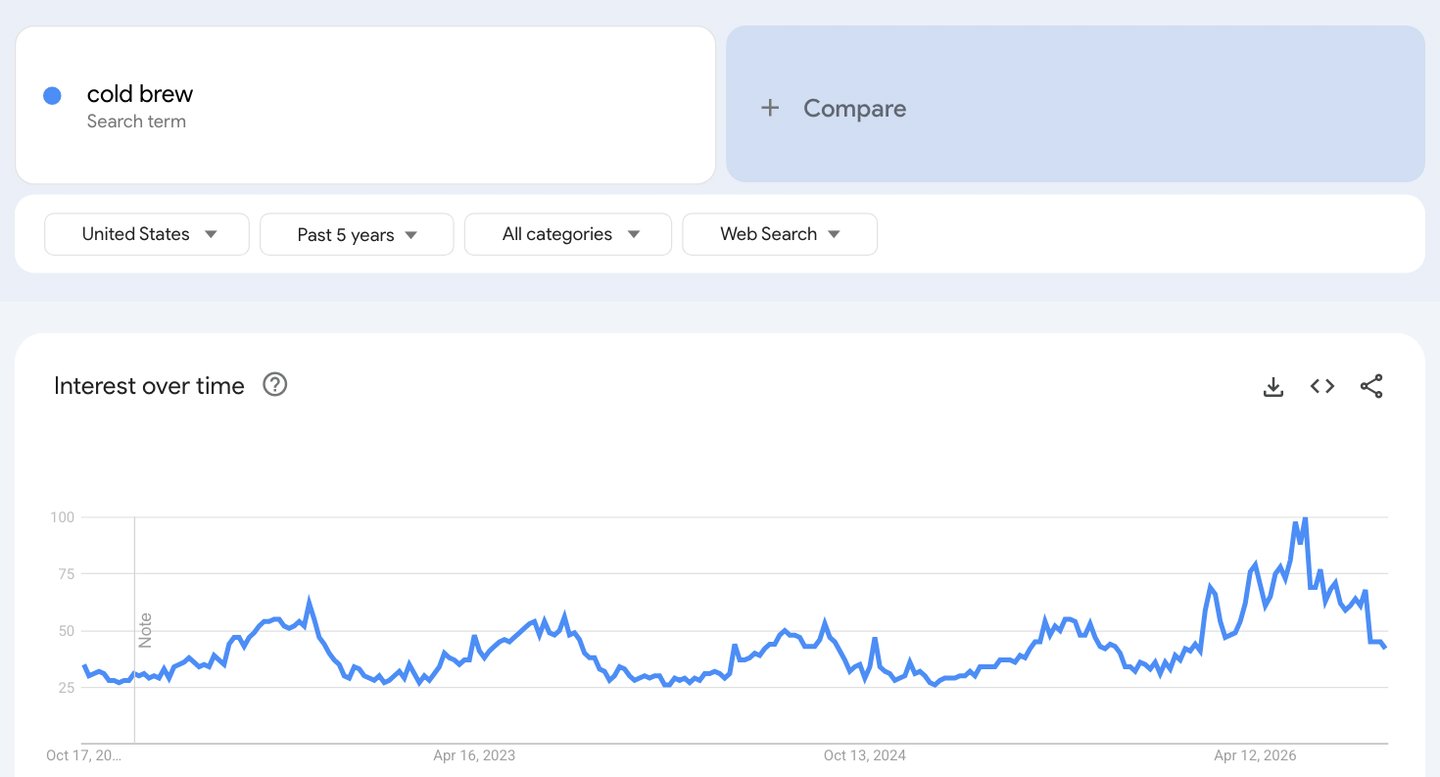
- Type a problem or product your buyers search for, in their words.
- Switch to your buyers' country or state.
- Five years makes the yearly wave easy to see.
- The yearly peak. Send the promo in the weeks before interest starts to climb.
- 100 is this term's own busiest point, not a count of searches.
Screenshot of Google Trends Explore (cold brew, United States, past 5 years), taken 2026-10-17
The Payday Calendar gives each month one reason to buy: the problem your buyer faces that month, the product that solves it, and the content style that carries it. Every promo runs four days: Thursday early access for repeat buyers, a Friday launch on payday, a Sunday night end, and one Monday extension only for people who clicked and did not buy. Every deadline is real.
A subscriber is worth revenue per email times emails per month, divided by the monthly unsubscribe rate.
No holiday fits your niche? Borrow the feeling of a day
Most promo advice says: find a holiday. Fine for a toy store. Not much help if you sell bookkeeping, protein or roof repairs.
Here is the truth about promos. A promo does not talk people into buying; it gives them an excuse. Your buyer already wants the thing; they want a reason to buy it without guilt.
Shopping days get invented all the time. Singles' Day started as a joke day for single college students in China.
Then Alibaba made it a 24-hour online sale. That was 2009. Alibaba and JD later reported a combined $139 billion in Singles' Day sales for 2021.
Christmas in July is older. US Navy officials and the advertising and greeting card industries held a Christmas in July lunch in 1944, to get people mailing gifts to troops early.
So you can make your own. Here is the idea engine we use.
Step 1: look at the whole month. Mark every big holiday, plus your buyers' own calendar: school terms, sports seasons, tax time.
Step 2: add the odd days. National Day Calendar lists a fun day for almost every date. Food days work well for food brands.
Step 3: find the feeling. St. Patrick's Day means luck, so a weight-loss coach can write: "Losing weight is not luck. Here is the plan."
Step 4: turn it into a guilt-free excuse. A food holiday is the perfect excuse for a healthy snack. Your buyer gets the treat and keeps the plan.
Step 5: tie it lightly to one product. One theme, one link.
Brainstorm without judging yourself. The silly ideas lead to the good ones.
One more free source: sign up for the emails of two big retailers outside your niche. Save every promo for a year. Retail already plans this way; nobody at a big chain wonders in November what to send for Black Friday.
Five steps turn any day of the month into a promo theme
- 1. Look at the whole month Big holidays plus your buyers' own calendar.
- 2. Add the odd days A fun-days calendar has one for almost every date.
- 3. Find the feeling Luck, love, guilt, a fresh start.
- 4. Make it an excuse A reason to buy without guilt.
- 5. Tie it lightly One theme, one product, one link.
Our idea engine for promo themes.
Example: six themes and the excuse each one gives a buyer
| Month | Theme | The excuse it gives |
|---|---|---|
| February | Love yourself | A treat that is also self-care |
| March | St. Patrick's luck | Results are not luck: here is the plan |
| May | Mother's Day | A gift she will actually use |
| July | Christmas in July | Get the gifts done early |
| September | Falling prices for fall | A real price drop with a season attached |
| December | 12 days of Christmas | One small offer a day |
Examples of themes e-commerce brands run. Examples, not results.
Run every promo on the four-day payday schedule
A good reason still flops on a bad day. So every promo on the calendar runs on the same four-day shape.
Thursday: early access for repeat buyers. Your best customers get first pick, a day before anyone else. It is a real perk for people who already trust you.
Friday: launch to everyone. For example, one supplement brand sees sales jump every Friday, a payday for many of its buyers.
Your buyers may differ. Check which weekday your past sales peak, and launch on that day.
Sunday night: the main sale ends. Say the end time in plain words. Then end it.
Monday: one extension, only for clickers. People who clicked but did not buy get one short window, ending Tuesday night. Buyers get no more emails about it.
A three-day sale becomes four or five days for the people still deciding. Splitting your list into groups like this is called segmentation.
Slow, high-price buys, like a financial service or a big program, can use a seven-day window instead. Start it on a day your buyers get money, covered below.
Four days, one end time, one extension for the people still deciding
- Early access Thursday Repeat buyers only. First pick, a day early.
- Launch to everyone Friday On payday, or the weekday your sales peak.
- Main sale ends Sunday night Say the end time in plain words. Then end it.
- One extension Monday Only people who clicked and did not buy.
- Done Tuesday night No second extension.
The Payday Calendar launch schedule.
Buyers drop out after they buy, so nobody gets pitched twice
| Day | Who gets it | Who is left out | The email's job |
|---|---|---|---|
| Thursday | Repeat buyers | Everyone else | Thank them with first pick |
| Friday | The whole list | Thursday buyers | The reason, the product, the end time |
| Sunday | Everyone who has not bought | All buyers | Say it ends tonight |
| Monday | Clicked, did not buy | Buyers and non-clickers | One short window, ending Tuesday night |
The Payday Calendar launch schedule.
Buyers drop out the moment they buy, and the one extension goes to clickers
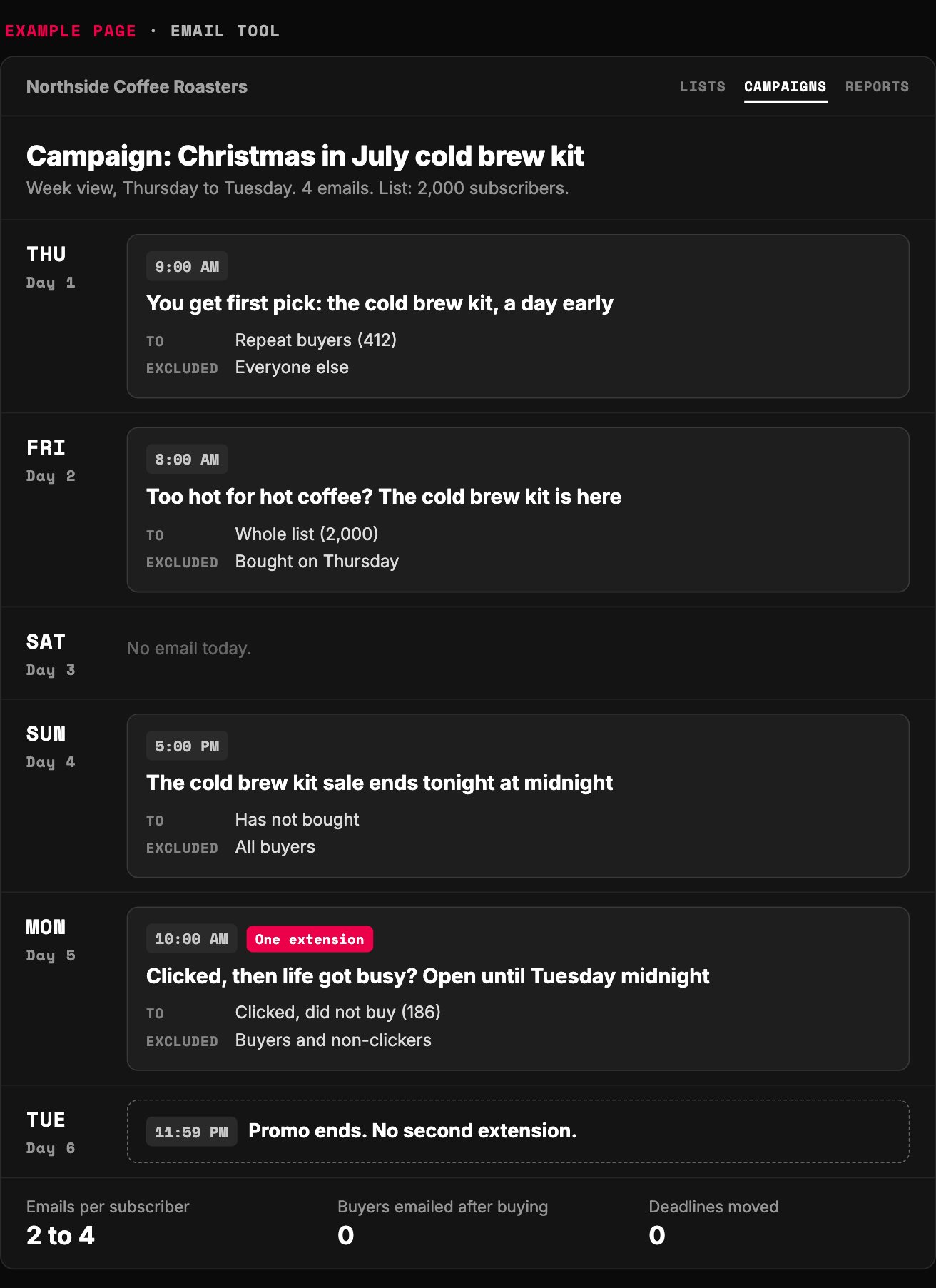
- Repeat buyers go first. Real early access, a day before anyone else.
- Launch to everyone on payday, or the weekday your sales peak.
- Buyers drop out the moment they buy.
- The only extension goes to people who clicked and did not buy.
- Then it really ends.
Example page built for this article with a made-up brand
Extend once, only to the people who clicked, and keep every deadline real
The extension is where most promos turn shady. A deadline that moves every time sales are slow is not a deadline. It is just a word in the email.
Our rules are simple. The Sunday email says the main sale ends Sunday night, not "last chance ever." The Monday email goes only to people who clicked and did not buy, and it says why they got it.
Our Monday email reads like this: "Looks like a few of you clicked, and then life got busy. Fair enough. We kept it open for you until Tuesday at midnight."
Then Tuesday at midnight, it ends. Really ends.
That real ending is what makes the whole promo work. Buyers feel FOMO, the fear of missing out, only when the door really closes. Move the deadline once, and they learn the door never closes.
Discounts follow the same rule. US rules on deceptive pricing say a "was" price must be one you really offered to the public, in good faith, for a reasonable time.
A strikethrough price you never charged is not a deal. It is a lie in red ink.
And most months need no discount at all. Early access, a bundle, a seasonal kit or a new product can each be the reason.
How to teach your list to ignore your sales in four easy steps:
1. Launch on Tuesday, because that is when the email was done.
2. Send the same blast to buyers and strangers.
3. Write "final hours" three times in one week.
4. Discount every month. Then wonder why the hell nobody pays full price.
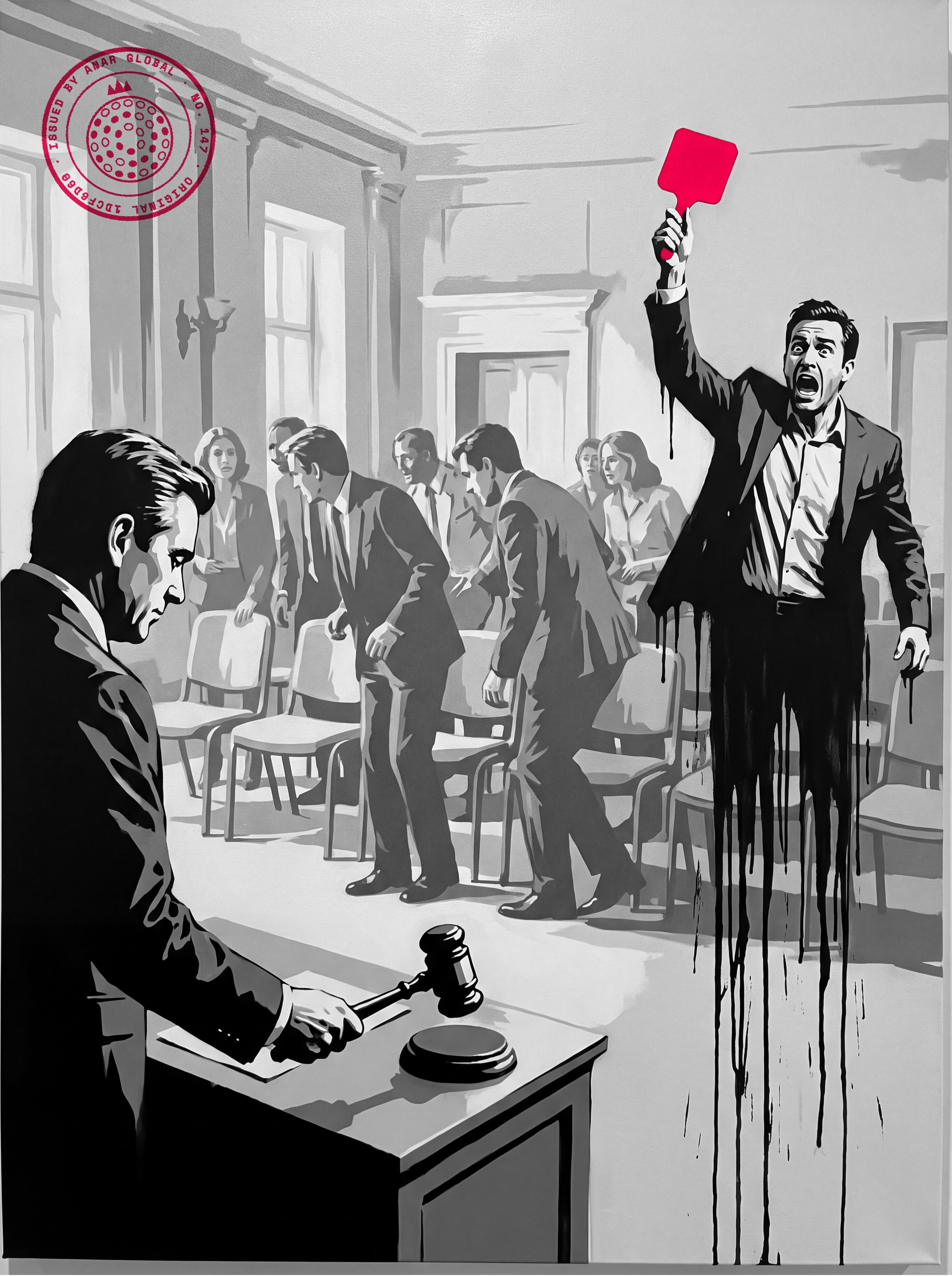
Urgency works when the deadline is true
| Fake urgency | Our rule |
|---|---|
| "Final hours" every week | One end time per promo, kept |
| Extend to the whole list, twice | Extend once, to clickers only |
| A "was" price you never charged | Only prices you really charged |
| A discount every month | Most months: early access, a bundle or a new product |
Our rules. Former-price rule: 16 CFR Part 233.
When do your buyers have money? Launch on that day
Launch on the day money lands in your buyer's account. For most workers, that is payday.
Payday is a fixed day. In an ADP Research survey, 48 percent of US workers said they are paid every two weeks, the most common schedule.
That means the same weekday, every other week. Put your biggest promos in payday weeks.
Other buyers run on other clocks. Retirees wait for benefit day. Many families wait for a tax refund in spring.
Businesses spend when a new month or quarter opens a fresh budget. Time those promos to the first week.
News can be the reason too. When something big happens in your buyers' world, a promo that speaks to it feels timely. It reads like a person wrote it.
Not sure when your buyers get paid? Ask. One question on your next survey, or a look at which days your past orders spike, will tell you.
Nearly half of US workers are paid on the same weekday every two weeks
- US workers who say they are paid every two weeks 48
- Paydays a year on that schedule 26
Source: ADP Research, HR Experience Survey, in 'More paydays, more fairness?'. 26 is 52 weeks divided by 2.
Each kind of buyer has its own day when money arrives
| Buyer | When cash lands | Promo window |
|---|---|---|
| Workers paid every two weeks | Payday, a fixed weekday | Thursday to Sunday of payday week |
| Retirees | Benefit day | Start on benefit day |
| Families | Tax refund season | A seven-day window in spring |
| Businesses | A new month or quarter | The first week |
Our planning rules.
What is one email subscriber worth?
One email subscriber is worth what the average person on your list spends before they leave. The math takes three numbers your email tool already reports.
Revenue per email, per subscriber. Last month's email revenue, divided by emails each person got, divided by subscribers.
Emails per subscriber per month. How many emails each person got last month.
Monthly unsubscribe rate. People who left last month, divided by your list size.
Multiply the first two. Divide by the third.
Example: $640 of email revenue, 2,000 subscribers, 8 emails each. That is $0.04 per email, per subscriber.
Forty people left, so the monthly rate is 2 percent. The value is $0.04 times 8, divided by 0.02. That is $16 a subscriber.
Why divide by the unsubscribe rate? At 2 percent a month, the average subscriber stays about 50 months. It is a simple form of customer lifetime value, built on your churn rate.
Now compare it with what a subscriber costs you. For example, one online brand paid about $4 for each new subscriber and found each one was worth $85.31.
You cannot call a lead cheap or expensive by its cost alone. Compare its cost with this number.
Two warnings. The math counts people who stay subscribed but never open, so treat it as the most a subscriber could be worth.
And if you will use it to set ad spend, use profit, not revenue. See how to set a max allowable CPA.
The math also shows what each promo costs you. Double the unsubscribe rate and each subscriber is worth half, so every promo has to earn more than the readers it loses.
Example: a $4 subscriber worth $85.31 is a bargain, not a cost
- What one new subscriber cost 4
- What each subscriber was worth 85.31
Example from another business. Not our result, and not verified by us.
Example: double the unsubscribe rate and each subscriber is worth half
Value of one subscriber at $0.04 per email and 8 emails a month, by monthly unsubscribe rate
- 1% a month 32
- 2% a month 16
- 4% a month 8
Worked example: $0.04 x 8 / monthly rate. The math is ours.
How often should you send promotional emails?
Send one or two emails a week once your automated welcome or follow-up emails run out. Make most of them useful, and send a promo when the calendar says so.
Once a quarter is too slow. Someone who joined in the first week of a quarter has forgotten you by the time the next promo lands.
Once a month, check your automated emails one at a time. Find the one with the weakest clicks or the most unsubscribes. Fix that one.
Busy list? Check every two weeks, or weekly.
The inbox has rules too. Gmail asks every sender to keep spam complaints below 0.3 percent; the box below has the current details.
US law adds one more. Under the CAN-SPAM Act, every commercial email needs a working unsubscribe, and you must honor it within 10 business days.
How much of your sending should be offers at all? See how often to sell to your audience without wearing it out.
For the follow-up emails themselves, see the lead-first email sequence. For why the list matters this much, read email as the profit center of a service business.
Check one email at a time, fix the weakest, repeat
- Send One or two emails a week, plus the month's promo.
- Read Clicks and unsubscribes for each automated email.
- Fix Rewrite the weakest one. Only that one.
- Repeat Monthly, or weekly on a busy list.
Our review routine.
Plan next month's promo with AI: the copy-paste prompt
Paste the prompt below into your preferred AI. It asks about your products, your month and your list, one question at a time.
Then it picks the month's reason, writes the theme and lays out the four days. It says who gets each email and works out what a subscriber is worth.
It never invents a number. If you do not know one, it tells you how to measure it.
Want a second pair of eyes on the plan? Send it to us.
Paste into your preferred AI. It asks about your products, your month and your list, then gives you a reason, a theme, a four-day plan and a subscriber value.
Act as an email marketing planner. Plan my next promotion with the Payday Calendar.

Ask me one question at a time, with the example:
1. What do you sell, and which product brings in most new customers? (Example: coffee beans, a $24 monthly bag)
2. What else can a customer buy from you? (Example: cold brew kit, mugs, gift boxes)
3. Which month are we planning, and what will my buyers deal with that month? (Example: July, too hot for hot coffee)
4. When do most of my buyers get paid, or which weekday do my past sales peak? (Example: every other Friday)
5. List size, emails each subscriber gets a month, and last month's email revenue? (Example: 2,000 people, 8 emails, $640)
6. How many people unsubscribed last month? (Example: 40)

Never invent a number. If I don't know one, tell me how to measure it and leave it blank.

Rules:
- One reason per month: the problem, the product that solves it, and a content style (quick tips, common mistakes, how-to, customer story).
- No holiday fits? Find the feeling of a day this month, turn it into a guilt-free excuse, and tie it lightly to one product.
- Schedule: Thursday early access for repeat buyers. Friday launch to everyone, or the weekday my buyers get paid. Main sale ends Sunday night. Monday, one extension email only to people who clicked and did not buy, ending Tuesday night. Leave buyers out of every later email.
- Slow, high-price buys may use a 7-day window that starts on a cash day.
- Every deadline is real. Never extend twice. Never show a "was" price I did not really charge. Most months need no discount.
- Subscriber value = revenue per email per subscriber x emails per subscriber per month / monthly unsubscribe rate. Show the math.
- Between promotions, one or two useful emails a week.

Answer in this format:
This month's reason: problem / product / content style
Theme and excuse:
Day-by-day plan: Thu / Fri / Sun / Mon, who gets each email, one subject line each
Subscriber value: $ (math shown)
Numbers to check after: 3
Next three actions: 1. 2. 3.
Run it this week
1. Run the prompt for next month. Pick the reason and the product.
2. Tag your repeat buyers. Set up a group for people who click but do not buy.
3. Write the four emails and schedule them: Thursday, Friday, Sunday, Monday.
Selling more to people who already bought? Read how to sell the next problem your product creates.
Back to that Tuesday sale. Same offer, same list. Move it to payday, and it reaches people who have just been paid.
Plan the reason a year ahead. Plan the day a week ahead.

Filip Kovacevic is the founder of Anar Agency in Phoenix. He spent five years running SEO, Meta ads, email, and content for medical practices across the United States, and now does the same work for healthcare, home-service, legal, and professional-service businesses, alongside AI implementation. More from Filip →
Talk it through in 15 minutes
Bring one question from this article. We will tell you what we would do, whether or not you hire us.
Book a 15-Min Chat →