Email Marketing for Service Businesses: Ads Buy, Email Earns
Email marketing for service businesses works best on people who already know you. Ads buy the first sale, often at break-even. Email to past customers, open quotes and enquiries costs almost nothing and brings them back.
Track both every week in two columns: what ads cost to win customers, and what email earned from your list.
Email marketing for service businesses starts with a list you already paid for
Picture a small live-events business with 20,000 people on its email list. About 500 of them have already bought a ticket, at $197 to $500 each.
The owner spends $1,000 to $2,000 a day on ads to find new buyers. The 500 who already paid hear almost nothing from him.
Why? An email push on an older offer flopped, and he likes systems he can set and forget.
So the list just sits there, like a shop with the lights off.
That is a real example from another business. It is also a very common setup. Email marketing for service businesses starts right here, with the people you already paid to find.
Here is the short version. Ads buy the first sale, and often only break even. Email to people who already know you is where the profit shows up.
So we keep score in two columns, every week. We call it the Inbox Ledger.
Ads pay to find a customer; email gets paid by the same customer again
| Ads column | Email column |
|---|---|
| Reaches strangers | Reaches people who already know you |
| Costs money for every click | Costs close to nothing per send |
| Often breaks even on the first sale | Brings repeat and delayed sales |
| Judge it by cost per customer | Judge it by revenue each week |
Our comparison, the two columns of the Inbox Ledger.
Ads buy the customer. Email earns the profit.
Most ads pay for the first sale and little more. That is normal. Finding a stranger costs money.
Keeping one costs less. Harvard Business Review notes that, depending on the study, winning a new customer costs five to 25 times more than keeping one.
Email is the cheapest way to reach the people you already won. They know your name. Sending to them costs close to nothing.
For example, one large online store showed a month of $1.8 million in sales on about $1 million of ads. Email brought in 737 of those sales. Without email, the store said, that month would have lost money.
A store is not a service business. So treat that as one store's example, not a benchmark for you.
Does the idea hold for a plumber or a clinic? Yes.
The numbers get smaller, but the pattern stays the same.
For example, picture a cleaning company. A new customer costs $150 in ads, and the first visit brings in $160. That leaves $10 after the ad, before your other costs.
Now email books four more visits that year. One $150 ad bill now brings in $800. Marketers call the full total customer lifetime value.
The ad found the customer. Email brought in most of the money.
Our take, said out loud: most agencies get paid to buy you the lead. Very few get paid for what happens to it next.
Example: one online store said email turned losing months into profit
| The case | What they reported | How sure |
|---|---|---|
| One large online store, one month | $1.8 million in sales on about $1 million of ads; 737 sales from email; a loss without email | Example; we have not seen the data |
| Same store, a weaker month | $2.2 million in sales on about $800,000 of ads; a loss without email | Example; not verified |
| Same store, one day | About $116,000 in sales, about half from email | Example; not verified |
| A supplement brand with 11,000 contacts it barely emailed | More than 30 percent bought once it sent the right offers | Example as told; not verified |
Example from another business. Not our result, and not verified by us. Online stores, not service businesses.
Example: a $150 ad bill, $160 up front, $800 a year with email
A made-up cleaning customer: ad cost, first visit, and the year with four rebookings from email
- Ad cost to win them 150
- First visit 160
- The year, with email 800
Worked example: $160 a visit x 5 visits. Made-up business; the math is ours.
The Inbox Ledger is a weekly two-column record: what ads cost to win new customers, and what email earned from people already on your list. Count four groups: everyone who opted in, open quotes, past customers and repeat customers. Credit email with a sale when the buyer clicked or replied in the 30 days before buying.
Each week, send one useful email to everyone and one email to past buyers tied to a real date, plain text from a named person, about 20 minutes of work. Send only to people who asked, keep complaints rare, and write the email share down every Friday.
Count what you already own before you buy another click
Step one takes ten minutes. Export your contacts and count four groups.
Everyone who agreed to hear from you. Enquiries, sign-ups, people who booked a call.
Open quotes. People who got a price and went quiet.
Past customers. Anyone who paid you once.
Repeat customers. Anyone who paid you twice or more. These are your warmest readers.
In the events example, the counts were about 20,000 people and about 500 buyers. That is 2.5 percent who bought. The rest still asked to hear from that business once.
What counts as a list? Only people who gave you their address and agreed to hear from you. That is called opt-in email.
Bought lists and scraped addresses do not count. They earn complaints, and complaints get your mail sent to spam.
A bought list is not really a list. It is a pile of future spam complaints.
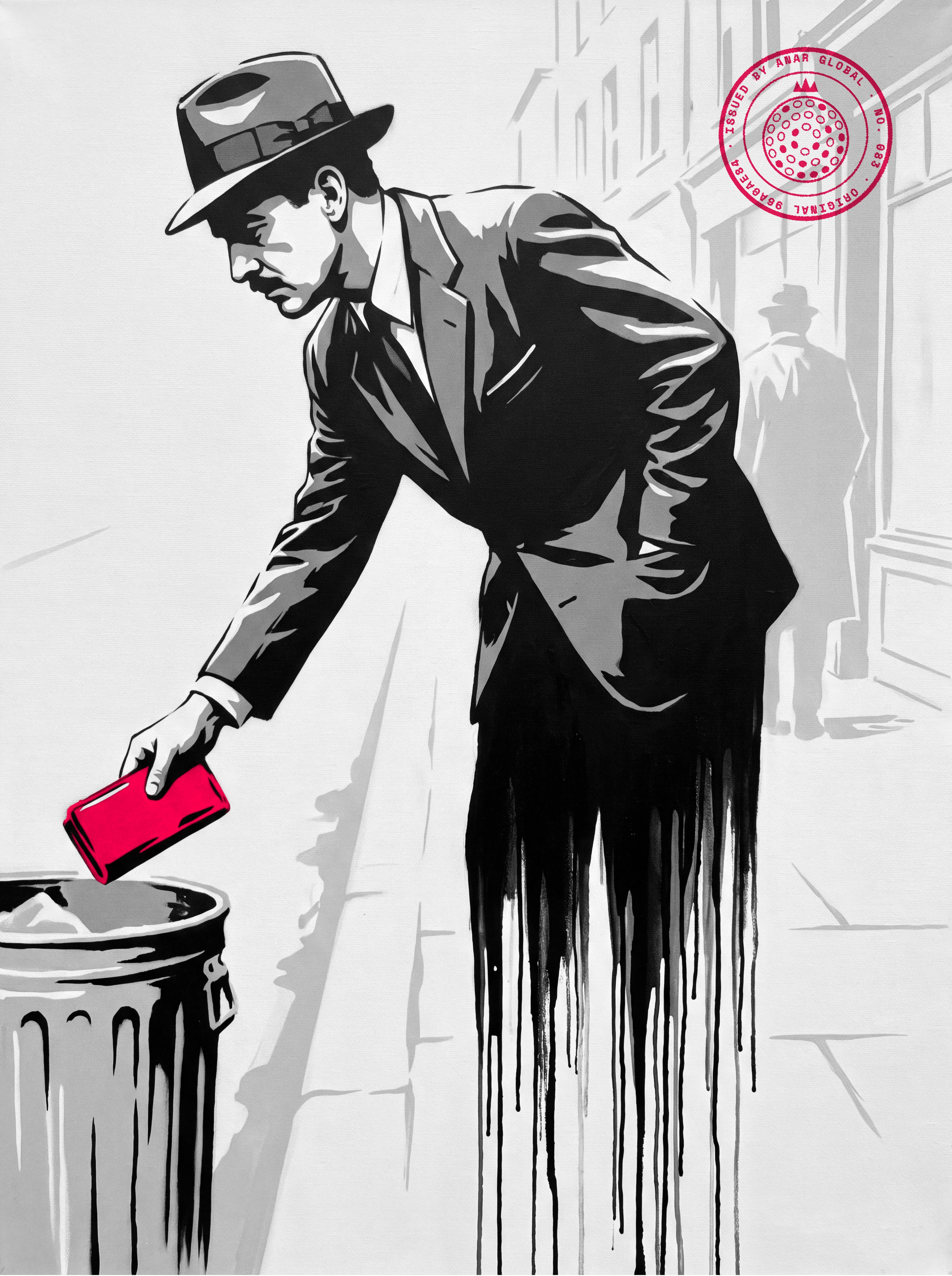
Count four groups, from the widest to the warmest
- Everyone who opted in Enquiries, sign-ups, booked calls.
- Open quotes Got a price, went quiet.
- Past customers Paid you once.
- Repeat customers Paid you twice or more. Your warmest readers.
The Inbox Ledger, step one.
Example: 20,000 people on the list, about 500 of them buyers
- On the email list 20000
- Bought at least once 500
Example from another business. Not our result, and not verified by us. A small live-events business.
Keep an Inbox Ledger: ads on one side, email on the other
The Inbox Ledger is a weekly record with two columns. One shows what ads cost to win customers. The other shows what email earned from people already on your list.
Ads column. Ad spend, new customers, and what they paid on their first sale.
Subtract the spend from that first-sale money. The result is your front-end profit or loss.
To set a limit for this column, work out your maximum allowable cost per customer.
Email column. Emails sent, and revenue from buyers who clicked or replied to an email before they bought.
Which sale belongs to email? Deciding that is called attribution. Our rule: email gets the sale when the buyer clicked or replied in the 30 days before buying.
Why 30 days? Buyers often take two weeks to a month to buy, and sometimes longer. A shorter window hides sales that email helped win.
The bottom line is one number: email revenue as a share of all revenue. Write it down every Friday.
Most businesses never write it down. In Litmus survey data, 21 percent of marketing leaders do not measure email ROI at all. You cannot grow a number you never look at.
How big can the share get? For example, the online store said email was about 25 percent of sales on some days.
For the events business, the estimate was about 20 percent more revenue a month from email. Estimates, not results.
If email shows zero, that does not prove email fails. It proves nobody sent any.
Example: ads made $50 this week; email made $480
| Column | Line | This week |
|---|---|---|
| Ads | Ad spend | $750 |
| Ads | New customers | 5 |
| Ads | First-sale revenue | $800 |
| Ads | Front-end profit | $50 |
| Emails sent | 2 | |
| Revenue credited to email | $480 (3 rebooked visits) | |
| Email share of all revenue | 37.5% |
Made-up cleaning business at $160 a visit. Email credit: clicked or replied in the 30 days before buying. The math is ours.
Example: one share, written down every Friday
- Ads: front-end profit 50
- Email: revenue credited 480
- Email share of all revenue 37.5
Same made-up week: $480 / ($800 + $480) = 37.5 percent. The math is ours.
Repeat the ledger every week: count, send, credit, log, adjust
- Count The four groups on your list
- Send One useful email, one past-buyer email
- Credit Clicked or replied in 30 days
- Log Email share, every Friday
- Adjust Change one thing next week
The Inbox Ledger.
What should a service business email its past customers?
Send past customers one email tied to a real date. A season, a holiday, or a service that comes due again.
For example, the plan for the events business was an email to its buyers before Mother's Day. The message was simple: we are planning a special night in May, here are the dates, request an invite.
No discount. No countdown clock. Just a real reason to come back now.
A service business has dates like that all year.
Furnace checks before the cold. Gutters after the leaves fall. A cleaning six months after the last one.
Keep the email plain. One named person, a few short lines, one ask.
Our email has four parts. Name the date, and remind them what you did last time.
Then give one useful tip, and ask for one reply.
Ask for a reply, not a form. Replying takes them ten seconds.
Plan the year's dates once with a promotion calendar. Then each email starts with its reason already written.
A real date gives people a real reason to act now. A fake deadline only pretends to.
Example: five real dates a home-services business can email about
- Spring cleaning Late winter Book before the rush.
- Give a service as a gift Before Mother's Day A real date. No discount needed.
- Air conditioning check Early summer Before the first heat wave.
- Gutters and furnace Fall After the leaves, before the cold.
- Due again Six months after a job The anniversary of their last visit.
Example plan, ours.
The past-customer email: four parts, one ask
- 1. Name the date The season, holiday or service that is due.
- 2. Remind them What you did for them last time, in one line.
- 3. Give one tip Something useful even if they never book.
- 4. Ask for one reply A day that suits them. No form.
Our template.
A past-customer email needs one real date, one reminder, one tip and one ask
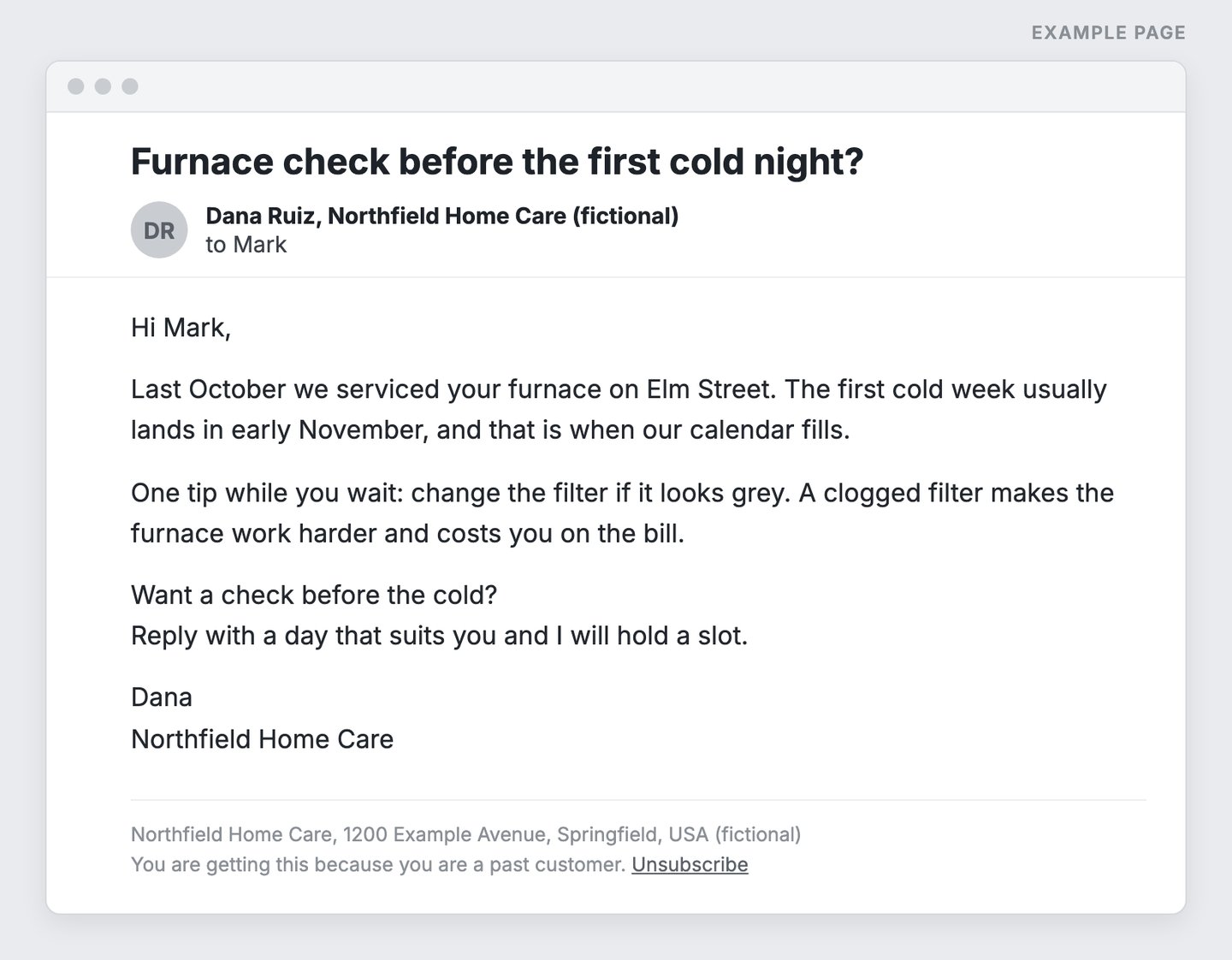
- A real date on their calendar, not a fake deadline.
- One line on what you did for them last time.
- One useful tip, worth reading even if they never book.
- One ask. A reply, not a form.
- A real postal address and an easy way out, every time.
Example page built for this article with a made-up brand; the business, names and address are invented.
How often should you email your list without boring it?
Email every week, and make most of it useful. A list goes cold when every email says buy.
Nothing kills a relationship faster than being predictable. If every email says buy my stuff, people stop opening.
For example, one health brand sent its audience a steady stream of short expert videos. The offers came after the help. People kept opening because each email gave them something.
How often to sell, and to whom, is its own question. We answer it with the Five-Percent Cap.
How to train your list to ignore you in four easy steps:
1. Email only when sales are slow.
2. Open every email with a discount.
3. Send the same template every Tuesday, forever.
4. Blame the list when nobody opens.
Then announce that email is dead. Email was not dead. Your readers were bored as hell.
Predictable emails get skipped; useful ones get opened
| Predictable | Useful |
|---|---|
| Same template, same day, forever | A real reason each time |
| Every email asks for money | Most emails help, with no ask |
| Sent when sales are slow | Sent every week, slow or busy |
| From the company | From a named person |
Our comparison.
Aim for useful, every week
- Forgotten Good emails, too far apart. They forget your name.
- The target Useful every week. Offers come second.
- Ignored A sale blast twice a year. Nobody opens.
- Unsubscribed Selling every week. People leave.
Our model.
Why do people who are still deciding need your emails?
Most buyers are not ready today. They are partway through a decision, and email keeps you in it.
In the events example, many buyers were tourists planning a trip. Hotel, flights, other shows. Each step is a chance to forget you and book something else.
The estimate there: for every person ready to buy now, three to five more were still planning. An estimate, not a count.
Service buyers go through the same steps. A homeowner collects three quotes, talks it over, waits for payday. A patient checks insurance first.
Go quiet and they finish those steps without you. They pick the other quote.
Not because your offer got worse. Because you stopped showing up.
The first reply matters most, as we show in speed to lead. The emails after it are written out in our nurture email sequence.
Example: a homeowner's decision takes weeks, and email keeps you in it
- 1. Asks for quotes Your fast reply lands first.
- 2. Talks it over at home A short email answers the question they argue about.
- 3. Waits for money or a date A useful note keeps your name in the inbox.
- 4. Picks a quote The business they still remember has the edge.
Example, ours.
How long should email take each week? About 20 minutes
One good email a week takes about 20 minutes. If it takes much longer, the routine is wrong.
Put every opted-in contact in one email tool. Give your preferred AI the date, the last job and one tip. Ask for plain text under 150 words.
Then read every line. AI writes confident nonsense when it has no facts. Fix anything untrue, and send it to the right group.
Will you actually do it? Be honest. If not, hand it off.
For example, one plan for the events owner was to pay a helper 10 percent of the revenue he could tie to email. The ledger makes that share easy to count.
Two more habits decide whether your mail arrives at all. Prove your domain is yours with email authentication. And make leaving easy, because a person who cannot unsubscribe hits the spam button.
The current rules from Gmail and Yahoo sit in the box below. In the US, the CAN-SPAM Act adds a truthful subject line and a real postal address. Other countries are stricter, so send only to people who asked.
Ad accounts and social reach can be taken away. A list of people who asked to hear from you goes wherever you go. That is permission marketing, and it is the only kind we run.
One email a week in three steps
- 1. One tool Every opted-in contact in one email tool.
- 2. Draft with AI Give it the date, the last job and one tip. Plain text, under 150 words.
- 3. Check and send Fix anything untrue. Send to the right group.
Our routine.
Do it yourself, or hand it off on a share of email revenue
| Option | Cost | Best when |
|---|---|---|
| You, about 20 minutes a week | Your time | You know the customers and can write plainly |
| A helper on a share | For example, 10 percent of revenue credited to email | You will not do it, and the ledger can count the share |
Our comparison. The 10 percent share is an example from another business, not a rate we set.
Where people get stuck with email
Three stuck points come up again and again. Each has a plain fix.
"We tried email and it did nothing." One send flopped, so email got shelved. Usually it was an offer blasted at everyone.
The fix: start with past buyers and one real date.
"Email will break what is working." Ads finally run well, so nobody wants to touch anything. But email does not change your ads.
The fix: send anyway, and change only one thing a week, as in one-variable testing.
"I don't have time." Email sits on the to-do list every Monday and never goes out. Each email starts from a blank page.
The fix: the 20-minute routine, or the helper on a share.
A few unsubscribes after a send? Fine. Someone leaving is making a choice.
A spam complaint is the real problem, so watch that number instead.
Every week you skip email, the list earns nothing. The ad bill still arrives.
Three ways email stalls, and the fix for each
| Stuck point | Symptom | Cause | Fix |
|---|---|---|---|
| "We tried it" | One send flopped; email got shelved | An offer blasted at everyone | Start with past buyers and one real date |
| "It will break what works" | Ads finally run well; nobody touches anything | Fear that any change breaks the machine | Email leaves your ads alone. Still, change one thing a week |
| "No time" | On the to-do list every Monday, never sent | Each email starts from a blank page | The 20-minute routine, or a helper on a share |
Our list.
Gmail's rules on one free page: authenticate, keep complaints under 0.3 percent, make leaving easy
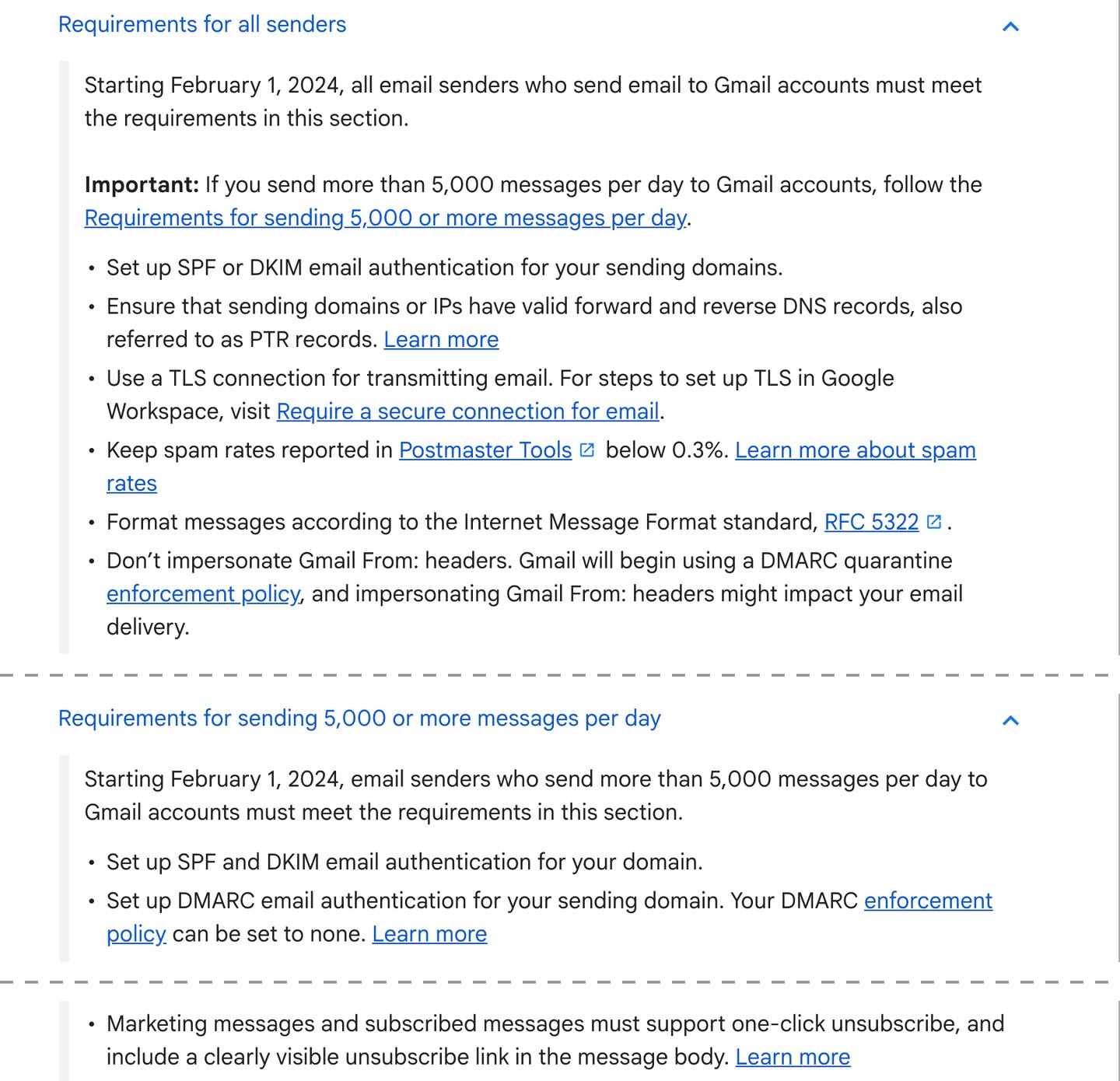
- These apply to everyone who sends to Gmail, even a small list.
- Prove the domain is yours. Your email tool walks you through it.
- The complaint limit. Below 0.3 percent, and lower is better.
- Bigger senders also need DMARC.
- Make leaving one click. People who cannot leave press the spam button.
Screenshot of Google Help, Email sender guidelines (support.google.com/a/answer/81126), taken 2026-10-17.
Run your Inbox Ledger with AI this week
Paste the prompt below into your preferred AI. It asks for your list counts and last month's numbers. Then it fills both columns and drafts this week's two emails.
It never invents a number. If you do not know one, it tells you where to look and waits.
1. Export your list and count the four groups.
2. Run the prompt, check the drafts, and send the past-customer email.
3. Start the ledger this Friday. Look again next Friday.
List warm again? Next, offer the next step to people who already bought.
The events owner did not need more ads. He needed to turn the lights on in the shop he already had.
Paste into your preferred AI. It asks for your list counts and last month's numbers, then fills both columns and drafts two emails.
Act as an email revenue analyst. Set up my Inbox Ledger and draft this week's two emails to my own list.

Ask me one question at a time, with the example:
1. What do I sell, and what does one job or sale bring in? (Example: house cleaning, $160 a visit)
2. How many contacts agreed to hear from me, and how many have bought? (Example: 3,000 contacts, 400 past customers)
3. Last month: ad spend, new customers from ads, and what they paid on their first sale? (Example: $3,000, 20 customers, $3,200)
4. Last month: revenue from buyers who clicked or replied to one of my emails in the 30 days before buying? (Example: $0, we did not email)
5. Which real dates or seasons matter to my buyers in the next 60 days? (Example: spring cleaning, Mother's Day)

Rules:
- Never invent a number. If I do not know one, tell me where to find it in my email tool, booking system or ad account, and wait.
- Ads column: spend, new customers, first-sale revenue, front-end profit or loss.
- Email column: emails sent, revenue credited to email, email share of all revenue.
- Credit email with a sale only when the buyer clicked or replied in the 30 days before buying. Same rule every week.
- Send only to people who gave me their address and agreed to hear from me. Never a bought or scraped list.
- Every email has a truthful subject line, my postal address and a working unsubscribe link.
- Email 1 goes to everyone and is useful, with no ask. Email 2 goes to past buyers, tied to a real date, with one ask.
- No fake deadlines, no fake scarcity, no invented results or reviews.
- Plain text, from a named person, under 150 words each.

Show your math, then answer:
Ads column: spend $ / new customers / first-sale revenue $ / profit or loss $
Email column: revenue credited $ / share of all revenue %
Email 1: subject + draft
Email 2: subject + draft
What to log next Friday: [the numbers]
Next three actions: 1. 2. 3.

Filip Kovacevic is the founder of Anar Agency in Phoenix. He spent five years running SEO, Meta ads, email, and content for medical practices across the United States, and now does the same work for healthcare, home-service, legal, and professional-service businesses, alongside AI implementation. More from Filip →
Talk it through in 15 minutes
Bring one question from this article. We will tell you what we would do, whether or not you hire us.
Book a 15-Min Chat →