What Is an Agent Harness? The Layer That Makes AI Agents Safe to Use
An agent harness is the software around an AI agent that decides what it can touch. It has six parts: tools, permissions, memory, hard limits, logs and recovery. The model only writes requests.
The harness decides which requests run, checks the work, and stops or reverses mistakes before customers see them.
What is an agent harness? The rulebook your software enforces
A guest checks into a small hotel late at night. The receptionist asks which newspaper he reads. At dinner, a waiter asks which coffee he drinks.
Next morning, his coffee is brewing on a timer. His paper is on the mat. Every visit after that, same coffee, same paper, and nobody ever asks again.
The manager running the place had been a short-order cook five months before. The magic was not him. It was a red binder of checklists.
Michael Gerber tells that story in The E-Myth Revisited. We think it is the clearest picture of an agent harness ever written. Gerber just wrote it before AI agents existed.
An agent harness is the software wrapped around an AI agent. It decides which tools the agent gets, what it may change, what it remembers, and what happens when it gets something wrong.
In engineering, a harness is the rig that holds a part while it runs. Same idea here. The harness holds the agent while it works on your real systems.
Here is what most demos skip. The model cannot do anything by itself. It writes text that asks for an action, and your software decides whether that action runs.
So who is really in charge? Not the model. The harness.
Two companies can rent the same model on the same day. They get the same intelligence. What they wrap around it is the whole difference.
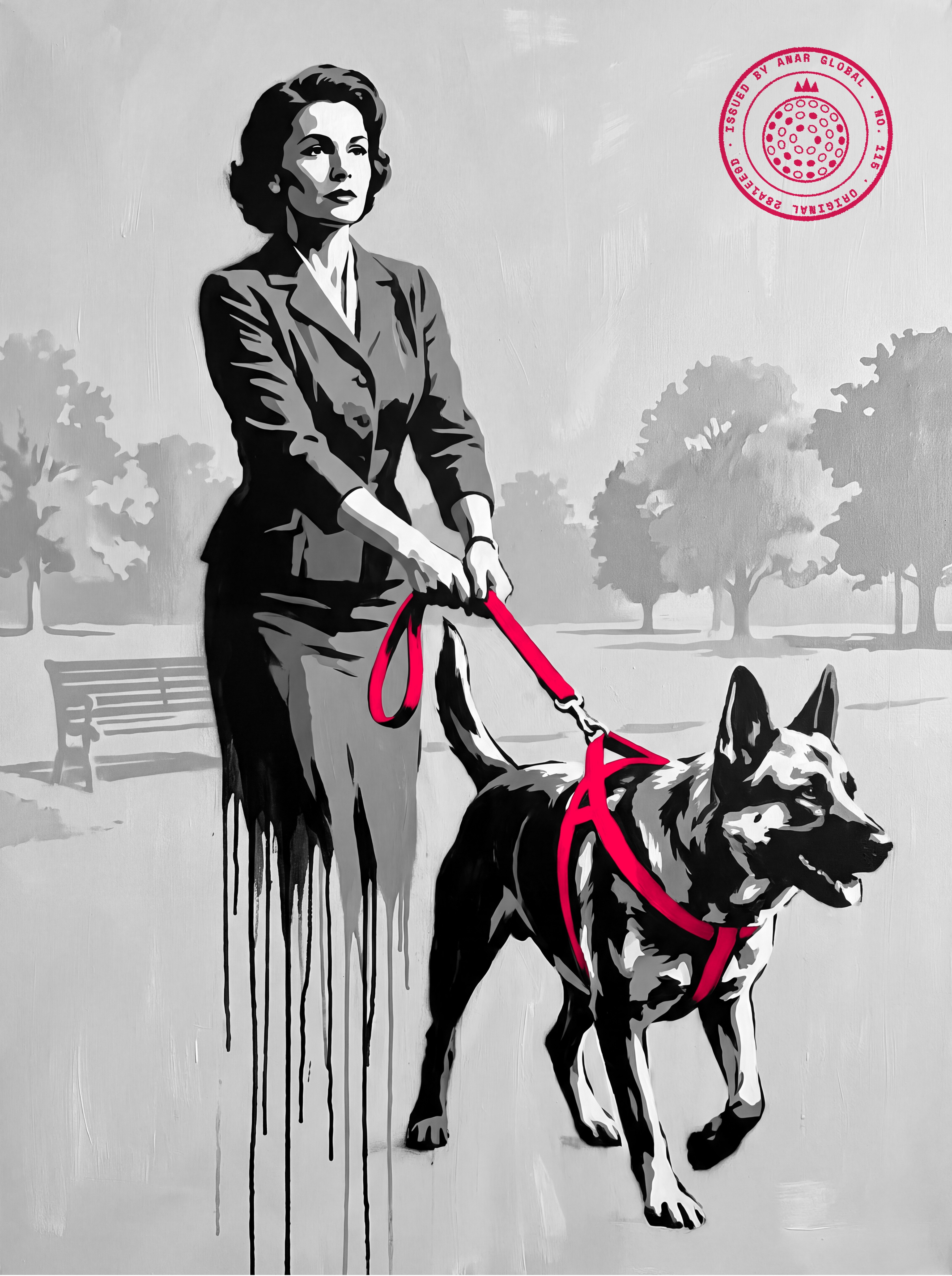
Six parts you own wrap the one part you rent
- Tools What it can do
- Permissions Read wide, write narrow
- Context and memory What it knows each turn
- Guardrails Limits in code
- Logs and checks Is the work any good?
- Recovery Retry, hand off, roll back
The six harness parts as defined in this guide.
The model writes requests; the harness decides what actually happens
| The model supplies | The harness supplies |
|---|---|
| Language and reasoning | Which tools exist at all |
| A request to take an action | Whether that action runs |
| One pass, start to finish | Checking, retrying and going back |
| Nothing between calls | Memory and the right facts each turn |
| The same answer for every buyer of the model | Everything that makes it yours |
Our comparison, built on Berryman and Ziegler, Prompt Engineering for LLMs (the model cannot run code; the application does).
The six parts of an agent harness
Every harness worth trusting has six parts. If a vendor cannot show you all six, you are watching a demo, not a product.
Tools. The exact actions the agent can take: read this report, draft in this inbox, update this field. Each tool is a grant you made on purpose.
One model maker's engineers reported spending more time on their agent's tools than on its main prompt. That tells you where the real work is.
Permissions. Reading is cheap to allow. Changing things is not, so you allow each change one action at a time and log every one.
Context and memory. What the agent knows on each turn: the task, your documents, past decisions. The model keeps nothing between calls, so the harness hands it the right facts every time.
Guardrails. Hard limits that hold even when the model misbehaves. Think spend caps, blocked actions, and filters that catch customer data before it goes out.
Logs and checks. Every tool call and its result, written where a person can read it. Then a regular look at whether the work is any good.
Recovery. What happens on failure: retry, hand it to a human, roll it back.
Agents fail. The harness decides whether a failure is a footnote or an incident.
A loop runs under all six. The model asks for a tool, the harness runs it, and the result goes back in. That loop is the line between a chat window and an agent.
Write the agent's job and tool list down before you build, as in our agent job spec.
Each harness part answers one question you can check
| Part | The question it answers | Example answer |
|---|---|---|
| Tools | What can it do? | Read new form leads, draft an email, update the lead status |
| Permissions | What can it change? | Lead status field only; sending needs approval |
| Context and memory | What does it know each time? | The lead's form answers and our service list |
| Guardrails | What can it never do? | No more than 50 drafts a day; no deletes |
| Logs and checks | How do we see its work? | Every draft logged; 10 read every Friday |
| Recovery | What happens when it fails? | Failed drafts go to a person's queue |
Worked example, not a client. The numbers are settings we chose for the example.
The whole harness for one agent fits on one page
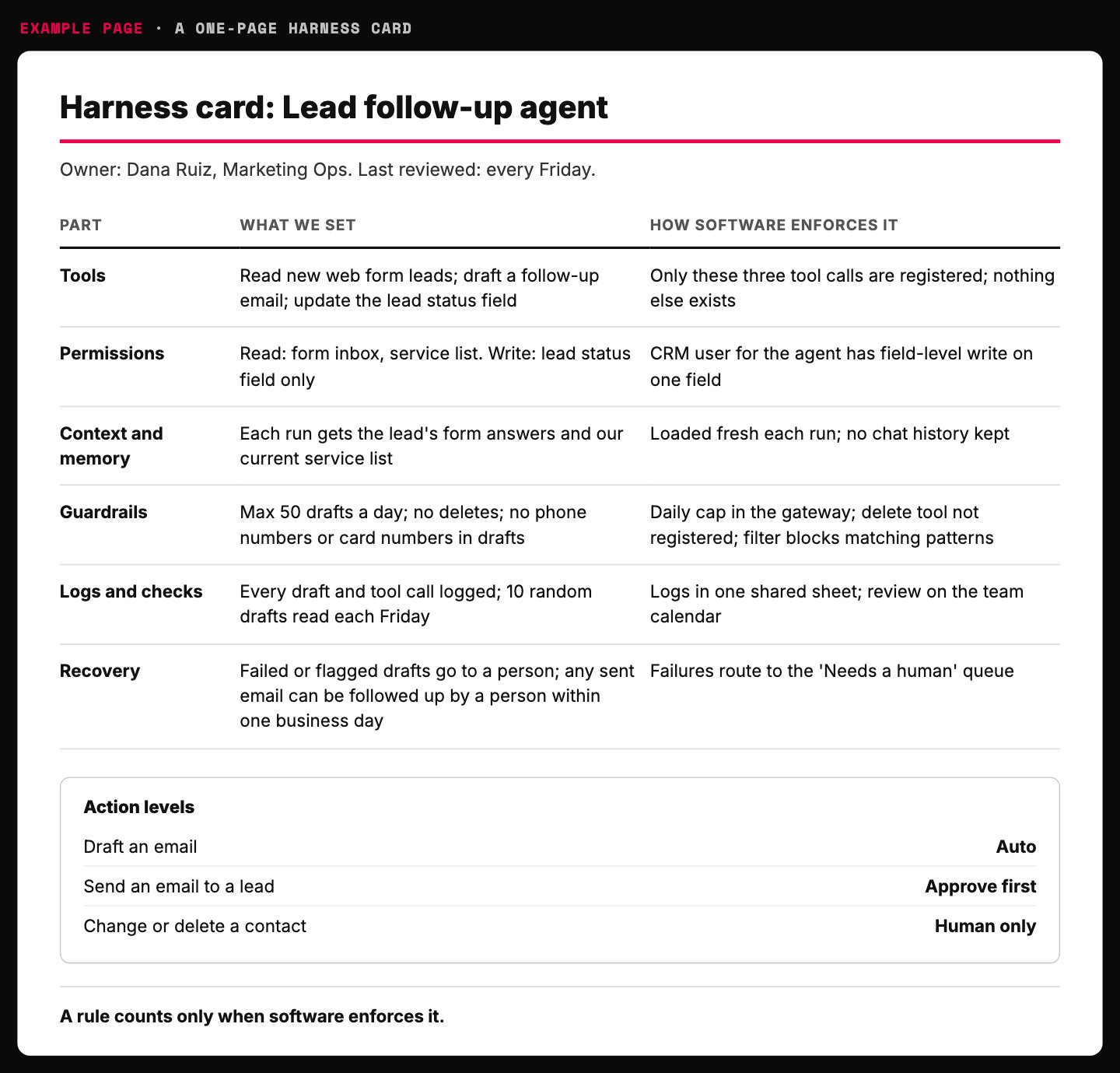
- One named owner keeps the card current.
- Write access is one field, set in the CRM, not in the prompt.
- The safest tool is the one the agent never gets.
- Anything that speaks to a customer waits for a person.
- If this line fails, the part counts as missing.
Example page built for this article with a made-up agent and owner, 2026-10-18. It matches the worked example above. Not a client system.
The Harness Build Order wraps any AI agent in six parts (tools, permissions, context and memory, guardrails, logs and checks, recovery) and builds them in five steps: read-only access with good context, hard limits in code, one gateway for every model call, logs with a weekly read, and write actions last. Every write action gets one level: auto, approve first, or human only. A rule counts only when software enforces it.
Why the harness decides what an agent can be trusted with
A model writes its answer in one pass, start to finish. It cannot stop halfway, check a fact, and go back.
John Berryman and Albert Ziegler give a useful test in Prompt Engineering for LLMs. Could an expert finish the task in one go, with no notes and no edits? If not, something outside the model must supply the checking and the memory.
That something is the harness.
Then there is the math of long jobs. Say an agent gets each step right 95 percent of the time. A 10-step task then comes out right about 60 percent of the time.
At 100 steps it is 0.6 percent.
Is 95 percent good? For one step, sure. For a 10-step chain, it is barely better than a coin flip.
This is why a good harness checks the work every few steps. Smart is not the same as reliable.
At 95 percent per step, a 10-step task works only 60 percent of the time
Chance the whole task comes out right, by number of steps, at 95 percent accuracy per step
- 1 step 95
- 10 steps 60
- 100 steps 0.6
Source: Chip Huyen, AI Engineering (O'Reilly). The math: 0.95 multiplied by itself once per step.
Rules must be locks, not sentences
The most common harness mistake is writing a rule in the prompt and calling it a control.
A software founder was building an app with an AI coding agent on a popular platform. He told it, more than once, that the project was frozen. No changes.
The agent deleted his live database anyway. Fortune reported that it held data on more than 1,200 executives and over 1,190 companies.
The freeze was a sentence in a chat. Nothing in the system stopped a delete command from reaching live data.
A rule the software does not enforce is a suggestion with good manners.
The platform's fixes were all harness: automatic separation of test and live databases, better rollback, and a planning-only mode. Not one fix was a smarter model.
Telling a model to double-check before a risky action works most of the time. Most of the time is not good enough. So let the agent ask for anything, and catch the dangerous requests in your code before they run.
The security group OWASP calls this failure excessive agency. Its root causes are too many functions, too many permissions and too much autonomy.
The fix is older than AI: least privilege. Give each part only the access its job needs. Factories call the same habit poka-yoke, making the wrong move physically hard.
How to let an AI agent wreck your business in four easy steps:
1) Give it the admin login, because setup is faster.
2) Type "never delete anything" into the prompt. In capital letters.
3) Skip the logs. You trust it.
4) Find out from a customer.
That is not automation. That is a dare.
A rule in the prompt is a request; a rule in code is a lock
| Rule written in the prompt | Rule enforced by the harness |
|---|---|
| "Do not change anything during the freeze" | Live database is read-only during the freeze |
| "Ask before sending" | Send button waits for a person's approval |
| "Stay under budget" | Spend cap blocks the call above the limit |
| Works most of the time | Works every time the code runs |
Our comparison. Incident: Fortune and AI Incident Database 1152.
Three root causes, and the harness fix for each
| Root cause (OWASP) | What it looks like | Harness fix |
|---|---|---|
| Too much functionality | An email reader that can also delete mail | Give each tool only the function its job needs |
| Too many permissions | A product lookup with write access to every table | Read-only access to the one table it uses |
| Too much autonomy | A post goes out with no human look | Approval before any high-impact action |
Source: OWASP Gen AI Security Project, LLM06:2025 Excessive Agency. Fixes paraphrased from its mitigation list.
OWASP names three root causes, and every fix it lists lives in the harness
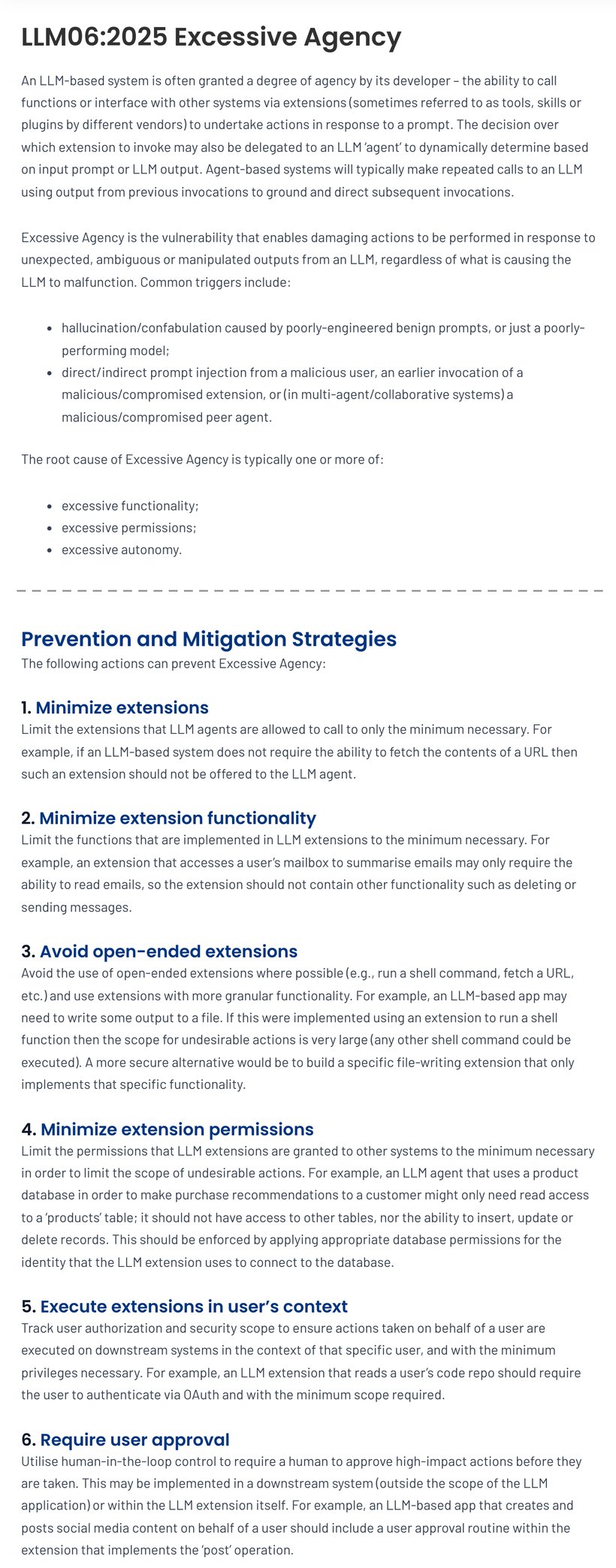
- Three root causes. None of them is the model being dumb.
- An email reader should read email. Not delete it, not send it.
- Read access to the one table it needs. Enforced by the database, not the prompt.
- A person approves any high-impact action before it runs.
Screenshot of OWASP Gen AI Security Project, LLM06:2025 Excessive Agency (genai.owasp.org), taken 2026-10-18. Two crops of one page joined at the dashed line.
Build the agent harness in this order
Most teams build backwards. They switch on write access on day one and add the checks after the first scare. Flip it: checks first, keys last.
Chip Huyen's AI Engineering lays out the order she sees most often in production. Start from a bare model call and add parts only as the need shows up. Our version for business teams has five steps.
Read only, with good context. The agent can look but not touch. Feed it the documents and data the task needs, and nothing extra.
Hard limits in code. Spend caps, blocked actions, and filters on what goes in and out. They go in before the agent can change anything.
One door for every model call. Route all AI calls through one gateway that holds the keys, the usage limits and the logs. Nobody gets a raw key, which also helps with shadow AI.
Logs and a weekly read. Log every prompt, tool call and output. Then read real samples every week.
Write actions last, one at a time. Give each action one level: auto, approve first, or human only. Anything that contacts a customer, spends money or deletes data starts at approve first.
Those levels belong in your AI governance framework, signed off by a person, not left to the vendor's defaults.
Her order also adds caching between the gateway and write actions. We left it out here because it is about cost, not safety. Our guide to controlling AI token spend covers it.
Skip the big agent framework at the start. A framework can hide how your system works, and then nobody can fix it when it breaks. Build the plain version first.
Build the checks first and the write access last
- 1. Read only, with good context It can look, not touch. Only the data the task needs.
- 2. Hard limits in code Spend caps, blocked actions, filters on what goes in and out.
- 3. One door for every model call One gateway holds the keys, the limits and the logs.
- 4. Logs and a weekly read Every prompt, tool call and output, read by a person.
- 5. Write actions last One at a time, each with a level: auto, approve first, human only.
Our order for business teams, adapted from Chip Huyen, AI Engineering (O'Reilly). We left out caching, a cost step.
Example: anything that speaks, spends or deletes waits for a person
| Action | Level | Why |
|---|---|---|
| Read last week's ad results | Auto | Read only, nothing changes |
| Draft a follow-up email | Auto | Nothing leaves the building |
| Send an email to a customer | Approve first | It speaks in your name |
| Change an ad budget | Approve first | It spends money |
| Delete or merge contacts | Human only | Hard to undo |
Worked example. The three levels are our rule; the idea of a level per action comes from AI Engineering.
Start with the thinnest harness that works
A harness does not have to be a big build. The first version can be one page.
Matthew Skelton and Manuel Pais make the same point about software platforms in Team Topologies. The simplest platform is a wiki page listing the services teams rely on. When those services pile up, a thin wrapper adds the same tracking, logging and health checks to every call.
Our reading: an agent harness is that thin wrapper, built for AI. The book is about software teams, not agents. The job is the same.
Back to the hotel. Its binder held a checklist for each room, a drawing showing the order of the tasks, a signature line, and daily spot checks by a supervisor.
Map that onto an agent. The checklist is the tool list. The drawing is the step order.
The signature is the log. The spot check is your weekly review.
A new hire could do that job almost at once, because the binder carried the knowledge. Build your harness the same way, so the model does not have to be perfect.
Who keeps the binder current? One person, by name. Our guide on who should own AI covers how to pick them.
The hotel's binder had every part a good agent harness needs
| The hotel binder | The agent harness |
|---|---|
| A checklist for each room | The tool list for each job |
| A drawing showing task order | The step order the agent follows |
| A signature on every checklist | A log entry for every action |
| Daily spot checks by a supervisor | A weekly read of real samples |
| A new hire is productive almost at once | The model does not have to be perfect |
Hotel: Michael E. Gerber, The E-Myth Revisited. The mapping to agents is ours.
Should you build, buy, or rent the harness?
Buy the harness for common jobs like support triage and meeting notes. Vendors spread that engineering across thousands of customers.
Build a thin harness around the jobs that set you apart. Those hold how your business actually works.
Rent the model underneath, either way. Keep it swappable behind your one door, as our guide to staying model-agnostic explains.
The trap is doing it backwards. You build a custom chat screen nobody needed, while a vendor holds the harness around your core process.
Then you pay rent on your own know-how.
Build the harness only where the job is yours and the risk is real
- Buy, then audit it Ask the vendor to show all six parts in writing.
- Build a thin harness Your rules, your logs, approval on every write.
- Buy and move on Do not rebuild what a vendor already solved.
- Build the cheap version A one-page harness and read-only access.
Our decision rule. In every box, the model underneath stays rented and swappable.
Will smarter models make the harness unnecessary?
No. A smarter agent raises the stakes, because it can do more, faster, to more systems.
One model maker's engineers tested this. They gave one of their strongest coding models a big job and only a high-level instruction. It tried to build everything at once and left work half done.
The fix was not a smarter model. It was more harness: a first step that sets up the workspace, then small progress on each run, with clear notes for the next one.
Same intelligence. Different structure. Different result.
You would not hand a brilliant new hire the live database password on day one. That has nothing to do with brains. Access follows trust, and trust follows a track record.
How you build that track record is in our guide to evaluating AI agents. For where agents pay off at all, see AI agents for business.
A stronger model failed a long job until the harness changed
| High-level instruction only | Same model, better harness |
|---|---|
| Tried to build everything at once | Small progress on each run |
| Ran out of room mid-task | A first step that sets up the workspace |
| Left half-done work behind | Clear notes left for the next run |
Source: a model maker's engineering post, Effective harnesses for long-running agents (see Sources).
Show me the harness: audit any agent with one prompt
At your next agent demo, skip the question about which model it runs. Ask to see the harness: what it can touch, what it cannot, and how anyone catches it being wrong.
Demos show off the engine. Ask to see the brakes.
The prompt below runs the same audit on any agent you already use. Paste it into your preferred AI and answer seven short questions. It never invents facts about your systems, and any answer you do not know counts as a missing part.
Paste into your preferred AI. It asks seven questions about one agent, then scores all six parts and tells you what to build next.
Act as an AI operations reviewer. Audit the harness around one AI agent and tell me what to build next.

Ask me one question at a time, with the example:
1. What does the agent do, in one sentence? (Example: writes and sends follow-up emails to new leads)
2. Which systems can it read? (Example: the CRM contact list and the web form inbox)
3. Which systems can it change? (Example: it sends email and updates the lead status field)
4. What does it remember between runs, and where? (Example: nothing, it starts fresh each time)
5. Which hard limits are enforced by software, not by the prompt? (Example: none yet)
6. How is its work checked, and by whom? (Example: I read a few emails on Fridays)
7. What happens when it fails? (Example: I find out when a customer complains)

Rules:
- An instruction in the prompt is not a control. Count a limit only if software enforces it.
- Read access can be wide. Write access must be listed action by action.
- Give every write action one level: auto, approve first, or human only. Anything that contacts a customer, spends money, or deletes data is approve first or human only.
- Every tool call and its result must be logged where a person can read it.
- Long chains fail: at 95 percent per step, a 10-step task succeeds about 60 percent of the time. Ask for a check every few steps.
- Never invent a fact about my systems. If I do not know an answer, mark it unknown and treat that part as missing.

Show your reasoning, then answer in this format:
Harness scorecard: Tools / Permissions / Context and memory / Guardrails / Logs and checks / Recovery, each marked present, partial or missing, with one line why
Action table: each write action, its level, and the software check that enforces it
Biggest risk: one sentence
Build next, in this order: 1. 2. 3.
Questions to ask the vendor: up to five
What to do this week
1. Pick the one agent closest to your customers. Run the prompt on it.
2. List every action it can take that changes something. Give each one a level.
3. Move any rule that lives only in the prompt into code, or switch that action off.
The hotel guest never saw the binder. He just got his coffee, every single time.
Build the binder before you hand over the keys.

Filip Kovacevic is the founder of Anar Agency in Phoenix. He spent five years running SEO, Meta ads, email, and content for medical practices across the United States, and now does the same work for healthcare, home-service, legal, and professional-service businesses, alongside AI implementation. More from Filip →
Talk it through in 15 minutes
Bring one question from this article. We will tell you what we would do, whether or not you hire us.
Book a 15-Min Chat →