Shadow AI Is a Demand Signal: Guardrails That Do Not Kill the Front Line
Shadow AI is any AI tool your staff use for work that the company never approved. Treat it as a demand signal, not a crime: each tool marks a task your approved tools fail. Run a 90-day amnesty to find it, write a one-page policy, and make the approved path easier.
Bans only hide it.
What is shadow AI? A map of where your official tools fail
It is 5:40 on a Tuesday evening. Your best account manager has a client spreadsheet open on her laptop. On her phone, a free AI chatbot is turning it into a summary.
She is not stealing anything. She just wants to be home by six.
Nobody approved that tool. Nobody asked why she needed it.
Shadow AI is any AI tool your people use for work that the company never approved. Personal chatbot accounts, browser add-ons, an AI note-taker someone hooked up to their calendar. It is the newest form of shadow IT, the old habit of buying software around the IT department.
Most guides treat it as a discipline problem. We treat it as a demand signal. Every unapproved tool marks a task your approved tools are failing to do.
So the goal is not zero shadow AI. The goal is shadow AI you can see.
A ban hides AI use; guardrails make it visible
| Ban it | Guardrail it |
|---|---|
| Usage moves to personal phones | Usage moves to business accounts |
| No logs, no say over the data | Every request logged in one place |
| Honest users stop reporting | Amnesty brings the reports in |
| The best builders route around it | The best builders become champions |
| One rule for everything | Strict rules only where red data lives |
Our comparison.
Should you ban AI tools at work? A ban only hides the usage
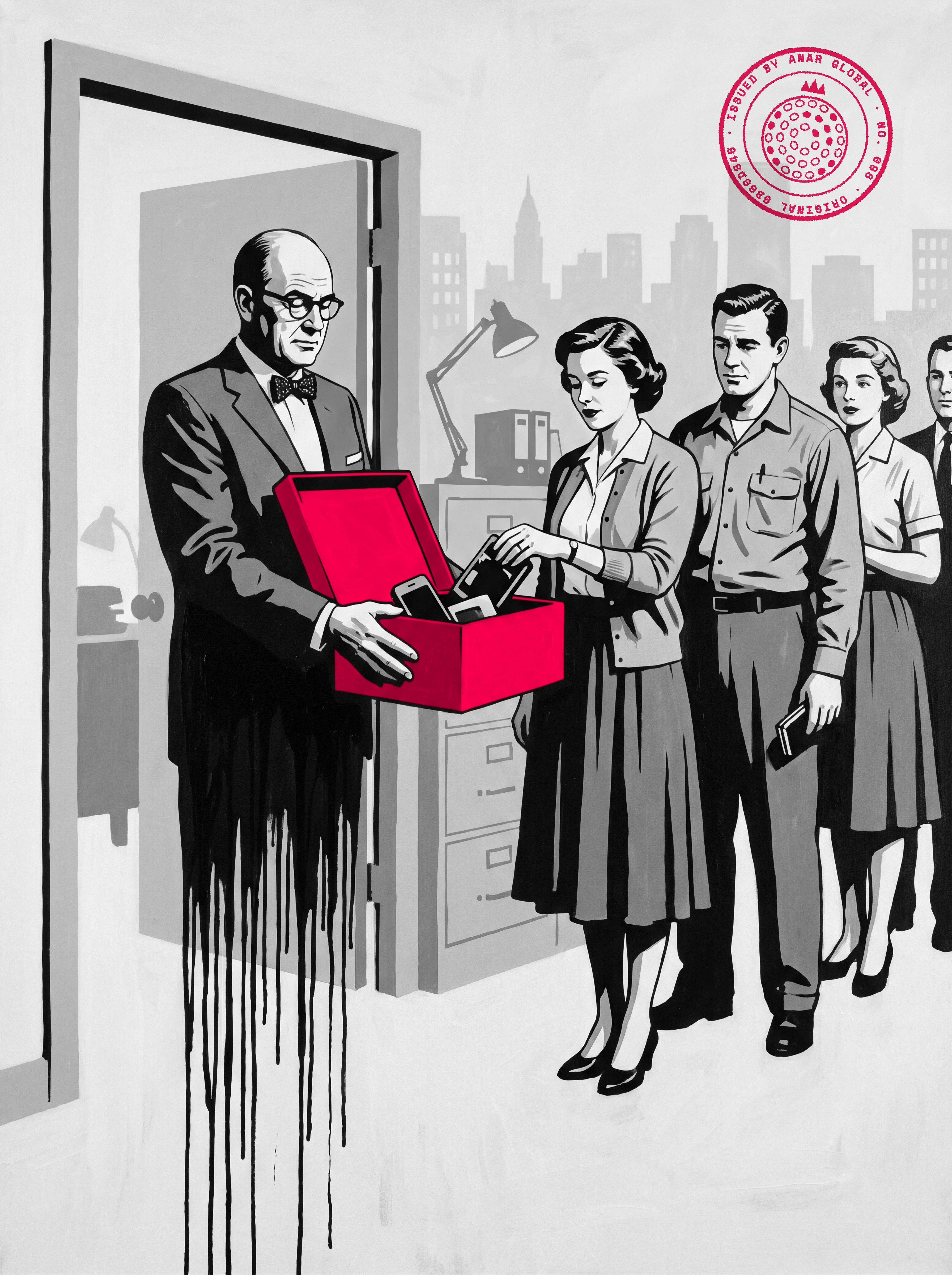
A ban does not stop shadow AI. It moves it to personal phones and home accounts, where you have no logs and no say.
How common is it already? Microsoft and LinkedIn surveyed 31,000 people in 31 countries for their Work Trend Index. Three in four knowledge workers used AI at work, and 78 percent of those users brought their own tools.
At small and mid-size companies the share was 80 percent. And 52 percent of AI users said they were reluctant to admit using it on their most important work.
So more than half already keep quiet about their most important AI work. Nobody has banned anything yet.
Donella Meadows names what happens next in Thinking in Systems. She calls it rule beating: people meet the letter of a rule and dodge its purpose. It usually happens when a rule from above is too rigid to work.
She sees two ways to respond. Tighten the rule and its enforcement, and the distortion grows. Or read the rule beating as useful feedback, then fix, explain or drop the rule.
We take the second way. Every time.
Even the most famous ban came with a plan. When Samsung restricted generative AI tools after engineers uploaded internal source code to a public chatbot, its memo called the limit temporary. The same report says it was building its own AI tools for translation, summaries and software work.
The ban made the headlines. The replacement was the real decision.
A ban is a blindfold, not a lock.
Most people who use AI at work bring their own tools
- Of AI users bring their own AI tools to work 78
- The same share at small and mid-size companies 80
- Of AI users reluctant to admit using it on their most important work 52
Microsoft and LinkedIn, 2024 Work Trend Index, survey of 31,000 people in 31 countries.
Tighter enforcement makes rule beating worse; feedback fixes it
| Tighten the rule | Read it as feedback |
|---|---|
| More blocks, more warnings | Ask why people went around the rule |
| Usage hides deeper | Usage comes into view |
| The rule looks obeyed | The rule gets fixed, explained or dropped |
| Distortion grows | The rule starts serving its purpose |
Donella Meadows, Thinking in Systems, on the rule-beating trap. Applying it to AI tools is our reading.
The Amnesty Audit is a 90-day window in which anyone can report the AI tools they use for work, with no penalty. Every report goes into one register: task, tool, data touched (public, internal or sensitive) and time saved. Each row is approved, swapped for an approved tool that does the same job, or stopped within two weeks, and the results are shared with everyone.
You get a risk map, a ranked automation list and your future AI champions from one exercise. Repeat the checks every quarter.
Read every workaround as a request for a better tool
Every unapproved tool answers two questions for free. Which task hurts enough that someone risked the rules to fix it? And which approved tool let them down?
Clayton Christensen and his co-authors make this case in Competing Against Luck. When people build a workaround to get a job done, pay attention. The job matters to them, and they are frustrated enough to invent their own fix.
Their sharpest example is a surgeon at Intermountain Healthcare. His exam room had modern software for recording a diagnosis. He sketched on paper instead, because typing meant turning away from a nervous patient.
The software worked. It did the wrong job.
Shadow AI is the surgeon's story, told across a whole company. The person pasting a client email into a free chatbot is telling you the approved tool is too slow, too locked down, or missing.
The Team Topologies authors see the same thing in org charts. People bend the rules and reach across reporting lines to get work done, and the authors argue that this problem solving should be nurtured.
Andy Grove had a version for busy managers in High Output Management. Managers wanted to hide from the people interrupting them, but Grove said those people had real problems. Give them a set channel, like an office hour, instead of a closed door.
That is our stance on shadow AI. Do not hide from the demand. Give it a door.
Each workaround points at an approved tool that failed
| What someone did | What it tells you | What to fix |
|---|---|---|
| Pasted client emails into a free chatbot on a phone | Replies take too long with approved tools | An approved writing assistant on a business account |
| Hooked an AI note-taker to their calendar | Meeting notes are a real time sink | One approved note-taker with set data rules |
| Uploaded a sales spreadsheet for a summary | Reports are hard to pull from the CRM | A proper report, or an approved tool with masking |
| Saved prompts in a personal doc | There is no shared place for what works | A team prompt library inside the approved tool |
Example rows, made up for illustration. The reading method is ours, built on the workaround idea in Christensen et al., Competing Against Luck.
Run a 90-day amnesty audit before you write a single rule
The Amnesty Audit is a 90-day window in which anyone can report the AI tools they use, with no penalty. It comes first because you cannot write good rules for usage you have never seen.
Here is how we run it.
Step 1, announce it in plain words: "Tell us every AI tool you use for work. Nobody gets in trouble for anything reported in the next 90 days."
Step 2, make reporting take two minutes: one short form with the task, the tool, what data went in, and the time it saves each week.
Step 3, log every answer in one register: a shared list with one row per tool and task. Tag each row with the data it touched: public, internal or sensitive.
Step 4, decide each row within two weeks: approve it, swap it for an approved tool that does the same job, or stop it. Stop only the rows that put sensitive data at real risk.
Step 5, report back to everyone: share what you approved and what you replaced. People report honestly a second time only if the first report changed something.
Why amnesty? Because more than half of AI users already hesitate to admit using it on their most important work. Punish the first honest answer and you will never hear a second one.
You get three things back at once. A risk map, a ranked list of tasks worth automating properly, and the names of people who already know how.
Those people are your future AI champions. Do not discipline them. Promote them.
Five steps turn hidden AI use into a list you can act on
- 1. Announce No penalty for anything reported in the next 90 days.
- 2. Ask in two minutes Task, tool, data that went in, time saved each week.
- 3. Register One row per tool and task, tagged public, internal or sensitive.
- 4. Decide in two weeks Approve, swap for an approved tool, or stop. Stop only real risk to sensitive data.
- 5. Report back Share what changed, so people report again next quarter.
The Amnesty Audit, our framework.
The register shows risk and demand in the same row
| Task | Tool | Data | Hours saved a week | Decision |
|---|---|---|---|---|
| Drafting client replies | Free chatbot, personal account | Sensitive | 3 | Swap for business account, mask names |
| Summarizing industry news | Free chatbot, personal account | Public | 1 | Approve |
| Meeting notes | AI note-taker on calendar | Internal | 2 | Swap for the approved note-taker |
| Cleaning a customer list | Browser add-on | Sensitive | 4 | Stop now; build it inside the CRM |
Example register, made up for illustration. Columns are from our Amnesty Audit.
The amnesty fits on one screen, and one question sorts the risk
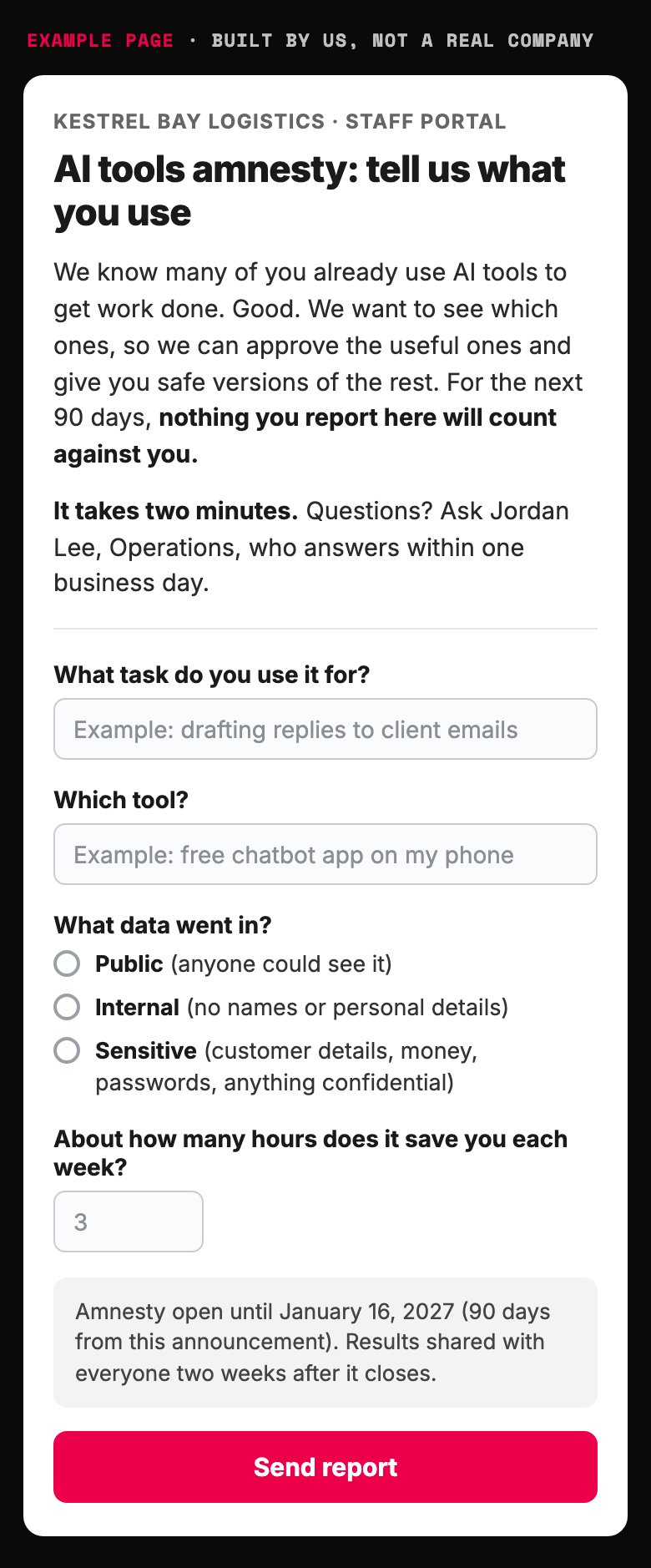
- The amnesty in one line. No penalty for 90 days.
- Short form. Long forms get skipped.
- A named person and a one-day answer keep the shadow from coming back.
- The only field that sets the risk level.
- Report back, or nobody reports a second time.
Example page built for this article with a made-up brand, from the Amnesty Audit steps above. Built 2026-10-18.
Write a one-page shadow AI policy with five parts
Once you know what is out there, write the rules. One page, five parts. A long policy goes unread, and an unread policy protects nobody.
Green data. What anyone may put into approved tools: public pages, live ads, general research, drafts with no names in them.
Red data. What never goes into an outside tool: customer personal details, passwords and keys, unreleased financials, anything under a confidentiality agreement. The OWASP guide to sensitive information disclosure lists more ways private data slips out through AI tools.
Approved tools. The short list, on business accounts whose contract keeps your data out of model training.
The ask-first rule. One named person answers any "can I use this?" question within one business day.
The amnesty clause. Reporting past use carries no penalty for 90 days.
The ask-first rule holds the whole page up. Why one day?
The Accelerate research team studied how software teams approve changes. Teams that needed sign-off from an outside body, such as a manager or a review board, shipped slower and recovered from outages slower. Those approvals did nothing to cut the share of changes that failed.
Peer review did better than the board. So did no formal approval at all. That finding is about software changes; applying it to AI tool requests is our reading.
A three-week approval is not a policy. It is a slower ban, and the shadow comes right back.
This page is one piece of a wider rule set. For the full version, with risk scoring and approvals, see our one-page AI governance framework.
Five parts fit on one page, and the ask-first rule holds it up
| Part | What it says | Example |
|---|---|---|
| Green data | What anyone may put into approved tools | Public pages, live ads, drafts with no names |
| Red data | What never goes into an outside tool | Customer details, passwords, unreleased numbers |
| Approved tools | The short list, on business accounts | Contract keeps your data out of model training |
| Ask-first rule | One named person answers within one business day | The operations manager |
| Amnesty clause | No penalty for reporting past use | 90 days from the announcement |
Our policy template.
A finished policy really fits on one page: five parts and one owner
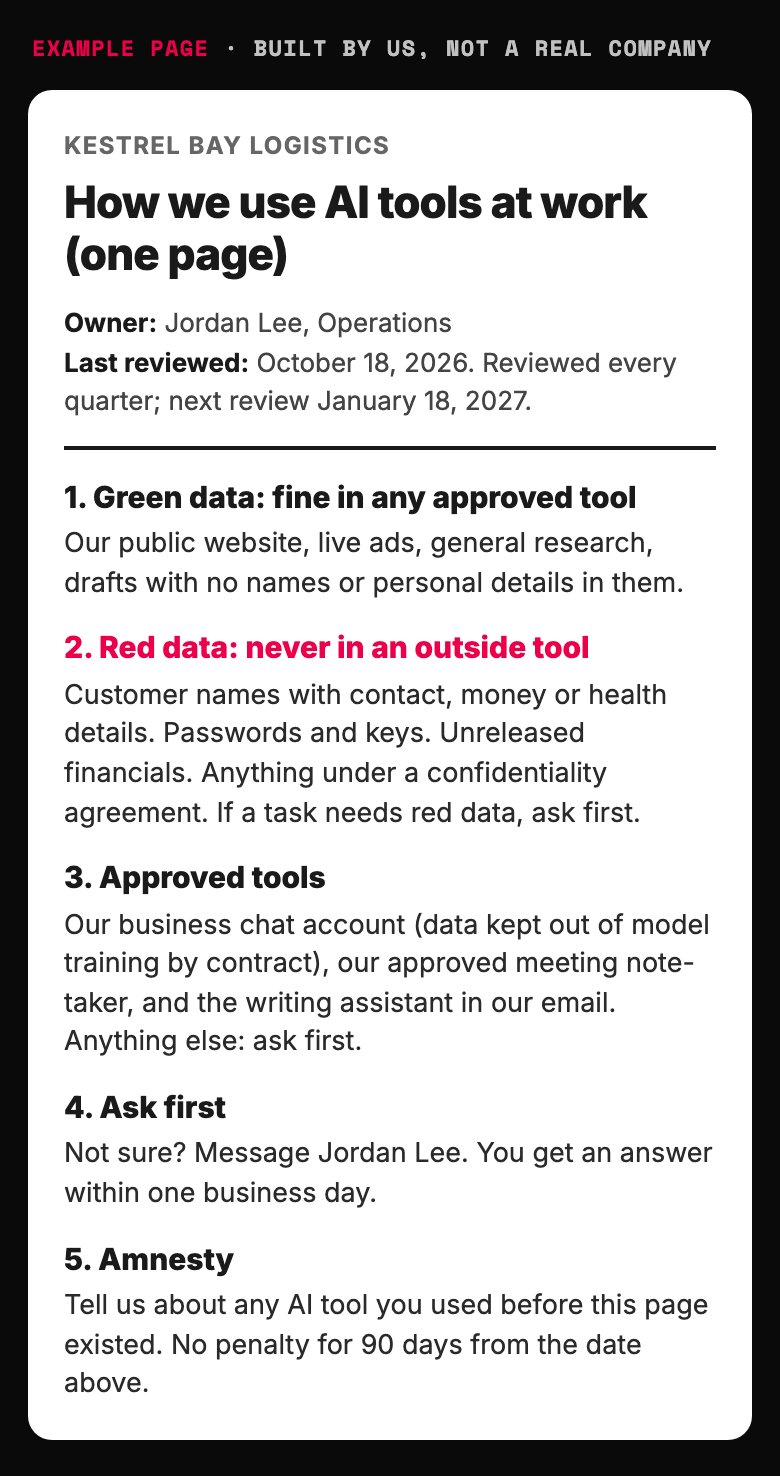
- The one hard line. Everything else is allowed by default.
- Business accounts, not personal ones.
- The rule that holds the page up. Slow answers bring the shadow back.
- Amnesty turns hidden use into a list you can act on.
Example page built for this article with a made-up brand, from the five-part policy above. Built 2026-10-18.
An outside approver slowed software teams and caught nothing extra
| How changes got approved | What happened to delivery |
|---|---|
| An outside body (a manager or a board) approves every change | Lower performance: slower shipping and slower recovery, no drop in failed changes |
| Approval only for high-risk changes | No link to performance either way |
| Peer review | Higher performance |
| No formal approval | Higher performance |
Forsgren, Humble and Kim, Accelerate, chapter 7. Software teams; applying it to AI tool requests is our reading.
Make the approved path easier than the shadow one
People pick the shadow tool because it is easier. So the approved path has to be easier still, not just safer.
The Accelerate team also found that letting teams choose their own tools helped them deliver. Its answer to security risk was not a ban either. Security teams should hand out ready-made, approved toolkits that are simple to use, and people will adopt good ones of their own free will.
We use that as a test. If your approved AI tool needs a mandate to get used, it is not good enough yet.
For teams that build with AI, the cleanest version is one front door. Chip Huyen describes it in AI Engineering as a model gateway. Instead of handing out the company's API keys, the passwords software uses to call an AI model, everyone goes through one controlled entry point.
The gateway decides who may use which model. It caps usage, so a runaway job cannot run up the bill. It logs every request in one place.
It can also hide personal data on the way out. A phone number becomes [PHONE NUMBER] before the request leaves, and the real number is swapped back into the answer.
One warning from the same book: track how often your guardrails block legitimate work. Huyen calls it the false refusal rate. A rule that blocks everything is perfectly safe, perfectly useless, and it sends people straight back to their phones.
How to grow a shadow AI problem in four easy steps:
1. Ban every AI tool by email on a Friday.
2. Approve one tool six months later, with the useful features switched off.
3. Send every request to a committee that meets once a month.
4. Act shocked when the next audit finds personal accounts everywhere.
Four steps, zero safety, and a hell of a lot of paperwork.
People use the safe tool only when it is also the easy one
- Ignored Safe on paper. People go back to their phones.
- The approved path Safe and easy. People choose it on their own.
- Worst of both Nobody likes it, and it still risks data.
- Shadow AI today Easy, and nobody can see the data.
Our framework, built on the toolkit finding in Accelerate.
A model gateway gives access without handing out the keys
- Controls access Decides which person or app may use which AI model.
- Caps usage Limits calls so a runaway job cannot run up the bill.
- Logs everything Every request and answer in one place.
- Masks personal data Swaps details like a phone number for a placeholder before the request leaves.
Chip Huyen, AI Engineering, chapter 10.
Let trust grow in three rungs: sandbox, team, production
Start everyone on safe defaults. Business accounts, read-only connections to company data, logging switched on.
Then let people earn more room. We use three rungs for anything someone builds with AI, from a saved prompt to a small agent.
Sandbox. Anyone can build for themselves, with green data only. No approval needed.
Team. A tool other people rely on needs a named owner and one review by someone who did not build it. Give it a written brief, like an AI agent job spec.
Production. Anything that touches customers, money or red data passes the same gate as any other software: tests, a log and an off switch.
Grove described a similar path for new hires. Start them in a clear, well-defined job. As they build shared experience with the team, move them into messier work with more freedom.
Trust in AI tools grows the same way, in our reading. When people can see the next rung, they climb it. When they cannot, they go around it.
For what a real review looks like, see how to evaluate AI agents. For the code that enforces the limits, see what an agent harness is.
AI tools earn wider use one rung at a time
- Sandbox Build for yourself with green data. No approval needed.
- Team Others rely on it: a named owner and one reviewer who did not build it.
- Production Touches customers, money or red data: tests, a log and an off switch.
Our framework.
How do you find shadow AI you have not heard about?
Ask first, then check. The amnesty form finds what people remember, and four quiet checks find the rest.
Expense reports and company cards. Search for AI subscriptions bought on personal or team budgets.
App connections. Your email and calendar admin panels list every outside app someone has granted access. AI note-takers and assistants show up here.
Browser add-ons. On company devices, the extension list shows AI writing and summary tools.
Network and security logs. If you have them, they show traffic to AI services. Use them to count, not to punish.
Most companies skip this step. They should not.
IBM's breach research looked at 600 organizations that had a data breach. One in five reported a breach tied to shadow AI, and those with high levels of it paid about $670,000 more per breach.
Among those breached companies, 63 percent had no AI governance policy or were still writing one. Of the ones with a policy, only 34 percent audited regularly for unapproved AI.
A policy nobody checks is a smoke alarm still in the box.
Repeat the checks every quarter, with the amnesty form still open for new reports. The register stays current, and so does the trust.
Not sure where your company sits overall? Our AI maturity assessment scores it in one pass.
Shadow AI made breaches costlier, and few companies checked for it
- Reported a breach tied to shadow AI (one in five) 20
- Higher average breach cost with high shadow AI use 670000
- Had no AI governance policy, or were still writing one 63
- Of those with a policy audited regularly for unapproved AI 34
IBM, Cost of a Data Breach Report 2025 (Ponemon Institute), 600 breached organizations.
Four quiet checks find the AI tools people forget to mention
| Where to look | What it shows | How often |
|---|---|---|
| Expense reports and company cards | AI subscriptions on personal or team budgets | Every quarter |
| Email and calendar admin panels | Outside apps granted access, such as AI note-takers | Every quarter |
| Browser extension lists on company devices | AI writing and summary add-ons | Every quarter |
| Network and security logs | Traffic to AI services, if you have the logs | Every quarter; count, never punish |
Our checklist.
Draft your shadow AI policy and amnesty plan with AI
Paste the prompt below into your preferred AI. It asks about your team, your tools and your data, one question at a time.
It drafts the amnesty announcement, the register and the one-page policy. It never invents your data rules. It asks you.
Paste into your preferred AI. It asks five questions, then drafts the announcement, the register and the one-page policy.
Act as an AI policy advisor for a small or mid-size company. Help me turn shadow AI (AI tools staff use without approval) into approved use I can see.

Ask me one question at a time, with the example:
1. What does the company do, and how many people work here? (Example: 60-person accounting firm)
2. Which AI tools do people already use, approved or not? (Example: free chatbots on phones, "not sure")
3. What sensitive data do we handle? (Example: client tax records, bank details)
4. Which AI tools do we pay for on business accounts? (Example: one business chat plan for 10 people)
5. Who can answer "can I use this?" questions within one business day? (Example: the operations manager)

Rules:
- Shadow AI is a demand signal. Stop a tool only if it puts red data at real risk, and name an approved replacement.
- Green data: public, or internal with no personal details. Any approved tool may use it.
- Red data: personal, financial, health, passwords, anything confidential. Never into an outside tool unless masked first.
- Approved tools are business accounts whose contract keeps our data out of model training. If you can browse, check current vendor terms and say what you found; if not, tell me to check.
- Amnesty: 90 days, no penalty for anything reported.
- Ask-first questions get an answer within one business day.
- Trust ladder: sandbox (yourself, green data), team (named owner plus one reviewer who did not build it), production (tests, a log, an off switch).
- Never invent facts about my company. Ask me.

Output:
1. Amnesty announcement (under 120 words, plain)
2. Register columns, plus three example rows from my answers
3. One-page policy: green data, red data, approved tools, ask-first rule, amnesty clause
4. Four checks to repeat every quarter
5. Next three actions: 1. 2. 3.
Do three things this week
1. Send the amnesty announcement. Keep it to five sentences and promise no penalty for 90 days.
2. Name your ask-first person and tell everyone their name. Their job is an answer within one business day.
3. Run the prompt and print the one-page policy. Read it aloud to the heaviest AI user you know.
Remember the account manager with the spreadsheet and her phone? Under these rules she reports the tool, gets an approved one within a day, and her client data stays in a system you control.
Next, settle who answers for all of this with who should own AI. Then cap the bill with AI cost controls.
You cannot switch the usage off. You can only switch the lights on.

Filip Kovacevic is the founder of Anar Agency in Phoenix. He spent five years running SEO, Meta ads, email, and content for medical practices across the United States, and now does the same work for healthcare, home-service, legal, and professional-service businesses, alongside AI implementation. More from Filip →
Talk it through in 15 minutes
Bring one question from this article. We will tell you what we would do, whether or not you hire us.
Book a 15-Min Chat →