Data Silos and AI: Build a Company Brain Without a Two-Year Overhaul

No. You do not have to fix your data silos before AI can use them. Leave the data where it lives and add a search layer that finds the right page for each question. Start with one task and the two or three tools it needs.
Check who may see what, and measure whether the search finds the right page.
Data silos do not need fixing before AI can use them
Someone asks for the latest pricing sheet. Four people search four tools. Ten minutes later, two different versions turn up, and nobody knows which one is current.
Then a manager says the line everyone has heard: "We need to clean up our data before we do AI."
It sounds responsible. It is usually a two-year detour.
Data silos are business facts stuck in separate tools that do not share with each other. Your CRM, your shared drive, your help desk, your team chat. The name borrows from farm silos: plenty of grain inside, none of it any use outside.
The usual cure is one giant cleanup. Move everything into one warehouse, agree on one name for everything, then switch on AI.
Our answer is shorter. Leave the data where it lives. Build a search layer over it, one task at a time.
Weeks, not years.

Five moves get AI answering from messy data in weeks
- 1. Archive the past One folder named Archive plus the date. Clean nothing.
- 2. Pick one task Connect only the two or three tools it needs.
- 3. Search by keyword first Add meaning search only when the test says so.
- 4. Check permissions every time On every question, not once at setup.
- 5. Score it weekly 20 real questions, the right page in the top five.
The Retrieval-First Rule, as set out in this guide.
Why the two-year data overhaul usually fails
The overhaul freezes every AI benefit behind a finish line that keeps moving. Each step sounds sensible on its own. Together they take years.
Why does the finish line move? Because the business keeps buying tools while the project runs. You clean the garage while someone keeps backing the truck in.
There is a deeper problem. The authors of Team Topologies call it a monolithic model: one shared language and format forced on every part of a company.
They warn it starts to hold the work back once a company has more than a handful of teams. For example, sales, support and finance each mean something slightly different by "customer."
Forcing one definition on all three takes months. It fixes nothing anyone asked for.
So we do the opposite. Each tool keeps its own shape. The search layer reads them where they are.
A single model of everything sounds tidy. In practice it is a project with no customer.
The overhaul pays at the end, if ever; retrieval first pays per task
| Overhaul first | Retrieval first |
|---|---|
| Move everything into one warehouse | Leave each tool where it is |
| Agree one definition for every term | Each tool keeps its own shape |
| AI starts when the project ends | AI starts on the first task |
| New tools re-split the data mid-project | New tools join when a task needs them |
| Value arrives at the end | Value arrives task by task |
Our comparison. Monolithic-model warning from Skelton and Pais, Team Topologies.
The Retrieval-First Rule says: before you approve any data cleanup, price the alternative. What would a search layer over your existing tools cost, and which of your next three AI tasks would it unblock this quarter? The cleanup must beat that bid on value and time, not on elegance.
Archive the past, connect one task's sources, search by keyword first, check permissions on every question, and score the search every week.
Archive the past instead of cleaning it
Start by cleaning nothing. Make one folder named Archive plus today's date, and move the old mess into it.
The cost of the mess is real. Tiago Forte's Building a Second Brain cites an IDC report: knowledge workers spend 26 percent of the day looking for and pulling together information. They find what they need only 56 percent of the time.
His fix came from an Apple Store job, helping new owners move their files. A one-hour visit could not sort thousands of old files, so he moved them all into a dated Archive folder.
He waited for someone to come back and ask to sort the old files. Nobody ever did. When people came back, they talked about their projects, not their old files.
Archived files still show up in search. You lose nothing. You just stop paying to tidy things nobody needs.
Then organize only what live work needs. His rule is one organizing system across every tool, not one tool for everything.
Our version: give each live project the same name in the drive, the CRM, the task board and the chat channel. One search for that name then finds it everywhere.
Tidy is optional. Findable is not.
A quarter of the workday goes to searching, and half the searches fail
- Share of a knowledge worker's day spent looking for and pulling together information (IDC) 26
- Share of the time they find what they need (IDC) 56
- Hours a year the average US employee spends looking for misplaced notes, items or files (Microsoft) 76
Source: IDC and Microsoft research as cited in Tiago Forte, Building a Second Brain.
Archive the backlog in ten minutes instead of cleaning it for a year
- 1. Make one folder Name it Archive plus today's date.
- 2. Move the old files in All of them. Do not sort.
- 3. One folder per live project Only work that is happening now.
- 4. Same name everywhere Drive, CRM, task board and chat use one project name.
- 5. Let search do the rest Archived files still show up when you look.
Adapted from Tiago Forte, Building a Second Brain. Step 4 is our rule.
Pick one task and connect only the tools it needs
What data work does AI actually need? Only what your next one to three AI tasks require. Everything else waits.
Say you want AI to summarize sales calls and draft the follow-up. It needs two sources: the call transcripts and the deal history in your CRM.
Connect those two well. Matching IDs, so each call links to the right deal. Correct permissions, and data fresh enough for the task.
Ignore the other seventeen tools until a task needs them. They will still be messy next quarter. That is fine.
Write it all on one page. A platform can start as a list on a wiki page, and ours does.
Our source list names each tool, its owner, what it holds, who may see it and how fresh it is. That page is your first platform.
This is the heart of the Retrieval-First Rule. Price the search layer for your next task before you approve any cleanup.
The diagram does not pay you. The task does.
Example: each AI task needs two or three sources, not the whole company
| AI task | Sources it needs | What to fix first |
|---|---|---|
| Summarize sales calls and draft the follow-up | Call transcripts, CRM deal history | Matching deal IDs; reps see only their own deals |
| Draft support replies | Help-center articles, past tickets | Remove outdated articles; hide private ticket notes |
| Weekly ad performance memo | Ad platform export, CRM closed deals | One campaign name in both tools |
| Answer new-hire questions | Handbook, recorded walkthroughs | One index with a 60-second findability check |
Worked examples of the method. Everything not listed waits until a task needs it.
A source list for one AI task fits on one page
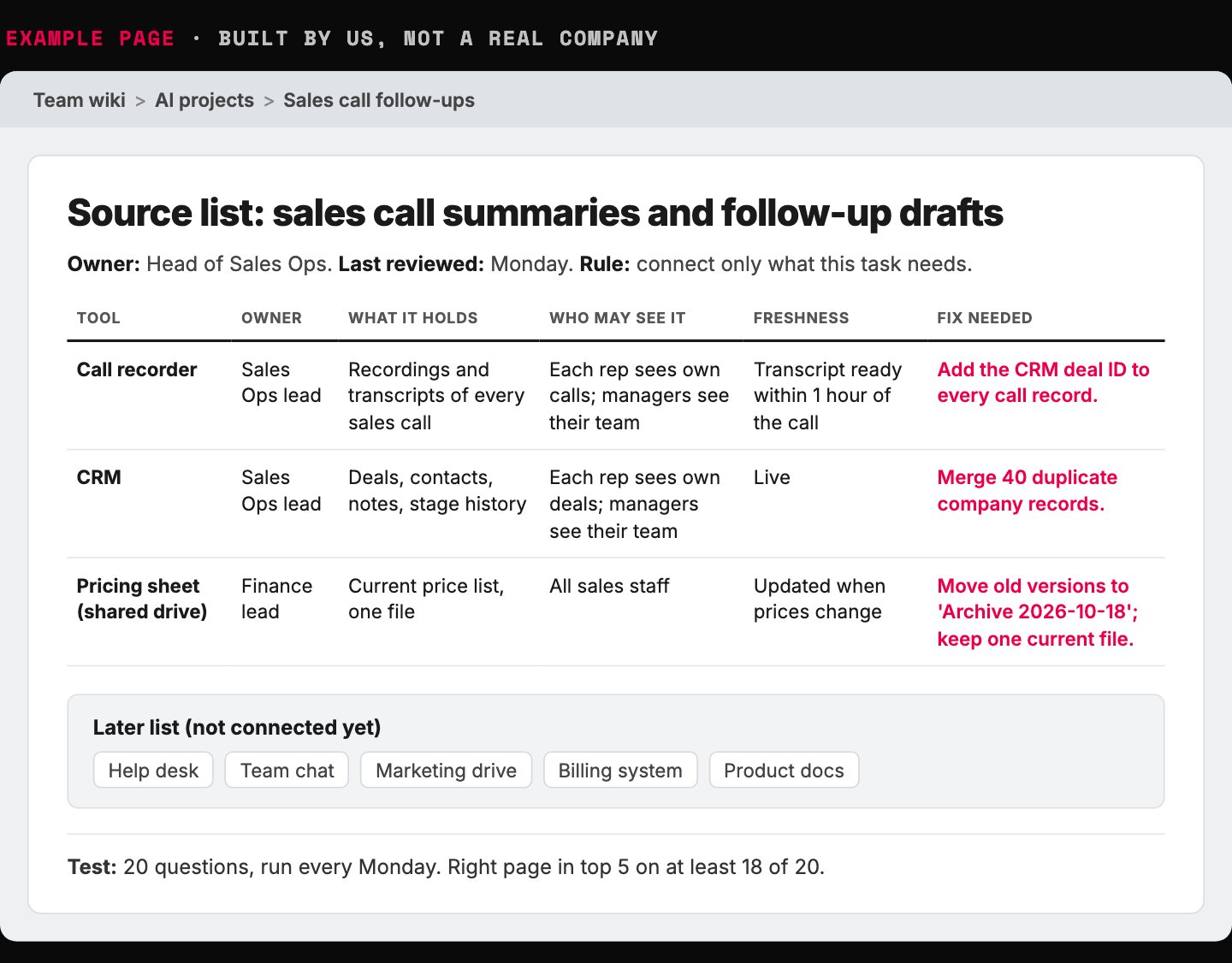
- One task, one page. Only the tools this task needs.
- Write who may see what before anything is connected.
- One fix per source: matching IDs so calls link to deals.
- Everything else waits until a task needs it.
- The weekly 20-question test, written on the same page.
Example page built for this article with a made-up company, 2026-10-18. No real company data.
Start with keyword search, not a vector database
The search layer has a name: retrieval-augmented generation, or RAG. The AI looks up the right passages first, then answers from them.
The method comes from a 2020 research paper. Most chat-with-your-documents tools work this way.
There are two ways to search. Keyword search matches the words in the question to the words on the page. Meaning search turns text into long lists of numbers, called embeddings, and finds pages that mean something similar.
A vector database stores those lists of numbers. Plenty of vendors will tell you that you need one on day one.
Chip Huyen's AI Engineering says the opposite. Start with a keyword method such as BM25, a ranking formula from the 1980s that is still hard to beat.
Why? Keyword search is much faster and much cheaper. Huyen notes that vector database bills can reach one-fifth to half of what a company spends on AI models.
Meaning search also blurs exact terms. Error codes, product names and part numbers get lost in the numbers.
Keyword search is easier to debug. When a page does not match, you can see which words were missing and fix them.
Our decision rule: add meaning search only when your test questions fail because people use different words than the page. Run both side by side. Do not replace one with the other.
Start boring. Upgrade only when the test tells you to.
Keyword search is faster, cheaper and easier to fix; meaning search catches different wording
| Keyword search | Meaning search (embeddings) | |
|---|---|---|
| Speed | Much faster | Can be slow |
| Cost | Much cheaper | Embeddings and vector storage cost money |
| Out of the box | Strong, but hard to improve | Can beat keyword search once tuned |
| Weak spot | Misses different wording | Blurs exact codes and product names |
| When it fails | You can see which words were missing | Hard to see why |
Source: Chip Huyen, AI Engineering, Table 6-2; Berryman and Ziegler, Prompt Engineering for LLMs.
Climb one rung only when the 20-question test fails
- Keyword search Start here. Fast, cheap, easy to debug.
- Context notes on each chunk Add the document title and a one-line summary to every piece.
- Add meaning search alongside Only when people use different words than the page.
- Rerank the results A second pass re-sorts the top results.
Our build order, based on Huyen, AI Engineering, and a published contextual retrieval test.
Do you need to train an AI model on your own data?
Usually not. Training changes how a model writes. Search changes what it knows.
If the AI gets your facts wrong, it is missing information. Search fixes that. If it gets your format or tone wrong, that is a behavior problem, and better instructions often fix it.
The numbers back this up. On a test of current-events questions, a small open model scored 48 percent on its own and 88 percent with search added. Two retrained versions scored 50 and 59 percent.
Retraining also goes stale. Every new price, policy or product means training again. A search index just reads the new page.
Teaching a model your prices by retraining it is like tattooing your phone number. It works until the number changes.
Adding search lifted the score far more than retraining did
Accuracy on current-events questions, one 7-billion-parameter open model
- Model alone 48.1
- Retrained, method A 50.4
- Retrained, method B 58.8
- Model plus search 87.5
Source: Ovadia et al., as reported in Chip Huyen, AI Engineering, Table 7-2 (scores 0.481, 0.504, 0.588, 0.875).
Check permissions on every search, not once
A search layer raises one hard question. The AI can now read everything it is connected to. Should this person, through this assistant, see this file?
So the search must check the source tool's permissions every time someone asks. Not once when you build the index. On every question.
This is the least glamorous line in the plan. Naturally, it is the first one cut.
Skip it and you get one of two outcomes. Private files show up for the wrong people. Or you lock things down so hard that nobody uses the tool.
A large software vendor wrote a deployment guide for its own AI assistant. The first of its three pillars has nothing to do with AI: fix oversharing.
Read that again. The company selling the assistant tells buyers to fix their file sharing first.
The assistant does not create the mess. It makes ten years of sloppy sharing searchable in plain English. Set the rules with guardrails people actually follow and a one-page AI governance framework.
Check permissions on every question, not once at build time
| Checked once at setup | Checked on every question |
|---|---|
| Index built with one admin account | Each question runs as the person asking |
| Everyone can surface everything | People see only what the source tool allows |
| Fix: lock it all down, nobody uses it | Fix: clean up oversharing in the source tools |
| Old sharing mistakes become searchable | Old sharing mistakes stay hidden |
Our comparison. Oversharing first: Microsoft's secure and governed deployment blueprint.
Score the search with 20 real questions
Search fails quietly. The AI still answers. It just answers from the wrong page, with total confidence.
So treat search quality as a number. Two numbers, actually, and both have plain meanings.
Precision asks: of the pages the search pulled, how many were relevant? Recall asks: of the relevant pages that exist, how many did it pull?
Our test: write 20 real questions your team asks. Next to each, name the page that holds the answer. Run all 20 every week.
Our rule: if the right page is missing from the top five results on more than 2 of the 20 questions, fix the search before you add a new source.
Even good setups miss. In one AI lab's published test, a basic setup missed the right passage on 5.7 percent of questions.
Adding a short note of context to each piece of a document, and running keyword search next to meaning search, cut misses to 2.9 percent. A reranking step, which re-sorts the results, brought it to 1.9 percent.
You do not need their technique. You need someone on your side watching the number. More on that in how to evaluate AI agents.
Better search cut missed passages from 5.7 to 1.9 percent
Share of questions where the right passage was not in the top 20 results, one published test
- Basic setup 5.7
- Context notes on each chunk 3.7
- Plus keyword search alongside 2.9
- Plus reranking 1.9
Source: Anthropic, Introducing Contextual Retrieval (2024). Top-20 retrieval failure rates.
One page and one weekly check tell you if search finds the right page
- 1. Collect 20 real questions Ones your team actually asks for this task.
- 2. Name the right page Next to each question, the page that holds the answer.
- 3. Run all 20 weekly Note whether the right page is in the top five.
- 4. Apply the line More than 2 misses out of 20: fix search before adding a source.
Our rule. Precision and recall definitions: Huyen, AI Engineering.
Build the company brain by recording work, not writing manuals
The deepest data silo is not a database. It is what your people know and never wrote down.
Why we price this way. What happened last time we tried that. Which client hates which phrase.
That unwritten know-how walks out the door with every person who leaves. No warehouse touches it.
Most companies try to fix this with a manual. Mike Michalowicz describes the attempt in Clockwork. He spent four hours writing a fifteen-step guide, with pictures, for shipping used books.
His intern came back with questions within minutes. Then the Postal Service and Amazon changed their systems, and the guide was dead.
His fix was to capture the work instead of writing it up. Record the screen and talk while you do the real task. When the process changes, whoever does the task now records the new version.
We use his findability rule too. If anyone needs more than 60 seconds to find a recording, the filing is broken.
How to build a knowledge base nobody opens, in four easy steps:
1. Write every process from memory in one heroic month.
2. Cover every exception. Then watch the damn exceptions change.
3. Store it in a folder only its author can find.
4. Never update it. Blame the team for ignoring it.
We add three capture habits on top. Decision records: five lines per big decision, covering context, options, choice, reason and owner.
Blameless postmortems, written while the facts are fresh, for wins as well as failures. And a recorded exit interview before anyone leaves, filed with everything else.
The search layer then makes all of it askable in plain language. Not just what you decided. Why.
Store it where your AI can read it, like a shared growth repo, and feed it what customers say with a customer truth system.
Most companies do not have a knowledge problem. They have a memory problem.
A written manual goes stale; a recording gets redone by whoever does the task
| Written manual | Recorded capture |
|---|---|
| Written from memory, steps get missed | Recorded while doing the real task |
| Hours to write before any work gets done | The work gets done while you record |
| Dies when a website changes | The current owner records a new version |
| Nobody can find it | Indexed: found in under 60 seconds |
Mike Michalowicz, Clockwork (used-book shipping example).
Three small habits fill the company brain without a documentation project
| Habit | When | What it holds |
|---|---|---|
| Decision record | Every big decision | Five lines: context, options, choice, reason, owner |
| Blameless postmortem | After a win or a failure | What happened, why, what changes next |
| Recorded exit interview | Before anyone leaves | What they know that nobody wrote down |
Our habits. Postmortems: Google SRE book. Decision records: adr.github.io.
Five lines per decision turn into company memory your AI can search
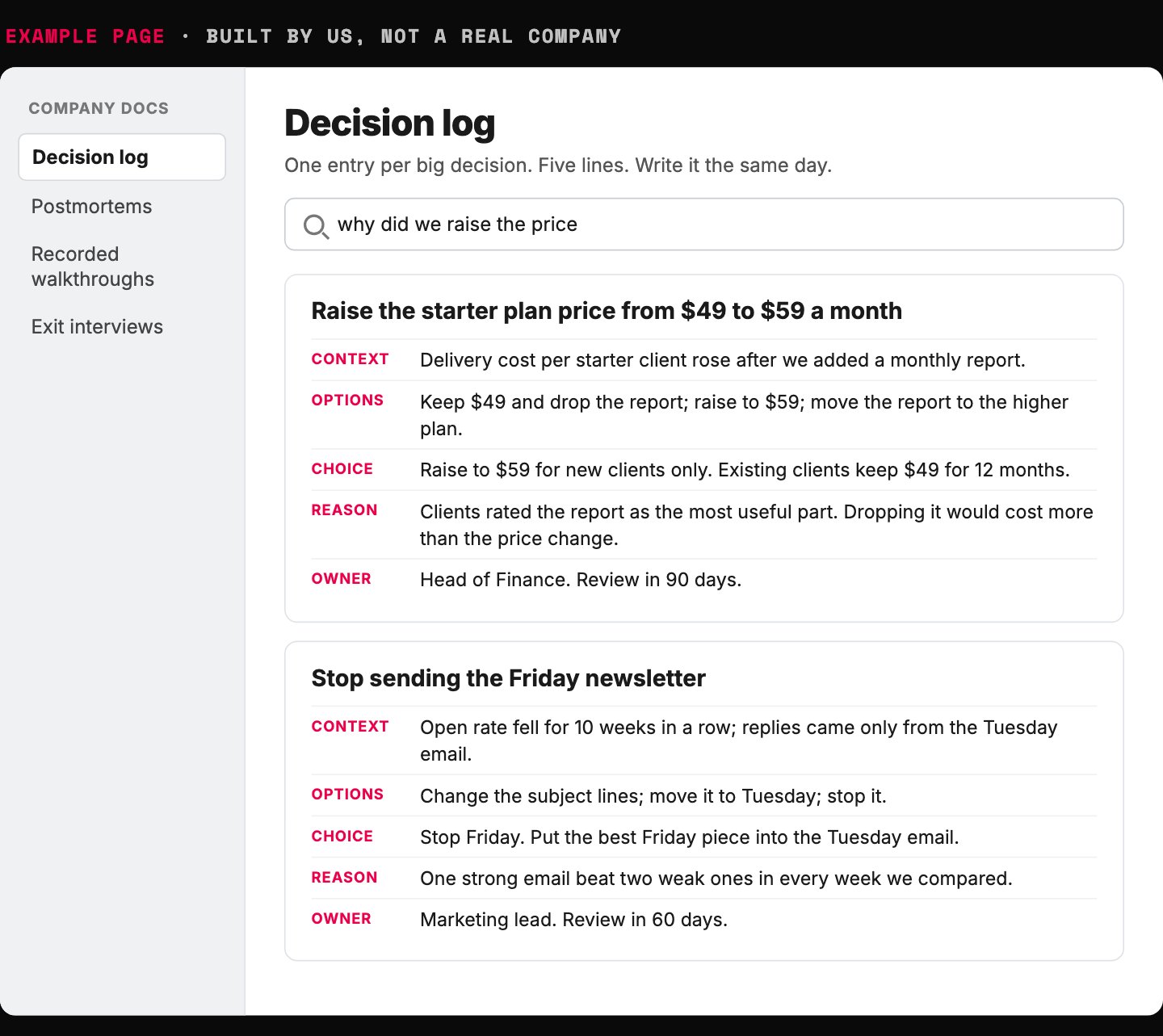
- Five lines, written the same day, while the reasons are fresh.
- Record the options you rejected. They are what people forget.
- The reason is the line a new hire needs most.
- Every decision has an owner and a review date.
- With a search layer on top, the log answers plain questions.
Example page built for this article with a made-up company, 2026-10-18. Both decisions are invented examples.
Plan your first build with AI: the copy-paste prompt
Paste the prompt below into your preferred AI. It asks about your task and your tools, one question at a time.
Then it writes your source list, your permission check and your 20-question test. It never invents facts about your tools. It asks you.
Once the search works, the next layer is the agent harness that runs the task.
Paste into your preferred AI. It asks about your task and your tools, then writes your source list, permission check and 20-question test.
Act as a data and AI planner. Use the Retrieval-First Rule to get AI answering from my existing tools without a data overhaul.

Ask me one question at a time, with the example:
1. Which one task should AI help with first? (Example: summarize sales calls and draft the follow-up)
2. Which tools hold the facts it needs? (Example: call recorder, CRM)
3. Who owns each tool, and who may see what? (Example: reps see only their own deals)
4. How fresh must the data be? (Example: same day)
5. Twenty real questions for this task, each with the page that answers it. (Example: "What did the client ask for last call?" -> that call's transcript)

Rules:
- Never invent facts about my tools, owners, permissions or data. Ask me.
- Connect only the sources this task needs. Every other tool goes on a "later" list.
- Archive old files in one folder named Archive plus today's date. No cleanup project.
- Give each live project the same name in every tool.
- Start with keyword search. Add meaning search only if the test fails on questions worded differently from the page.
- Search checks the source tool's permissions on every question, not once at setup.
- Run the 20 questions weekly. If the right page is missing from the top 5 on more than 2 of 20, fix search before adding a source.
- Never suggest training a custom model to teach it facts. Search supplies facts.
- If you can browse, check each tool's current help pages for search and permission features, and tell me what you checked.

Output:
Task:
Source list: tool | owner | holds | who may see it | freshness | fix needed
Later list:
Permission check:
Search plan:
20-question test: question | right page
Capture habits to start:
Next three actions: 1. 2. 3.
What to do this week
1. Make the dated Archive folder. Give each live project one name in every tool.
2. Pick one task and write its one-page source list.
3. Write your 20 test questions before you buy any search tool.
Remember the pricing sheet from the start? With one name per project and a search that checks permissions, finding it takes one question. You get the current version, not two guesses.
If the hard part turns out to be the process, not the data, read why most AI problems are operations problems. If it is the bill, read how to control AI token spend.
Your data does not need a new house. It needs a good front door.

Filip Kovacevic is the founder of Anar Agency in Phoenix. He spent five years running SEO, Meta ads, email, and content for medical practices across the United States, and now does the same work for healthcare, home-service, legal, and professional-service businesses, alongside AI implementation. More from Filip →
Talk it through in 15 minutes
Bring one question from this article. We will tell you what we would do, whether or not you hire us.
Book a 15-Min Chat →