How to Write AI Agent Skills That Follow Your Rules

An AI agent skill is a short written procedure your AI reads when a matching task comes up. It has four parts: when to use it, where the facts are, the steps, and the check. Keep the facts in one folder of files.
Write a skill for every task you repeat.
AI agent skills: write it down once, not every morning
Between 2007 and 2008, eight hospitals tested one page before every operation. It had nineteen items.
Confirm the patient's name. Confirm the site of the surgery. Check for allergies.
These were experienced teams. Nothing on the page was news to them. Not one item.
Deaths fell from 1.5 percent of operations to 0.8 percent. Major complications fell from 11 percent to 7 percent.
The surgeons did not get better at surgery. The page made sure that what they already knew got done every time.
Your AI has the same problem, only worse. It is fast and well read. It also forgets your business every morning.
So you paste the brand rules again. You explain the client's banned phrase again. One day you forget one line, and that is the line that goes out.
This guide fixes that with AI agent skills. A skill is a written procedure your AI reads when the task comes up. You will write your first one this week.
It is for owners and marketers who open an AI assistant every day. Use AI twice a month? A saved prompt is enough for you.

One page of nineteen items cut surgery deaths almost in half
Eight hospitals, before and after the WHO Surgical Safety Checklist
- Items on the page 19
- Deaths after the page, down from 1.5% 0.8
- Major complications after, down from 11% 7
Source: Haynes and others (2009), 3,733 patients before and 3,955 after, as summarized in Wikipedia, WHO Surgical Safety Checklist.
What is an AI agent skill?
An AI agent skill is a written procedure that an AI loads when a matching task comes up. It is a plain text file. You can also call it by name.
One AI tool maker's guide to skills gives a simple trigger for writing one. Write a skill when you keep pasting the same instructions or checklist into the chat.
A good skill has four parts. The first two are when to use it and where the facts are.
The last two are the steps and the check. Most of the value sits in the second part and the fourth.
How is that different from a prompt? A prompt is typed, used and gone. A skill is kept, fixed after each miss, and loaded without anyone remembering to paste it.
Skills are also an open format: one folder with one instruction file inside. A growing number of AI tools can read the same folder.
Our take: most AI advice sells you better prompts. A better prompt helps once. A written procedure helps every day.
Four parts make a skill; the facts and the check do most of the work
- 1. When to use it One or two lines, in the words people use when they ask for the task.
- 2. Where the facts are File names in your facts folder. Read them first.
- 3. The steps Numbered steps for repeated work. Goal and limits for new work.
- 4. The check What to open, what to look for, what proof to show.
The Skill Library, as set out in this guide.
A prompt helps once; a skill helps every time the task comes back
| A prompt | A skill |
|---|---|
| Typed into the chat | Saved as a file |
| Used once, then gone | Kept and fixed after each miss |
| You remember to paste it | Loads when the task comes up |
| Facts copied in every time | Points to facts kept in one place |
| No proof step | Ends with a check |
Our comparison.
A skill is one folder with one instruction file, loaded only when a task matches
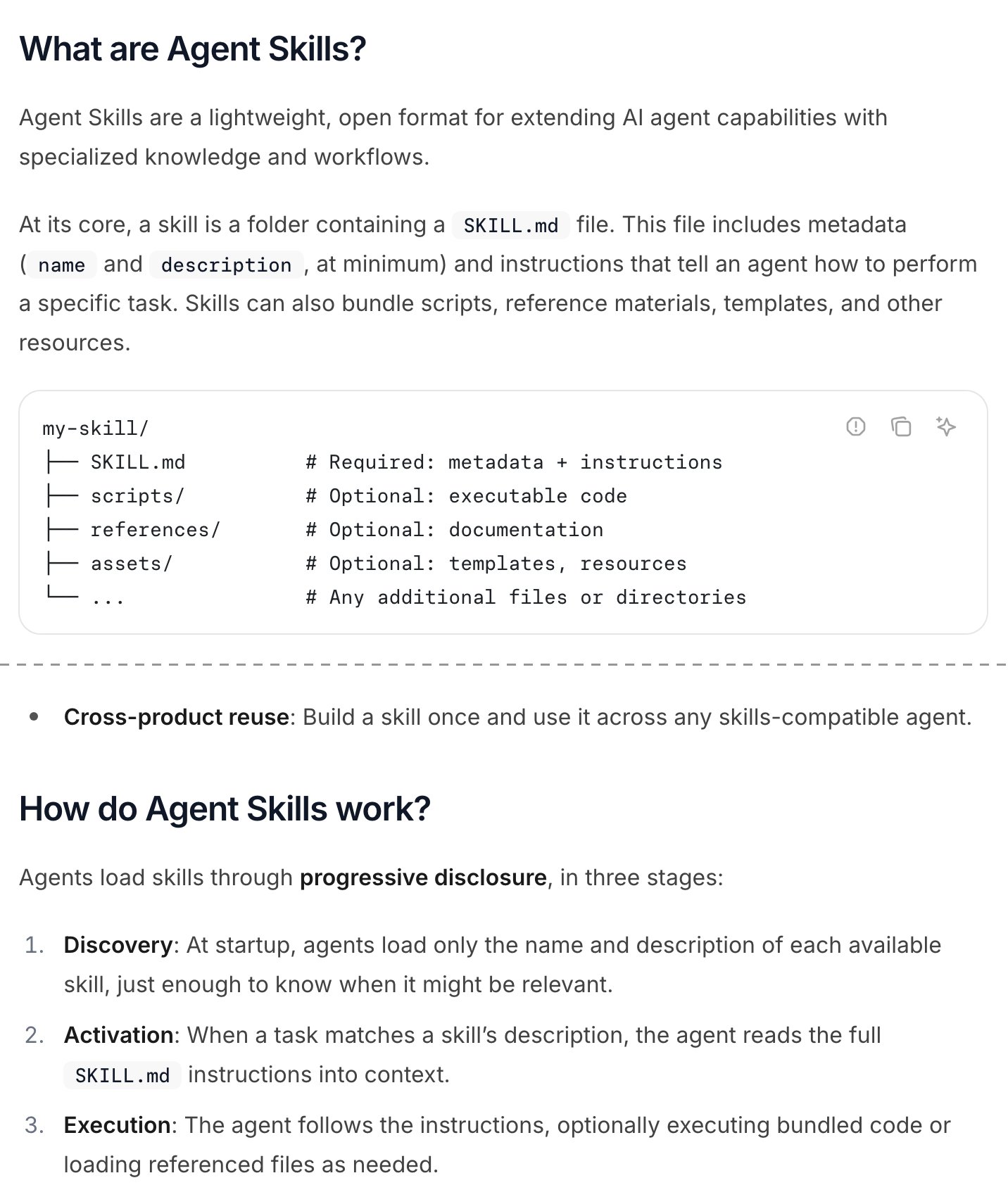
- A skill is one folder with one instruction file.
- Reference files can sit next to the steps. Your facts can live here or in one shared folder.
- At the start, the AI reads only each skill's name and description.
- The full file loads only when a task matches.
- An open format, so other AI tools can read the same folder.
Screenshot of the Agent Skills overview page at agentskills.io, taken 2026-10-17
The Skill Library keeps what your business knows in one folder of files and gives every repeated task a short written procedure, called a skill. Each skill has four parts: when to use it, where the facts are, the steps, and the check. Read the folder first.
Be loose on new work and strict on repeated work. Rank the rules, test skills on every new model, and prune monthly.
Keep the facts in one folder and point every skill at it
The facts do not go inside the skill. They live in a folder of plain files: client rules, the brand guide, past winners, call transcripts.
The skill points to those files by name. And it says to read them before writing a word.
Engineers call this a single source of truth. Each fact lives in one place, and everything else points to it.
Change a client's rule once, and every task after that uses the new rule. Once, not fifty times.
We put one line at the top of every skill: "Read the facts folder first. If the answer is not there, look elsewhere, and tell me where you looked."
That order matters. With no folder, an AI writes what an average website would say. Your copy then sounds like everyone else's.
Why not trust a smart person's memory instead? Teams measure that risk with the bus factor. It counts how many people could vanish before nobody knows how a task works.
In a small business, the number is often one. If that one person is out sick for a week, the work stops.
Some of what you know is tacit knowledge: things you do without ever saying them. Writing a skill forces you to say them, once.
A folder works for spoken knowledge too. For example, one founder's content team saved every interview transcript in one folder. When someone asked for clips on raising money, the AI pointed straight to interviews seven and twelve.
That folder is the start of the growth repo every marketing team should build. A few files, and one rule about reading them first.
The facts folder holds what your AI cannot guess
| File | What it holds | Example line |
|---|---|---|
| client-rules | Legal and compliance rules | Never promise a result in ad copy. |
| brand-guide | Voice, words, colors | No exclamation points. |
| past-winners | Ads, emails and pages that worked | The five best subject lines |
| transcripts | Calls and interviews, word for word | The customer's own words for the problem |
| lessons | Rules from work that went wrong | Check every link on the live page. |
Example folder. File names are ours; use your own.
The AI reads your folder first and says where else it looked
- 1. The facts folder Every skill starts here.
- 2. Elsewhere, only if missing General knowledge or the web fills the gap.
- 3. Say the source The AI names the file or the outside source it used.
The first line we put in every skill.
One skill, four parts, pointed at the facts folder
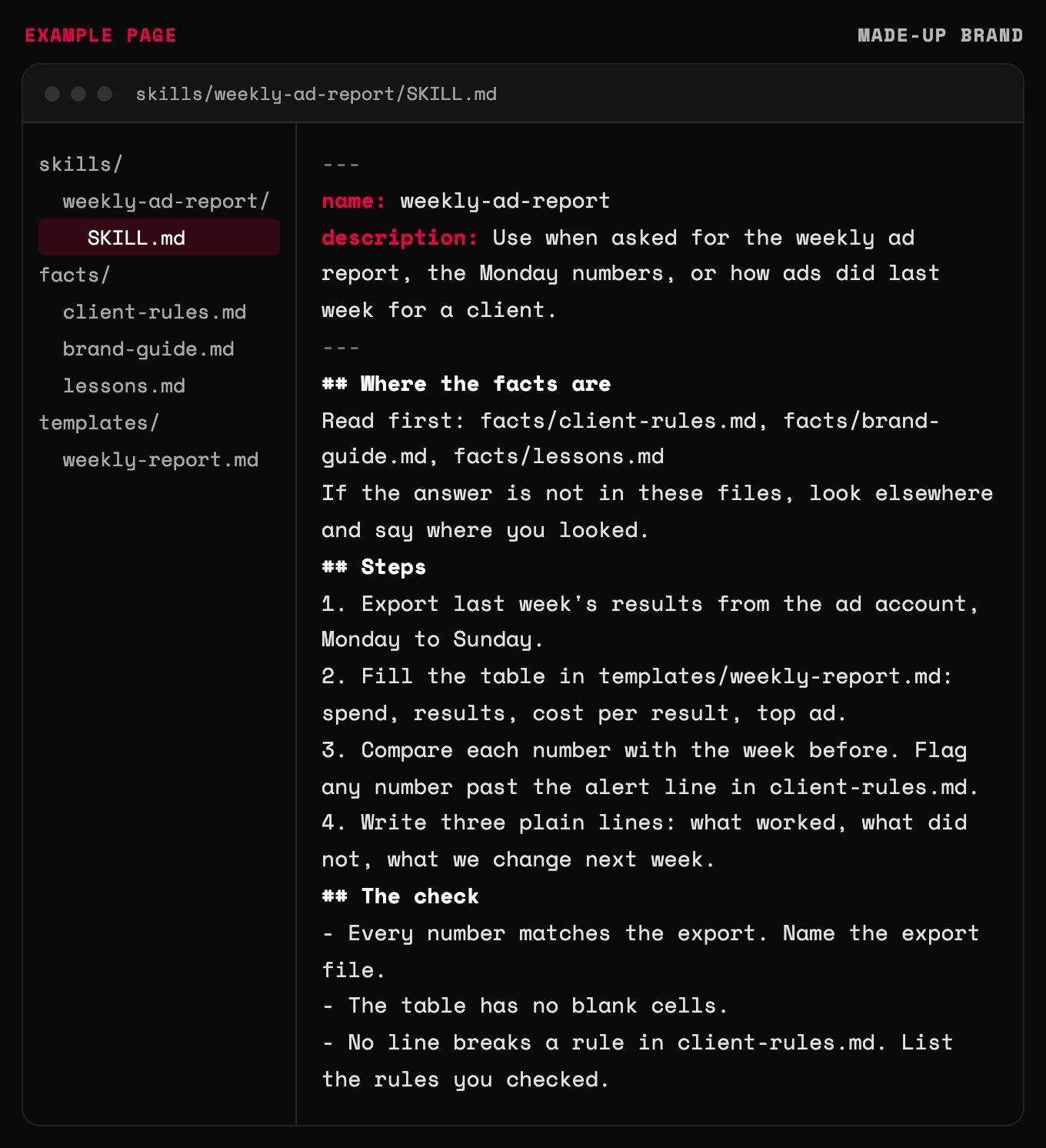
- When to use it: written in the words people use to ask.
- Where the facts are: the skill points to files and never copies them in.
- Facts missing? The AI must say where else it looked.
- Strict steps, because every Monday report must match.
- The check names the proof, never just make sure it works.
Example page built for this article with a made-up brand
Which tasks deserve a skill? The ones you repeat
Only repeated tasks get a skill. A one-off task gets a good prompt and a closed tab.
Our rule: the first time, you explore. The second time, you notice. The third time, it becomes a file.
Before you write it, ask one question. What would I do if I did this by hand?
AI does what a person can do, faster and while you sleep. If you cannot do the task by hand, the skill will just repeat a guess, faster.
So build in this order. First, research how the best people do the task. Then do it by hand a few times, using your own judgment about what the research says.
Then write the skill. The by-hand runs show you the steps, the traps and what done looks like.
Last, ask whether the task helps you win customers at all. Building skills is fun, and that fun is the trap.
You can end a day with ten new tools and zero new customers. Build for the work that brings in buyers first. Fix the slow parts once you have more buyers than you can serve.
Not sure which tasks qualify? Start with our list of AI marketing workflows worth automating.
By the third repeat, the task should be a file
- Explore First time Do it with a prompt. Learn what good looks like.
- Notice Second time You are explaining the same things again. Write them down.
- Write the skill Third time Four parts, pointed at the facts folder.
Our rule for when a task earns a skill.
Repeat it often and need the same result? That task gets a strict skill
- A short checklist Write the steps down. Skip the automation.
- Strict skill Numbered steps, facts folder, a hard check.
- A good prompt One-off and open. No skill needed.
- Loose skill Goal, facts and limits. Let the AI pick the method.
Our decision grid.
Be loose on new work and strict on repeated work
How tight should a skill be? It depends on whether the job is new or repeated.
New work gets loose instructions. Give the goal and the facts. Let the AI pick the method, then push back for a few rounds.
Repeated work gets strict steps. The weekly report, the image export, the page launch. Spell out every step in order, with the check.
If you mix them up, each one fails in its own way. Loose steps on a repeated job give a different result every run.
For example, one video maker ran a fixed editing process without a step-by-step skill. The AI came at it from a new angle each time. Every output came out different.
Strict steps on new work fail the other way. You get a tidy, dull answer to a question you have not understood yet.
Our line: if two runs should match, write steps. If they should surprise you, write the goal.
Writing the goal well is its own skill. Our guide on writing a job spec for an AI agent covers it.
Loose steps on repeated work give a new result every run
| Loose (new work) | Strict (repeated work) |
|---|---|
| Give the goal and the facts | Give every step, in order |
| The AI picks the method | The AI follows the method |
| Push back for a few rounds | Check against one standard |
| You want a surprise | You want the same result every run |
| Wrong use: drift on repeated jobs | Wrong use: dull answers on new jobs |
Our comparison.
Turn an expert's books into a filter skill
A filter skill checks finished work against one expert's ideas. It is the most useful skill most businesses never write.
Here is the method. Turn the expert's books or notes into text files in your facts folder.
Tell your AI that these files are the truth on this topic. Ask it to build a filter you can run copy through.
Give it few limits at first. Run real copy through it, argue with the result, and repeat a few rounds.
For example, one copywriter built a filter from a few books on persuasion language. It found holes in his copy that he had never thought of, and that his hired copywriter had missed.
A second example: one marketer kept a separate notebook for each coach he trusted. The AI checked a website against each notebook in turn and listed what was missing.
Why bother? Without a filter, AI hands you generic hype. With one, it hands you your experts' standards, on demand.
Where do the source files come from? Our system for collecting ideas instead of inventing them fills the folder as you work.
Five steps turn an expert's books into a filter for your copy
- 1. Gather the source The expert's books, notes or talks, as text files in your facts folder.
- 2. Name it the truth Tell your AI these files are the standard for this topic.
- 3. Ask for a filter A skill that checks any copy against those files and lists the gaps.
- 4. Argue a few rounds Run real copy through it. Push back where it is wrong.
- 5. Run it before shipping Every sales page, email and ad goes through it first.
The filter-skill method, as set out in this guide.
Put the check inside the skill
Every skill ends with a check. Not "make sure it works", but what to open, what to look for and what to show as proof.
A check that only says "make sure it works" is bullshit. It asks the AI to grade its own homework. It will give itself an A.
One of our rules reads like this. No page is called live until every link on it has been checked on the live site.
The makers of these tools agree. Their best practices guide puts giving the AI a way to check its own work near the top.
Some work needs a person in the check. Engineers call that human in the loop: a person approves before anything goes out.
We use a three-rung trust ladder for anything public. First, the AI drafts and a person sends. Then the AI sends and a person spot-checks.
Only after many clean runs does it send alone. Letting it post replies on day one is how a brand gets known for sloppy, robotic posts.
Rank your rules too. When two instructions disagree, which one wins? Ours puts client legal rules first, brand style second and speed last.
Someone has to own those rules. We cover that in who owns AI in a business.
An AI earns the right to send alone, one rung at a time
- AI drafts, a person sends The person edits every draft before it goes out.
- AI sends, a person spot-checks After many clean drafts. Every send is logged.
- AI sends alone Only after many clean runs. The check still runs and is logged.
Our rule for anything public: replies, posts, emails.
When two rules disagree, the higher rule wins
| Rank | Rule | Example |
|---|---|---|
| 1 | Client legal and compliance rules | No result promises in health ads |
| 2 | Brand style | The client's words, colors and tone |
| 3 | Speed | Ship today, only if 1 and 2 pass |
Our rule order, written into every skill.
Why does the same skill work differently on a new model?
The same skill can behave differently on a different AI model. Each model reads instructions in its own way.
So treat a new model like a new hire. Run your main skills on it, compare the results, and fix the instructions that drifted.
The fastest fix is to ask the AI itself. Tell it what the skill got wrong. Then have it rewrite the skill.
Should you commit to one AI company, or stay free to move? People who build with these tools disagree.
If you commit, you stop rebuilding your process every time a new tool gets popular. If you stay free to move, an outage or a price hike at one company never stops your work. Being stuck with one supplier is called vendor lock-in.
Our decision rule: pick one tool for daily work and stop shopping. Keep every fact in plain text files, so you can move the whole library to a new tool in an afternoon.
Keep a backup tool that can read the same folder. Then a bad day at one company is not a bad day for you.
One more honest line. Skills are working notes, not finished software. Call them works in progress when a client sees them.
The setup that runs skills, checks and tools together has a name. Read what an agent harness is.
A new model means one more test round, not a rebuild
- New model Run your main skills on it.
- Compare Check results against the last good runs.
- Ask for a fix Tell the AI what drifted. Let it rewrite the skill.
- Save Keep the new version with a date.
Our upkeep cycle.
Commit to one tool for daily work; keep the facts portable
| Choice | What you gain | What it costs | Our rule |
|---|---|---|---|
| Commit to one AI company | No rebuild every time a tool trends | An outage or price change stops you | One tool for daily work |
| Stay free to move | A backup when one tool is down | Time spent testing and switching | Plain files plus a backup tool |
Both views are held by people who build with these tools. The rule is ours.
Build a library you can trust, and prune it every month
A skill library is only as good as its last update. Most libraries die from neglect, not from bad writing.
How to build a skill library nobody trusts, in four easy steps:
1. Write fifty skills in one weekend. Use none of them twice.
2. Paste the brand guide into every skill. Now one rule change means fifty edits.
3. Skip the check. Believe the AI when it says done.
4. Never delete anything. Call the pile a knowledge base.
Do the opposite. Turn every lesson into a rule the same day. A lesson that is not written down has to be learned again, the hard way.
Once a month, cut what is stale. For each line, ask whether removing it would cause a mistake. That test comes from the same guide.
Long files hurt. When a skill gets bloated, the AI starts skipping the rules that matter.
None of this is new. It is a standard operating procedure, the kind checklist books have praised for years. Only the reader changed, from a new hire to an AI.
We run our own work this way. Here is how we run an agency as marketing engineers.
Write your first skill with AI: the copy-paste prompt
Paste the prompt below into your preferred AI. It asks about one task you repeat. Then it writes the skill with all four parts.
It never makes up a rule or a fact. Anything you leave out gets marked TO CONFIRM, so you can fill it in.
Want a second pair of eyes? Send us your first skill.
Paste into your preferred AI. It asks about one task you repeat, then writes the skill in four parts with a test plan.
Act as an operations writer. Help me turn one task I repeat into an AI agent skill.

Ask me one question at a time, with the example:
1. What task do you repeat? (Example: the weekly ad report for one client)
2. How often, and must every run match? (Example: every Monday; yes, same format)
3. Where are the facts? List the files or folders. (Example: client-rules, brand-guide, last month's report)
4. What does done look like, and what proof should be shown? (Example: every number matches the ad account export)
5. Which rule wins when two disagree? (Example: client legal rules, then brand style, then speed)

Rules:
- Never invent a fact, number or rule. If I have not given it, write TO CONFIRM.
- Facts stay in the files. The skill points to them by name and never copies them in.
- First step: read the facts files first. If the answer is not there, look elsewhere and say where.
- If runs must match, write numbered steps. If the task is new or creative, write only the goal, the facts and the limits.
- The check names what to open, what to look for and what proof to show. Never "make sure it works".
- Anything public: the AI drafts, a person approves and sends, until I say otherwise.
- Keep the skill under one page.
- If you can browse, check my AI tool's current help page for the skill file format and tell me if it differs.

Output, in this format:
Name: [short-name]
When to use it: [1 or 2 lines, in the words I use to ask]
Where the facts are: [file list]
Steps: [numbered steps, or the goal and limits]
The check: [what to open, what to look for, proof to show]
Rule order: [ranked]
TO CONFIRM: [list]
Test plan: run it on the next three real tasks. After each miss, tell me which line to change.
Your first skill, this week
1. Pick the task you explained to your AI twice this week.
2. Make one facts folder. Put the rules for that task in it, one topic per file.
3. Run the prompt and save the skill. Use it on the next three runs, and fix it after each miss.
The hospitals did not hire better surgeons. They wrote down what good surgeons already knew.
Do the same for your business. Your AI forgets every morning. Your files never do.

Filip Kovacevic is the founder of Anar Agency in Phoenix. He spent five years running SEO, Meta ads, email, and content for medical practices across the United States, and now does the same work for healthcare, home-service, legal, and professional-service businesses, alongside AI implementation. More from Filip →
Talk it through in 15 minutes
Bring one question from this article. We will tell you what we would do, whether or not you hire us.
Book a 15-Min Chat →