AI Cost Management: Control Token Spend Without Rationing Your Team
Control AI spend by pricing each job the AI does, not by capping the monthly bill. Work out what one task costs in tokens, the chunks of text the AI reads and writes. Cut that cost with reused instructions, bulk runs and smaller models.
Budget a range, and stop runaway jobs instead of people.
AI cost management starts with cost per task, not the monthly bill
The finance lead forwards the AI invoice with one line. "Can we cap this?" Nobody in the thread can say what the money bought.
So the cap goes in. Usage drops. So does the work the tools were doing.
That is the default move in AI cost management. It watches the wrong number. A total cannot tell you which job paid for itself.
We manage AI spend the way a factory manages materials. Every token is a cost of goods, charged to the job that used it. A token is a chunk of text, about three quarters of a word.
The method is called the Token P&L. One line per AI workflow, with its cost per task and its value per task. Once those two numbers exist, the cap argument ends.

Read as overhead, the AI bill starts a fight; read as cost of goods, it shows a margin
| Overhead | Cost of goods (Token P&L) |
|---|---|
| One total nobody owns | One line per workflow, owned by a team |
| The question: can we cap it? | The question: which line pays for itself? |
| The lever: ration usage | The levers: cost per task and value per task |
| The review ends in a fight | The review ends in three moves |
Our comparison.
Tokens are a cost of goods: charge each one to a workflow
Cost of goods is what you spend to make each thing you sell. Steel for a car plant. Minutes for a call center.
Overhead is one big bill nobody owns. Read AI spend as overhead and every review turns into a fight about the total.
Read it as cost of goods and it becomes plain unit economics. For example, one workflow costs 2 cents per support reply and saves a few minutes of a person. Another costs $30 per report and saves an afternoon.
Now you are arguing about a margin. You already know how to manage margins.
Metering comes first. Metering means tagging every AI call with the workflow and team that made it. Split keys by project if you have nothing else.
A gateway does it best: one internal doorway that every AI call passes through, with the keys, limits and logs in one place. We cover it in what an agent harness is.
Can't see spend per workflow? Then you do not have a cost problem yet. You have a metering problem, and that one is fixable in a week.
Example: three workflows pay for themselves; the fourth has 90 days to prove it
| Workflow | Tasks a month | Cost per task | Value per task | Verdict |
|---|---|---|---|---|
| Support replies | 20,000 | 1.9 cents | $2.67 | Keep |
| Sales-call summaries | 1,200 | $1.10 | $14 | Keep |
| Weekly market report | 4 | $30 | $45 | Keep, watch |
| Open-ended research bot | 900 | $22 | Not measured | Pilot: 90 days |
Illustrative numbers, not client data. Support-reply cost from the worked example in this guide; value = 4 minutes of a $40-an-hour agent.
The Token P&L is one page, reviewed monthly: each AI workflow with tasks, cost per task (every call counted, review time included), value per task (displaced cost, throughput or quality change against a baseline), margin and trend. Budgets are ranges, not single numbers. Caps catch failures, never people.
Workflows without a value line are pilots with 90 days to earn one.
How do you calculate the cost of one AI task?
Cost per task is what one finished job costs, counting every call it took. The bill hides this number. You have to build it.
The formula has four lines. Input tokens times the input price, plus output tokens times the output price. Multiply by the calls one task really makes, then add the human review minutes.
Why does output cost more? The AI writes one token at a time, and writing is the slow part. Chip Huyen's AI Engineering puts an output token at about two to four times the price of an input token across providers.
The trap is the calls you forgot. Grading is the big one.
Add a second AI call to check each answer and you roughly double your calls. Grade three qualities with three separate checks and you make four calls per task.
Prompt-testing tools hide calls too. Thirty test examples across ten prompt versions is 300 calls before anyone ships anything.
Search adds its own line. Huyen reports that the database behind AI search often costs a fifth to half as much as the AI itself.
For example, picture a support-reply workflow. Each call reads 3,000 tokens and writes 400. Use made-up round prices: $2 per million input tokens and $8 per million output.
One call costs about 0.92 cents. Add a grading call of the same size and a retry on one task in ten.
The real cost is about 1.9 cents per task. That is double what the draft alone suggests. The draft is the cheap part.
Cost per task in four lines
- 1. Input Input tokens per call times the input price.
- 2. Output Output tokens per call times the output price. Usually the pricier side.
- 3. Calls Multiply by every call one task makes: draft, grading, retries, tool calls, search.
- 4. People Add the human review minutes, priced at what those minutes cost.
The Token P&L cost formula.
Example: a grading call doubled the cost of every support reply
Cents per task at 3,000 input and 400 output tokens per call, using made-up prices of $2 and $8 per million tokens
- Draft call 0.92
- Grading call 0.92
- Retries (1 task in 10) 0.09
- Real cost per task 1.93
Worked example; the math is ours. Prices are round placeholders, not any provider's price.
Five levers that cut cost per task without cutting output
Cutting cost per task is an engineering job, not a policy. Five levers do most of the work. None of them asks anyone to use AI less.
Reuse the repeated part. Most prompts open with the same instructions and reference text every time. Prompt caching stores that shared opening so the provider does not reprocess it at full price.
The volume adds up fast. A 1,000-token set of instructions sent a million times a day is about a billion repeated tokens a day.
Caching only works if the repeated part comes first and stays word-for-word the same. Put fixed instructions at the top. Put the changing details at the bottom.
Run what can wait in bulk. Batch processing sends jobs that can wait hours, at a discount. Reports, tagging old records, newsletters and reprocessing old data rarely need an answer in two seconds.
Paying full price for speed nobody is waiting on is a choice. A bad one.
Route easy work to small models. A router is a cheap first step that sorts each request and sends the simple ones to a cheaper model. One routing study, RouteLLM, cut costs by more than half in some tests without hurting answer quality.
John Berryman and Albert Ziegler, in Prompt Engineering for LLMs, give the rule we use. Pick the smallest model that does the job reliably. Routing is easier when you are not locked to one vendor, as in staying model-agnostic.
Make answers shorter. Output is the expensive side, so ask for the answer and skip the extras. A stop sequence is a marker that ends the answer on the provider's side, so you stop paying when the useful part is done.
Greetings, recaps and repeated headers in every answer are tokens you pay for and then delete.
Split the mega-prompt. Prompts grow every time someone adds an edge case.
Huyen describes a support prompt that passed 1,500 tokens. Split into smaller task prompts, it worked better and cost less.
Five levers. Zero rationing.
Five ways to cut cost per task, and when each one does not fit
| Lever | What it cuts | Best for | Skip it when |
|---|---|---|---|
| Cache the repeated opening | Reprocessing the same instructions and documents | Long fixed instructions; one document many people ask about | The opening changes on every call |
| Batch what can wait | Paying for instant answers nobody waits on | Reports, tagging, newsletters, reprocessing old data | A person is waiting for the answer |
| Route easy work down | Big-model prices on simple requests | Sorting, short replies, classifying | You have no test set to prove the small model holds up |
| Shorter answers, stop sequences | Output tokens, the pricier side | Structured answers with a clear end | The answer needs its reasoning |
| Split the mega-prompt | Instructions every request carries but few need | Prompts that grew past a page | One short prompt already works |
Our summary of levers described in Huyen, AI Engineering, and Berryman and Ziegler, Prompt Engineering for LLMs.
Caching a long document cut cost 90 percent and the first-word wait by 79 percent
Chat with a book: a 100,000-token cached prompt
- Lower cost per request 90
- Wait for the first word, no cache 11.5
- Wait for the first word, cached 2.4
A model provider's published figures (2024), as reported in Chip Huyen, AI Engineering (O'Reilly), Table 9-3.
Why your AI budget should be a range, not one number
Most AI budgets are built the same way. Typical tasks times typical tokens times today's price. That number is wrong in a known direction: too low.
Why too low? Token costs are lopsided. Most tasks are short, but long documents, retries and loops make a long tail.
So the most likely month costs less than the average month.
Douglas Hubbard and Richard Seiersen's How to Measure Anything in Cybersecurity Risk shows what that does to a plan. In one worked example, budgeting at the sum of each line's most likely cost left about a 97 percent chance of going over.
A guest essay in the same book states the rule: a plan built on averages is wrong on average. It is called the flaw of averages.
So budget a range. For each workflow, give a 90 percent range for three inputs: tasks per month, tokens per task and price per token. A 90 percent range is a low and a high you are 90 percent sure the real number falls between.
Do not multiply all the lows together and all the highs together. That only works if every input moves in lockstep, and they never do. The range comes out far too wide.
Simulate instead. A Monte Carlo simulation draws each input at random from its range thousands of times, multiplies them, and sorts the results. Your preferred AI can run it if it can run code.
Read two numbers off the result. The middle is your plan. The 95th percentile, the top of your 90 percent range, is the line finance cares about: a 1 in 20 chance of spending more.
Then check the range against your last three months. If it calls last quarter nearly impossible, the range is wrong. Last quarter happened.
Budgeting at the most likely costs left a 97 percent chance of going over
A three-year cost plan from a risk book, used here to show the math, not an AI budget
- Chance of overrun at the sum of most likely costs 97
- Sum of the most likely costs 4.6
- Simulated average cost 5.1
Worked example with illustrative values in Hubbard and Seiersen, How to Measure Anything in Cybersecurity Risk, 2nd ed. (Wiley).
Build an AI budget range in five steps
- 1. Range each input Tasks per month, tokens per task, price per token: a low and a high you are 90 percent sure of.
- 2. Do not multiply the ends Lows times lows and highs times highs gives a range far too wide.
- 3. Simulate Draw every input at random 10,000 times, multiply, sort.
- 4. Read two numbers The middle is the plan. The 95th percentile is the alert line.
- 5. Check history If the range calls last quarter impossible, fix the range.
Our method, built on the range and simulation approach in How to Measure Anything in Cybersecurity Risk.
A budget range gives a plan, an alert line and the odds of going over
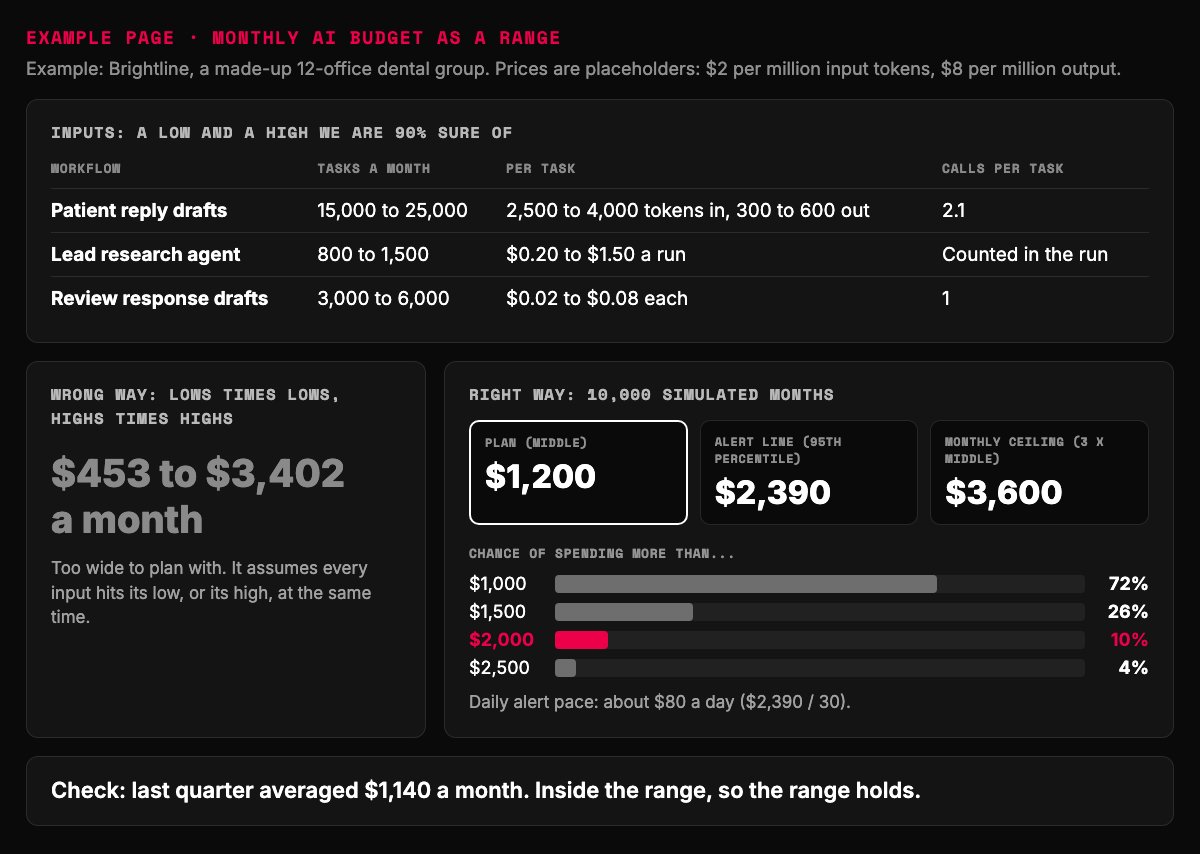
- Every input is a range, not a guess at one number.
- Multiplying the ends gives a spread too wide to use.
- The middle is the budget you plan around.
- Finance gets odds in plain words: a 1 in 10 chance of passing $2,000.
- Last step: check the range against real months.
Example page built for this article with a made-up brand. Results from a 10,000-draw simulation of the page's inputs, run 2026-10-18.
Cap the failure modes, not the people
Nobody loses sleep over high usage. People lose sleep over runaway usage.
What does runaway look like? A looping agent. A batch job pointed at the wrong folder.
Or a prompt hijacked by hidden text on a web page, burning money on garbage.
Agents are the classic case. Huyen notes that an early complaint about agents was that they were good mainly for burning through API credits.
So we set four tripwires. None of them rations real work.
A per-run ceiling. Any single run that costs five times a normal run stops and asks a person. Runaway jobs show up in minutes, not months.
A rate alarm. Alert when a workflow's daily spend runs faster than its 95th percentile allows. You catch the loop on day one, not on the invoice.
A workflow ceiling. A monthly hard stop at three times the middle of the range. A busy month never trips it.
Generous people limits. Set them so high that nobody doing real work ever meets one. Their job is catching a stolen key, as in guardrails for unofficial AI use.
Limits catch malfunctions. They never ration a tool that pays for itself in labor. Defend that line in the budget meeting.
How to make an AI bill worse in four easy steps:
1. Cap every person at a round number. Watch your best people hit it first.
2. Leave the loop alarm for later. Later arrives on the invoice.
3. Grade every answer with the priciest model, three separate times.
4. Call the result savings. Put it in a slide and hope like hell nobody asks what work stopped.
Four tripwires catch runaway spend without rationing anyone
| Tripwire | What it catches | Our starting setting |
|---|---|---|
| Per-run ceiling | Loops, stuck agents, hijacked prompts | Stop and ask a person at 5 times a normal run |
| Rate alarm | A bad job on day one | Alert when daily pace passes the 95th percentile |
| Workflow ceiling | A broken workflow nobody noticed | Hard stop at 3 times the middle of the range |
| People limits | A stolen or shared key | So high that real work never meets them |
Our starting settings. Tune them to your own range after one month.
Will falling AI prices fix the bill on their own?
No. Prices per token fall fast, and bills still go up.
Stanford's AI Index measured the price of a fixed level of model quality falling more than 280 times in about 18 months. Then Menlo Ventures measured enterprise spend on model APIs more than doubling in six months, from $3.5 billion to $8.4 billion.
Economists have a name for this. When something useful gets cheaper, people find more uses for it.
There is a second reason. The cheap price is for yesterday's quality. Teams move up to the newest model, and the newest model is not the cheap one.
Berryman and Ziegler turn that into a sensible habit. Prototype on a slightly bigger model than you can afford, because older models get cheaper by launch day. Once it works, route down.
So waiting for prices to drop is not a plan. It is a hope. The price will drop, and your volume will rise to meet it.
It is the same reason we manage ad spend by cost per lead instead of a monthly ceiling, as in sizing a Google Ads budget.
The price of fixed AI quality fell 280-fold, and enterprise spend still doubled
- Drop in price for fixed model quality, Nov 2022 to Oct 2024 280
- Enterprise spend on model APIs, Nov 2024 3.5
- The same spend, mid-2025 8.4
Stanford HAI, AI Index 2025; Menlo Ventures, 2025 Mid-Year LLM Market Update.
The monthly Token P&L review: one page, twenty minutes
The Token P&L is a one-page monthly report with one line per AI workflow. Each line shows tasks, cost per task, value per task, margin and trend. It turns "AI is expensive" into line items.
Value comes three ways, most rigorous first. Displaced cost: hours saved times what those hours cost. Throughput: the same team finishing more units.
Quality change: fewer errors or faster turnaround, against a baseline measured before the AI arrived. No baseline, no price. No price, no decision.
We go deeper on measuring quality in how to evaluate an AI agent. Prompt Engineering for LLMs adds one cheap habit: log token use and wait time in every test you run.
What else goes on the cost line? The build, the testing and, above all, human review time.
For example, a workflow that saves $10,000 a month in labor but eats $8,000 of senior review is a thin bet. Its token bill will never tell you that.
Then make three moves. Fix or kill the lines that lose money. Feed the winners, and dig into anything that jumped.
Workflows with no value line are pilots. Pilots get 90 days to earn one. Many stall because the process around them is broken, which we cover in most AI problems are operations problems.
Value per task works like a max allowable cost per acquisition. Know what one unit is worth, and the spend question answers itself.
Twenty minutes a month: meter, price, value, move
- Meter Every call tagged by workflow and team.
- Price Cost per task, every call and review minute in.
- Value Displaced cost, throughput or quality change.
- Move Fix or kill, feed winners, dig into jumps.
The Token P&L review cycle.
Three ways to price what an AI task is worth, most rigorous first
| Measure | How to count it | What you need first |
|---|---|---|
| Displaced cost | Hours saved times what an hour costs | A time log from before the AI |
| Throughput | Finished units per person per week | A unit everyone agrees on |
| Quality change | Errors or turnaround against the old baseline | A baseline measured before the AI |
Our method.
The biggest line on the bill can be the one with no value line
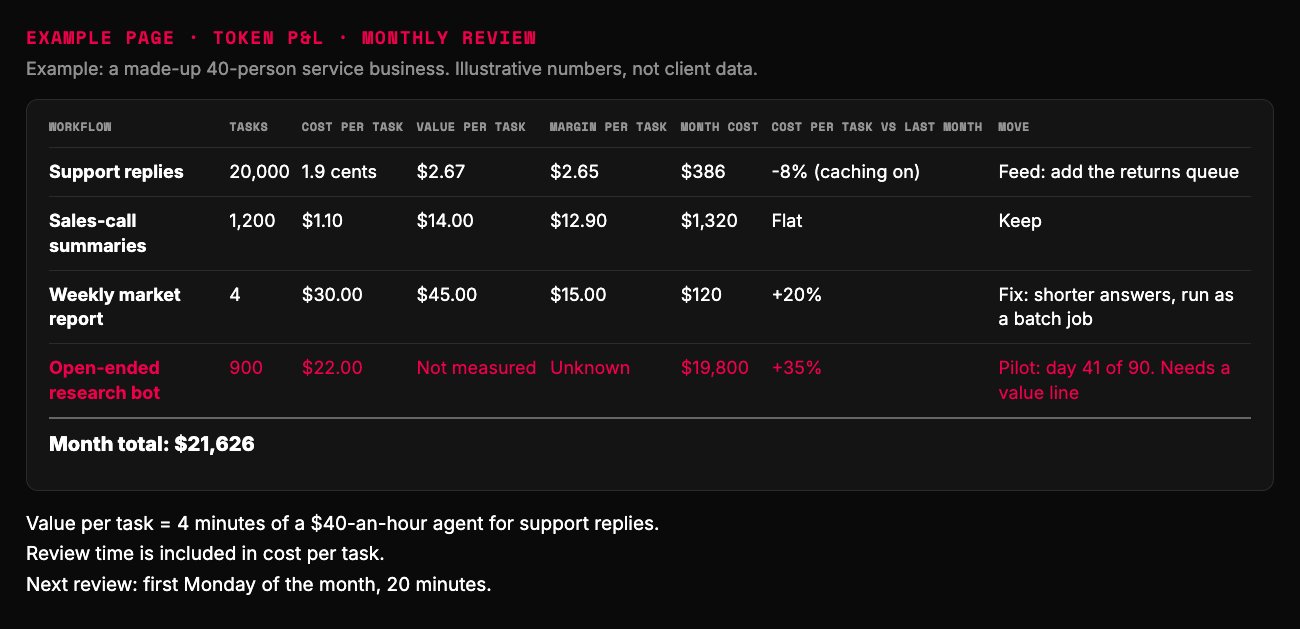
- Every call counted: draft, grading, retries.
- Pennies of cost, dollars of value. Feed it.
- The biggest line on the bill has no value line.
- Pilots get 90 days to earn a value line, then they are fixed or killed.
Example page built for this article with a made-up brand. Illustrative numbers; month cost = tasks times cost per task.
Build your Token P&L with AI: the copy-paste prompt
Paste the prompt below into your preferred AI. It asks about your workflows one at a time. Then it builds the P&L, the budget range and the tripwires.
It never guesses a price. It reads the provider's current pricing page if it can browse, or asks you. Either way, it tells you which it used and when.
Check its math once by hand on your biggest workflow. Then let the monthly habit do the work.
Paste into your preferred AI. It asks about each workflow, then prices it per task, budgets a range and sets the tripwires.
Act as an AI cost analyst. Build a Token P&L for my AI workflows, a monthly budget range and tripwires.

Ask me one question at a time, with the example:
1. Which AI workflows run today? (Example: support replies, weekly report)
2. For each, tasks per month as a low and a high you are 90% sure of. (Example: 15,000 to 25,000)
3. Tokens per call, input and output, low and high. (Example: 2,500 to 4,000 in, 300 to 600 out)
4. Calls per task, counting grading, retries, tool calls and search. (Example: 2.1)
5. What one task is worth: hours saved x hourly cost, extra output, or fewer errors. (Example: 4 minutes of a $40-an-hour agent)
6. Human review time per task. (Example: 30 seconds)

Prices: never invent one. If you can browse, read each provider's current pricing page and give the date. If not, ask me.

Rules:
- Cost per task = calls x (input tokens x input price + output tokens x output price) + review time.
- Margin = value per task - cost per task. No value line = pilot with 90 days to earn one.
- Budget: simulate the ranges with 10,000 draws if you can run code. Never multiply all lows and all highs. Report the middle and 95th percentile.
- Say which levers fit each workflow: cache the repeated opening, batch what can wait, route easy work to a smaller model, shorter answers, split oversized prompts.
- Tripwires: stop any run at 5x a normal run, alert when daily pace passes the 95th percentile, monthly ceiling at 3x the middle. People limits stay above real work.

Answer in this format:
Prices used: [source, date]
Token P&L: [workflow | tasks | cost per task | value per task | margin | keep, fix or pilot]
Budget range: middle $ / 95th percentile $
Levers to try first: [workflow: lever, why]
Tripwires: [settings]
Next three actions: 1. 2. 3.
What to do this week
1. Tag every AI call by workflow. Split keys by project if that is all you have.
2. Run the prompt on your top five workflows by spend. Find the one with no value line.
3. Switch on caching and bulk runs where the lever table says they fit. Then set the per-run ceiling.
Remember the finance lead and the one-line email? Send back the Token P&L, not a cap.
A cap tells you how much you spent. A meter tells you what you bought.

Filip Kovacevic is the founder of Anar Agency in Phoenix. He spent five years running SEO, Meta ads, email, and content for medical practices across the United States, and now does the same work for healthcare, home-service, legal, and professional-service businesses, alongside AI implementation. More from Filip →
Talk it through in 15 minutes
Bring one question from this article. We will tell you what we would do, whether or not you hire us.
Book a 15-Min Chat →