How Much to Spend on Google Ads: Test, Winner and Scale Budgets

Size a Google Ads budget from what one customer can pay you. Add up everything one buyer can buy. Test each new campaign at that amount per day.
Raise a winner to three times it. Past three times, it becomes a scale campaign. First, check that one click costs less than it earns.
How much should you spend on Google Ads?
Picture a Monday. An owner opens Google Ads and types $50 into the daily budget box.
Why $50? It felt safe.
A month later there are some clicks, two phone calls and one verdict: Google Ads does not work for us. The budget never had a job. It was just a number that did not scare anyone.
Here is the fix in one line. Size your Google Ads budget from what one customer can pay you, not from what feels safe.
Test each new campaign at that amount per day. Raise a winner to three times it. Past three times, it becomes a scale campaign and runs until the results break.
The method was built for Facebook ads. We carried it over to Google search. Where Google works differently, we say so and link Google's own help pages.
Our take: most budget advice starts from your comfort. This method starts from your customer.
Spend more only on what has already paid for itself
Daily budget per campaign, as a multiple of funnel value
- Test: 1 x funnel value a day Every new idea, in its own campaign with its own budget.
- Winner: up to 3 x A test whose sales cover its spend. Raise it in steps.
- Scale: 3 to 4 x and more Past 3 x it moves here and runs until results break.
Our method; built for Facebook, carried to Google by us
Start from what one customer can pay you
Your starting number is funnel value. Funnel value is everything one buyer can buy from you in one go: the main offer, any add-on at checkout and every upsell after it.
For example, picture a $100 course, a $50 add-on and a $150 upsell. Funnel value is $300. That is your daily test budget.
Why that number? If one person buys everything, that day hits its break-even point: one sale pays for the whole day. Somebody usually does.
Every buyer after that one is profit. Not every buyer takes every upsell, so plenty of days still lose money. That loss is the price of finding out.
Selling a service, not a funnel? Use what one new customer pays you on the first job. For example, a plumber whose average first job is $400 has a $400 funnel.
Lifetime value comes later. We plan on the first sale and treat repeat business as the bonus. Our guides to max allowable CPA and offer economics before launch show how to work out what one customer is worth.
A budget picked by feel is a guess. A budget picked from funnel value is a plan.
Example: a $300 funnel means a $300 test day
Add up everything one buyer can buy. The total is your daily test budget.
| Funnel step | Example price |
|---|---|
| Main offer (a course) | $100 |
| Add-on at checkout | $50 |
| Upsell after purchase | $150 |
| Funnel value = daily test budget | $300 |
Example prices
Start from funnel value: everything one buyer can buy from you, or what one new customer pays on the first job. Check the click ceiling: average buyer spend times the share of clicks that buy, at a careful rate. If real click prices sit above it, stop.
Test each new idea in its own campaign at one times funnel value a day; tiny or huge funnels test at the test limit divided by seven. A test that covers its spend becomes a winner and rises in steps to three times. Past three times it moves to scaling at three to four times and more, until results break.
With all three levels running, split the money 20, 30 and 50 percent. On Google, raise a budget only when Search lost IS (budget) is high and cost per sale is on target. When the searches run out, widen to new buyer groups.
Know the most you can pay for one click
Before you spend a dollar, find your click ceiling. That is the most one click can cost before you lose money. It is also called earnings per click: money in, divided by clicks.
No history yet? Estimate it. Take what an average buyer spends and multiply it by the share of clicks that buy.
For example, buyers spend $150 on average and 6 in 100 clicks buy. Your ceiling is $9 a click.
Run a lead business? Multiply what a customer is worth by the share of clicks that become leads. Then multiply by the share of leads you close.
Be careful with the buy rate. Everybody is optimistic about this number. Plan low, at 6 percent even if a template says 10 to 15, because you can always raise it later.
Then check the real price. Google's Keyword Planner forecasts estimate the clicks and cost per day for a keyword list at a given bid. Our guide to Google Ads cost per click by industry gives you a starting range.
If the keywords you need cost $15 a click and your ceiling is $9, stop. For example, one offer paid $15 a click and could not work at that price.
No budget fixes a click that costs more than it earns. A bigger budget just loses money faster.
Our piece on earnings per session explains why money per visit beats conversion rate as the number to watch.
Example: at a careful 6 percent, a $150 buyer is worth $9 a click
Click ceiling = average buyer spend ($150) x share of clicks that buy
- 3 in 100 clicks buy 4.5
- 6 in 100 clicks buy 9
- 12 in 100 clicks buy 18
Example math from the method
A hopeful buy rate makes a money-losing click look fine
| Hopeful plan: 12 in 100 buy | Careful plan: 6 in 100 buy |
|---|---|
| Click ceiling: $18 | Click ceiling: $9 |
| A $15 keyword looks fine | A $15 keyword loses $6 a click |
| You find out from the bill | You find out before launch |
Example math; $150 average buyer spend
Test each new idea at one times funnel value a day
A test campaign gets one times funnel value a day. With a $300 funnel, that is $300 a day for each new idea.
Give each test its own campaign and its own budget. Put many new ads together, and the platform hands the money to an early favorite. The rest never get a fair test.
Google does something similar inside an ad group. With ad rotation set to Optimize, Google shows the ads it expects to do better more often. If you use Smart Bidding, Google picks that setting for you.
Google also offers shared budgets, where money one campaign does not use moves to another. That helps proven campaigns. For a test, it means the money can drift away from the new idea, so our rule is simple: tests get their own budget.
Two cases break this rule: tiny funnels and huge ones.
For example, a $27 product at $2 a click, where 4 in 100 clicks buy, costs about $50 per sale. A $27 test day buys about half a sale. That is too little to learn from.
Now picture a law firm where one case is worth $5,000. One times funnel value is $5,000 a day. Few firms can test like that.
In both cases, our rule is to set the daily test budget from your test limit instead. Your test limit is the most you can spend and be fine with only data back. Divide it by seven, so the test sees every day of the week.
Then judge on sales, not clicks. On a new offer, start changing things after 10 to 30 sales. Not after one lucky afternoon.
Tiny and huge funnels test at the test limit divided by seven
Test limit = the most you can spend and be fine with only data back
| Your case | Example | Daily test budget |
|---|---|---|
| Funnel value fits | $300 funnel | $300 (1 x funnel value) |
| Tiny funnel: one sale costs more than the funnel | $27 product, about $50 per sale | Test limit / 7 |
| Huge funnel: 1 x is more than a seventh of your test limit | $5,000 case, $7,000 test limit | $1,000 (test limit / 7) |
Our rule for the edge cases; example numbers
Raise a winner to three times, then move it to scaling
A test becomes a winner when its sales cover its spend. Then you raise its daily budget, in steps, up to three times funnel value. With the $300 funnel, that is $900 a day.
Past three times, it moves to a scale campaign. Scale campaigns run at three to four times funnel value and more, until the results break. Then the next winner takes its place.
Why stack it like this? A test can lose at most one funnel value a day. You spend more only on what has already paid for itself.
Once you have all three levels, split the money. Tests get 20 percent, winners 30 percent and scale campaigns 50 percent.
A new account has no winners yet. So in week one, everything is a test.
Scale campaigns stay few. A handful of proven campaigns usually carry the account. New tests keep it fresh, because markets respond to new ideas.
To keep each test clean, change one thing at a time, as in our one-variable testing recipe.
Keep the test budget alive. Every scale campaign breaks one day, and without tests running, nothing is ready to replace it.
A campaign earns each raise by paying for the last one
- Test at 1 x Day 1 $300 a day in its own campaign.
- Winner Sales cover spend Raise in steps up to 3 x, $900 a day.
- Scale Past 3 x Run at 3 to 4 x and more, $900 to $1,200 a day and up, until results break.
- Widen When it breaks New buyer groups, each with its own keywords, ad and headline.
Method example, $300 funnel
Example: at $3,000 a day, half the money goes to proven campaigns
The 20/30/50 split applies once all three levels are running
| Level | Share | Daily money | What it buys |
|---|---|---|---|
| Tests | 20% | $600 | Two new ideas at 1 x ($300 each) |
| Winners | 30% | $900 | One winner at 3 x |
| Scale | 50% | $1,500 | One proven campaign at 5 x |
Method example, $300 funnel
What changes when you move this from Facebook to Google
The money math carries over. Funnel value, the click ceiling, the three levels and the 20/30/50 split work the same anywhere, because they come from your offer, not the platform.
The supply of buyers does not carry over. Facebook shows ads to people who were not looking, so more money can find more people. Google search only shows ads on searches people already typed.
So on Google, your budget can only buy the searches that exist. Past that point, more money buys nothing. The next section shows how to spot it.
Google's daily budget is also an average, not a cap. On a single day Google can spend up to twice your average daily budget. In a month, it bills at most 30.4 times your daily budget.
So a $300 test can bill close to $600 on a busy day. That is the setting working as designed. Judge spend by the month.
Last, automated bidding needs time. Google's Smart Bidding shows a learning status after a new strategy, a setting change or added keywords. It usually needs one to two conversion cycles, the time from click to sale, to settle.
Do not judge a test inside that window. For the Facebook version of this method, see how much to spend on Facebook ads for a new offer.
The money math carries over; the supply of buyers does not
| Facebook (where the method comes from) | Google search |
|---|---|
| Shows ads to people who were not looking | Shows ads to people who already searched |
| More money can find more people | Budget can only buy searches that exist |
| Many ads in one group: spend goes to an early favorite | Optimize rotation shows expected winners more often |
| Funnel value, 1 x / 3 x / 3 to 4 x, 20/30/50 | Same |
| Widen with new buyer groups | Widen with new keyword groups, ads and headlines |
Our method; Google Ads Help pages listed in Sources
Google's daily budget is an average: up to 2x a day, 30.4x a month
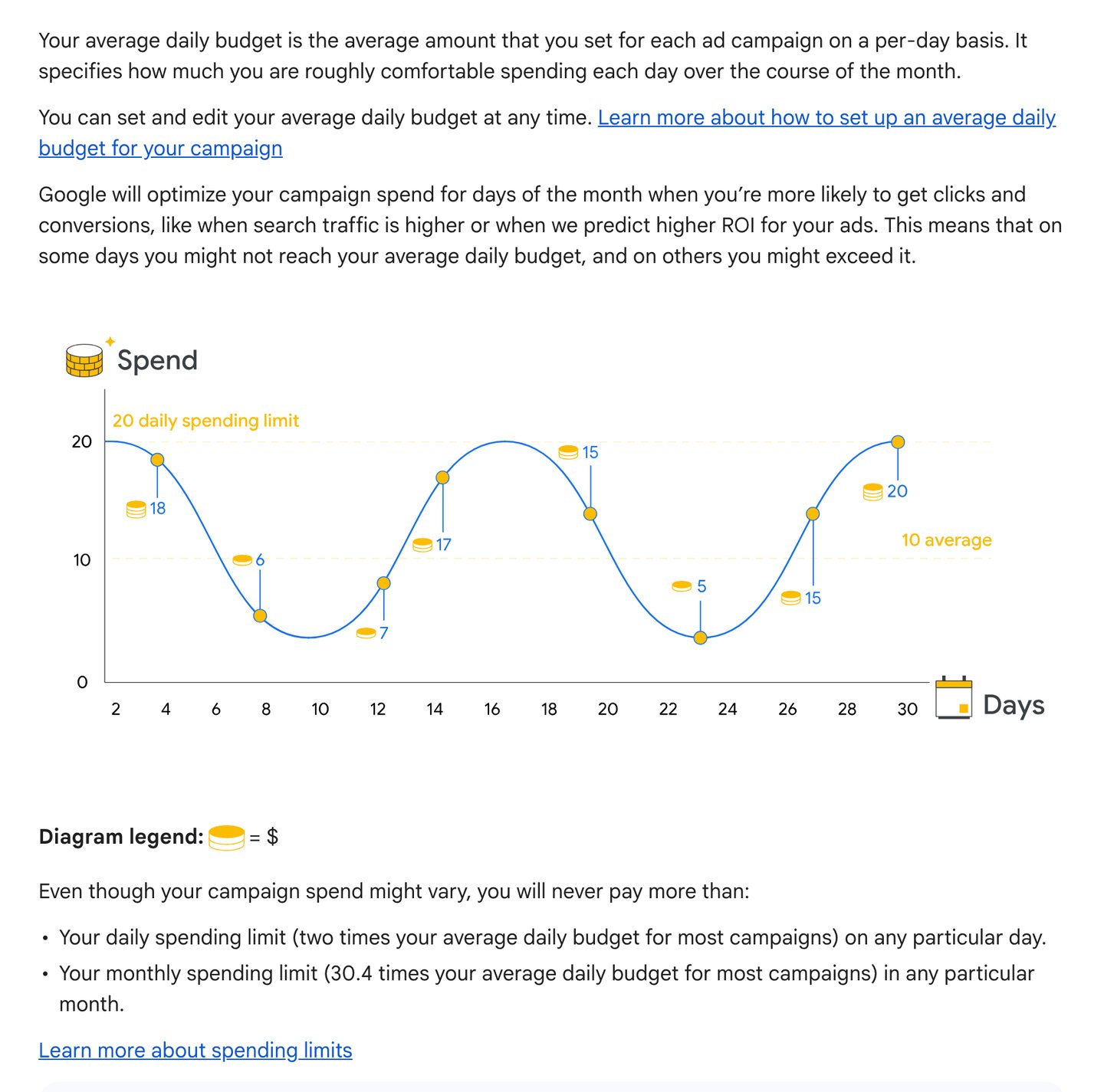
- The daily budget is an average across the month, not a cap on any one day.
- Some days spend under it, some days over it. That is the setting working as designed.
- Up to 2x on one day: a $300 test can bill close to $600 on a busy day.
- The month tops out at 30.4 times the daily budget. Judge spend by the month.
Screenshot of Google Ads Help, About average daily budgets, taken 2026-10-17
Why does more budget stop buying more customers?
Because every market has a pool of ready buyers, and the pool runs out. On Google, the pool is the number of people searching your keywords in your area.
Google tells you when the budget is the limit. The Search lost IS (budget) column shows how often your ads did not show because the budget ran out. Impression share is the share of possible showings you actually got.
Read it next to your cost per sale. Losing lots to budget while on target? Raise the budget.
Losing almost nothing to budget? The searches ran out. More money will just sit there.
When the pool runs out, widen it. Write down five to ten kinds of buyer, then give each one its own keywords, its own ad and its own landing page headline. Keep the offer behind it the same.
Clicks also cost more as you buy more of them. For example, one business paid $2.35 a click at $500 a day and expected much higher prices at $5,000 a day. The fix: plan the scale budget with a higher click price, before the bill forces you to.
Google's Performance Planner forecasts what more spend would buy, based on auctions from the last 7 to 10 days. Use it before a big budget jump. Not after.
Raise the budget only in the top-right box
- Searches ran out Widen to new keyword groups. More budget buys nothing.
- Raise the budget The one place more money helps.
- Fix before money Offer, page or keywords. Budget is not the problem.
- Hold the budget Fix cost per sale first, then raise.
Our decision rule, using Google's Search lost IS (budget) metric
Example: if clicks rise from $6 to $10, $1,500 a day buys 100 fewer clicks
Clicks a day = daily budget / cost per click
- $6 a click 250
- $7.50 a click 200
- $10 a click 150
Example math from the method
Search lost IS (budget) tells you when money, not searches, is the limit
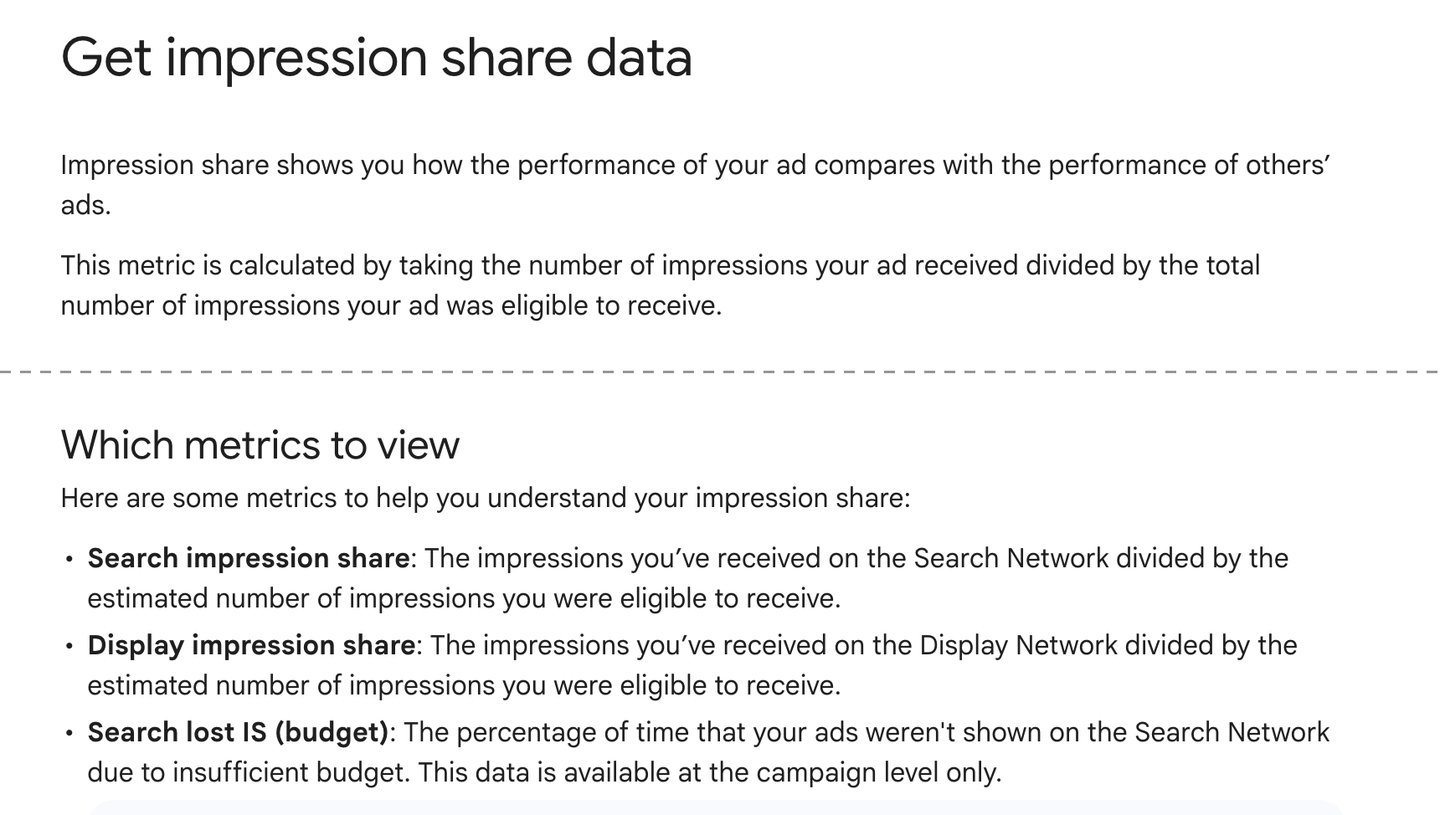
- Impression share: the share of possible showings you actually got.
- Search counts only searches people already typed. Your budget cannot buy more than exist.
- How often your ads did not show because the budget ran out. Read it next to your cost per sale.
- Lots lost here while on target? Raise the budget. Almost nothing lost? The searches ran out.
Screenshot of Google Ads Help, Get impression share data, taken 2026-10-17. Two parts of the page, joined at the dashed line
Where people get stuck
Most Google budget problems look like platform problems. Most of them are math problems.
How to prove Google Ads does not work in four easy steps. Step one: pick $50 a day because it felt safe. Step two: spread it over six campaigns on one shared budget.
Step three: panic on day two, when one day billed $100. Step four: switch it off after two weeks and tell everyone Google Ads does not work. Hell of a conclusion from $50 a day.
The table below lists the common stuck points, each with its cause and its fix.
One more trap: changing the plan because one day looked bad. Daily numbers always jump around. The next section gives you a habit that keeps you from overreacting.
If the money math holds but sales do not come, the problem sits after the click. Reading ad data shows which step is broken.

Most Google budget problems are math problems
| Symptom | Cause | Fix |
|---|---|---|
| One day spent twice the budget | The daily budget is an average | Judge by the month: at most 30.4 x the daily budget |
| The budget never spends | Not enough searches for your keywords and area | Widen keywords or area; more budget will not help |
| New tests get almost no spend | They share a budget or an ad group with an old winner | Give each test its own campaign and budget |
| Cost per sale jumped after a raise | Clicks cost more as you buy more | Step back down; plan with a higher click price |
| Bid strategy says Learning | New strategy, setting change or added keywords | Wait 1 to 2 conversion cycles before judging |
Google Ads Help pages listed in Sources; our method
Read yesterday's numbers from one place, every day
Pick yesterday as your reporting day. Today is not over, so its numbers are not final yet.
Pick one source of truth for each number, and never switch. Spend comes from Google Ads, and sales come from your checkout or payment processor. Ad dashboards and analytics tools rarely agree, and mixing them leads to bad calls.
Then check each campaign against its budget level. Did each test stay at one times funnel value? Did any test cover its spend?
Is a winner past three times funnel value and ready for scaling? At high spend, check daily. At low spend, weekly is fine.
Once it is a habit, it takes about five minutes. That is cheap insurance on a $300 day.
Make sure the sales number is real. If Google cannot see your sales, it bids blind. Our guide to server-side conversion tracking and Google's list of ways to track conversions cover the setup, and conversion values let you report each sale's real amount.
Worried you will be stuck spending forever? Treat it as a test window. Spend for a set time, keep going if it works, and scale back if it does not.
A five-minute daily check keeps every campaign at its budget level
- Report on yesterday Today is not over yet.
- One source per number Spend from Google Ads, sales from your checkout or payment processor.
- Check the test line Each test at 1 x funnel value. Did any cover its spend?
- Check the winner line Any winner past 3 x moves to scale.
- Check lost to budget Raise only on target with lots lost to budget.
Our method
Run it with AI
The prompt below runs the whole Budget Back-Solve for you. Paste it into your preferred AI and answer its questions. It shows its math and never invents a number.
This week: first, add up your funnel value and your click ceiling. Second, check real click prices for your keywords. Third, launch one test at one times funnel value, in its own campaign with its own budget.
Want a second pair of eyes on your numbers? Send them to us. Our ad spend calculator and benchmarks page help with the inputs.
Remember the $50 that felt safe? It was never too small or too big. It was just never tied to a customer.
Pay for the proof first. Then let the proof pay for the budget.
Paste into your preferred AI. It asks for your prices, click rates and test limit, then gives you test, winner and scale budgets.
Act as a careful media buyer sizing my Google Ads budget. Use only these rules and my answers. Never invent a number; if one is missing, ask me. If you can browse, first check Google Ads Help for average daily budgets, Search lost IS (budget) and the learning status, and tell me if anything below has changed.

Ask one at a time, with the example, and wait:
1. What I sell and who buys it. (Example: an online course for home bakers)
2. Every price one buyer can pay on the first sale: main offer, add-ons, upsells. For a service, my average first job. (Example: $100, $50, $150)
3. What an average buyer actually spends, if I know it. (Example: $150, or I don't know)
4. The share of clicks that buy, or the share of clicks that become leads and the share of leads I close. (Example: 6%, or 10% and 50%)
5. The cost per click for my main keywords, from Keyword Planner. (Example: $4 to $7)
6. My test limit: the most I can spend and be fine with only data back. (Example: $2,100)
7. My live campaigns: daily budget, spend, sales value and Search lost IS (budget) for each. (Example: none yet)

Rules:
- Funnel value = all prices in answer 2 added up.
- Click ceiling = average buyer spend x share of clicks that buy. If answer 3 is unknown, use the main price. If my rate is above 6%, warn me and also show the ceiling at 6%.
- If the cost per click is above the click ceiling, write STOP, explain why, and do not size a budget.
- Cost per sale = cost per click / share of clicks that buy.
- Test budget per campaign per day = funnel value. If funnel value is less than one cost per sale, or more than test limit / 7, use test limit / 7.
- Each test gets its own campaign and its own budget, never a shared budget.
- A test whose sales value covers its spend is a winner: raise it in steps up to 3 x funnel value. Past 3 x it moves to scaling at 3 to 4 x funnel value or more, until results break.
- Once tests, winners and scale campaigns are all running, split the total daily budget 20% tests, 30% winners, 50% scale.
- Judge on sales, not clicks. No changes before 10 sales unless the cost per click breaks the ceiling. Wait 1 to 2 conversion cycles after a bid strategy change.
- Raise a scale campaign only if Search lost IS (budget) is high and cost per sale is on target. If lost to budget is near zero, tell me to widen: new buyer groups, each with its own keywords, ad and headline.
- Google can spend up to 2 x the daily budget on one day and 30.4 x in a month. Show the monthly maximum.

Show your math, then use exactly this format:
FUNNEL VALUE:
CLICK CEILING:
GO OR STOP:
TEST BUDGET PER CAMPAIGN PER DAY:
WINNER LINE (3 x):
SCALE LINE (3 to 4 x):
SPLIT (20/30/50):
MONTHLY MAXIMUM:
WHAT TO CHECK DAILY:
NEXT THREE ACTIONS:

Filip Kovacevic is the founder of Anar Agency in Phoenix. He spent five years running SEO, Meta ads, email, and content for medical practices across the United States, and now does the same work for healthcare, home-service, legal, and professional-service businesses, alongside AI implementation. More from Filip →
Talk it through in 15 minutes
Bring one question from this article. We will tell you what we would do, whether or not you hire us.
Book a 15-Min Chat →