How Meta's Algorithm Actually Finds Your Buyers
Meta does not show your ad to everyone in your audience. It treats the audience as a pool and searches it for the people most likely to do what you asked, like buy. You steer that search with four things: the goal you pick, your budget, your ad, and a few limits like location.
How does the Facebook algorithm work for ads?
You pick an audience of two million people. You hit publish. A week later, the report says a small group saw your ad four times each, and most of the two million never saw it once.
Broken? No. That is how the Facebook algorithm works for ads.
Meta does not mail your ad to a list. It hunts inside a pool. Once you see the hunt, you stop fighting it and start steering it.
Here is the short version. Your audience is the pool, and your goal is the scent.
Your budget decides how far the hunt has to reach. Your ad is the bait that pulls people out.
The Pool Model is our name for that picture: Meta hunts for buyers inside a fenced pool, and you steer the hunt with four things.
Most advice tells you to find the perfect audience. That is the wrong fight.
Your audience is a pool to search, not a list to mail
| What people picture | What Meta does |
|---|---|
| A list of two million people | A pool it is allowed to search |
| Everyone sees the ad about once | Money goes to the people it predicts will act |
| You pick who sees it | You pick the goal, the budget, the ad and the limits |
Meta Business Help Center, About Ad Auctions
Your audience is a pool to search, not a list to mail
Your audience is the pool Meta is allowed to search, not a list it works through. Meta does not split your money evenly across it.
Every time someone scrolls, Meta runs an ad auction. The ad with the highest total value wins the spot.
Total value has three parts. Your bid is what a result is worth to you. The estimated action rate is how likely this one person is to do what you asked.
Ad quality comes from how people react, like hiding the ad, and from bad signs like engagement bait, meaning posts that beg for likes or shares. Meta says a more relevant ad can beat an ad with a higher bid.
Look at the middle part again. Meta guesses, person by person, who will act. Then it spends your money on its best guesses.
So the money piles up in one corner of the pool. Which corner? Wherever Meta's first guesses land.
That is why the same setup can get very different results. For example, one advertiser ran several ad sets with the same ad and the same broad audience.
One paid about $200 per purchase. Another paid about $16.
Same ad. Same pool. Different corner.
The lesson for you: the first few days of one ad set are like one roll of the dice. Never judge a whole audience on one roll.
Meta picks the ad it predicts this person will act on, not the biggest bid
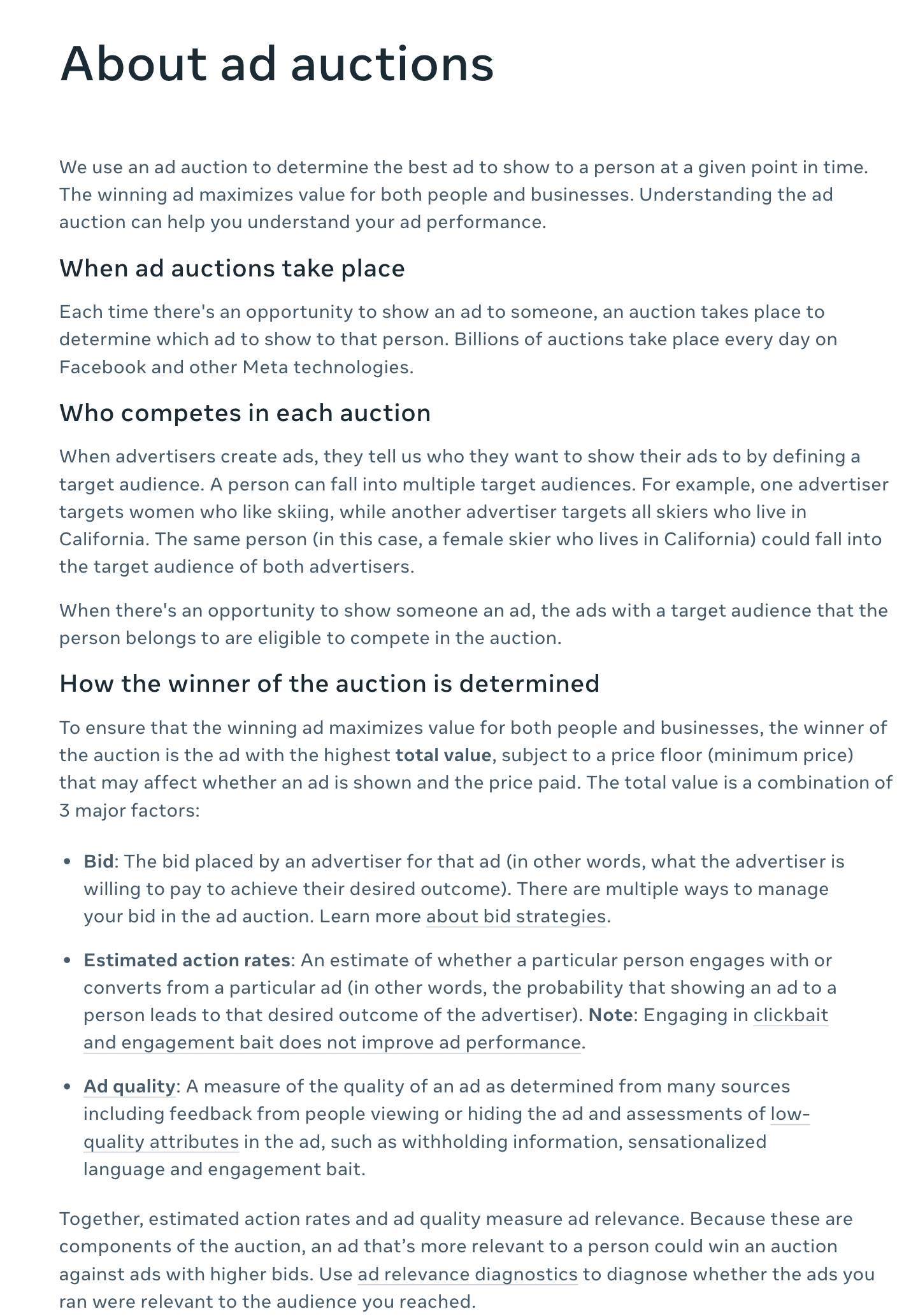
- Each spot goes to the ad with the highest total value, not to the first ad in line.
- Part one is yours: what a result is worth to you.
- Part two is Meta's guess about this one person. This is why your ad does not reach the whole audience.
- Part three is how people react. Tricks like engagement bait count against you.
- A more relevant ad can beat a bigger bid.
Screenshot of Meta Business Help Center, About ad auctions, taken 2026-10-17
Meta's guess about each person decides who sees your ad
The ad with the highest total value wins each spot. Total value has three parts.
| Part of total value | What it means | Who shapes it |
|---|---|---|
| Bid | What a result is worth to you | You |
| Estimated action rate | How likely this person is to do what you asked | Meta's prediction, steered by your goal and your ad |
| Ad quality | How people react, with points off for things like engagement bait | Your ad |
Meta Business Help Center, About Ad Auctions, read 2026-10-17
Example: the same ad and audience cost $200 a sale in one ad set and $16 in another
Cost per purchase in two ad sets with identical ads and an identical broad audience
- Ad set A 200
- Ad set B 16
Example from one advertiser's account, not our data
Four ideas. The audience is a pool Meta is allowed to search, not a list it delivers to evenly. The goal you pick is the scent it follows, so ask for the result that pays you.
The easiest buyers are found first, so cost per result tends to rise as you spend more in the same pool; raise budgets in small steps. The ad is the bait: keep the body that sells and refresh the opening and the image. Set the fence by hand (location, exclusions, the result, any legal category), start broad inside it, judge on cost per result, and repeat.
Ask Meta for the result you actually want
The goal you pick tells Meta who to hunt. Pick purchases, and it looks for people who buy. Pick clicks, and it finds people who click, which is a different crowd.
Why does a clicks goal cost less? Not because Meta is being nice.
For example, an ad might cost $40 per thousand views on a purchase goal and $5 on a clicks goal. The clicks goal costs one eighth as much per thousand views because Meta shows the ad to different people.
Testing on the cheap crowd tells you what the cheap crowd likes. They are not the people who pay you.
So set the goal to the thing that makes you money. Selling online? Purchases.
Selling by phone? Leads or booked calls.
This holds even when sales are rare. The goal still changes who Meta picks inside the pool, even before it has much data.
Meta also runs a learning phase, the stretch where it is still working out how an ad set will perform. Its number for leaving that stage is in the settings box below.
Does an ad set need to hit that number to work? No. For example, one seller of expensive products had ad sets that each got fewer than 10 sales a week, and they still made money.
Meta's own page says the system never stops learning. So treat the 'learning limited' label as a pay-attention light, not a grade.
Our rule: judge an ad set on its cost per result, meaning what you pay for each sale or lead. Compare it to the most you can pay for one. Our guide to setting the most you can pay per sale shows how to find that number.
Example: a clicks goal costs less because it reaches different people
| Goal: link clicks | Goal: purchases |
|---|---|
| About $5 per thousand views | About $40 per thousand views |
| Meta looks for people who click | Meta looks for people who buy |
| A cheap test on the wrong crowd | A pricier test on the crowd that pays you |
Example prices; the ratio (one eighth) illustrates the method, not a benchmark
Learning is a stage, not a pass or fail grade
What you will hear, what is true, and what we do about it
| What you hear | What is true | What we do |
|---|---|---|
| An ad set must finish learning to work | Meta says the system never stops learning | Judge cost per result, not the label |
| 'Learning limited' means it failed | It means Meta expects too few results to finish learning | Check cost per result first |
| Results swing early | Meta says ad sets are less stable while learning | Expect swings; avoid needless edits |
| Fewer than 10 sales a week cannot work | Example: one seller of expensive products had ad sets that worked below 10 a week | Treat it as an example, not a promise |
Meta Business Help Center, About the Learning Phase and About Learning Limited, read 2026-10-17; last row Example from one advertiser's account, not our data
Why does cost per result rise when you raise the budget?
Cost per result usually rises with budget because Meta finds the easiest buyers first. Picture a fruit tree.
At $50 a day, Meta picks the lowest fruit in the pool. At $100 a day, it still gets that fruit, but it has to reach higher for the next $50 worth.
At $500 a day, it is up on a ladder. Each extra sale costs more. Economists call this diminishing returns.
So a cost that climbs as you spend more is normal. It is not proof the ad died.
What do you do about it? Raise the budget in small steps, and watch cost per result after each step.
Meta warns that frequent budget changes can restart learning. So give each step a few days before you judge it.
If cost per result climbs past your limit, go back to the last budget that worked. Spending faster does not find you cheaper people.
A bigger pool helps too, because it has more low fruit. For how much to spend on a brand new offer, see how much to spend on Facebook ads for a new offer.
More budget in the same pool reaches harder buyers
- $50 a day Meta picks the lowest fruit: the people most ready to act.
- $100 a day Same low fruit, plus a reach for the next $50 worth of buyers.
- $200 a day Higher branches. Each extra sale costs a bit more.
- $500 a day Up on the ladder. Expect cost per result to climb.
Method example; the budgets are illustrations, not results
Your ad is the bait: change the opening and the image, keep the body
Your ad does part of the targeting. Meta makes its guess for each ad and each person, so two ads in the same pool can win with different people.
Meta's engineers built a system called Andromeda that narrows tens of millions of possible ads down to a few thousand for each person. They built it because the number of ads keeps growing.
So what do you change when an ad gets tired? Not the whole ad.
Keep the body copy that sells. Change the opening, meaning the lines people see before 'See more.' Change the image too.
To someone scrolling, that is a brand new ad. You did not have to write a whole new one.
For example, one advertiser spending about $500 a day kept its 500-word body and changed only the openings and images. Spend grew to about $1,000 a day, and return on ad spend, the sales each ad dollar brings back, about doubled.
Make every opening say who the ad is for, in the first few words. A vague ad brings back vague people. Our guide to before-words and after-words covers what to lead with.
Is frequency climbing in a big audience? Frequency is how many times the average person saw your ad. When it climbs in a big pool, Meta is stuck in one corner, and fresh bait gets it moving.
To test many openings without guessing, use our creative testing engine.
Refresh a tired ad by changing the first thing people see
- Keep the body The copy after 'See more' that already sells stays the same.
- Write 3 new openings Each one names who the ad is for in the first few words.
- Add 2 new images Pair each opening with each image: 6 new ads from one body.
- Launch them beside the winner Keep the live ad running while the new ones learn.
- Judge on cost per result Keep the winners. Cut the rest after a fair spend.
Example: new openings and images, same body, double the spend
| What changed | Example result | How sure |
|---|---|---|
| Body copy (about 500 words) | Kept the same | Reported |
| Openings and images | Replaced with test winners | Reported |
| Daily spend | About $500 to about $1,000 | Reported, not our data |
| Return on ad spend | About doubled | Reported, not our data |
Example from one advertiser's account, not our data
Should you go broad or start tight on Meta?
Start broad on Meta, with a fence around it. That is Meta's current advice, and it fits most accounts.
The older rule said the opposite for new accounts. Start with a small, well-defined audience, then widen it as sales data comes in.
That rule made sense when interest targeting was accurate. Then Apple's tracking prompt let iPhone users block tracking across other companies' apps, and Meta saw less of what happened after a click.
Meta now recommends Advantage+ audience for almost all campaign types. Advantage+ audience is the setting that lets Meta's AI find the audience instead of you.
Meta reports lower cost per result with it, as the chart below shows. Those are Meta's numbers about Meta's product, so test them on your own account.
Retargeting is the exception. Meta does not recommend Advantage+ audience for ads aimed at people who already know you.
Our rule: start broad inside your fence. Go tight only if your buyer is a small group you can name in two words, like dental offices, or if broad fails a fair test.
If tight works and broad does not, stay tight. Try broad again later, when you have more sales data.
Broad does not mean careless. It means you stop guessing interests and start setting limits.
Meta reports Advantage+ audience cut cost per result by 7 to 15 percent
Lower cost per result by campaign objective, as Meta reports it
- Awareness 14.8
- Traffic, engagement, leads 9.7
- Sales, app promotion 7.2
Meta Business Help Center, About Advantage+ audience, read 2026-10-17. Meta's figures; we have not tested them
Broad is the default; tight is for small buyer groups you can name
- Go broad Meta has the data to hunt. Keep the fence tight.
- Broad, plus one tight test Compare cost per result after a fair spend.
- Broad inside the fence Meta's default. Judge on cost per result.
- Start tight, then widen Name the group. Try broad again once sales come in.
Our decision rule, built on Meta's Advantage+ audience guidance
Build the fence: four settings that are still yours
Four settings are still yours on any audience: where, who is left out, what counts as a result, and any legal limits.
Where. A local business should not pay to reach another state. Set your locations by hand, and check whether Meta is allowed to go past them.
For example, one retargeting campaign ran worldwide. One day its click rate sank and its cost per thousand views dropped, because most views had moved to low-cost countries.
Cheap views. Wrong people.
Who is left out. Exclude people who already bought, unless they can buy again. Meta goes back to past visitors on purpose, because they showed interest once.
That sounds helpful. But it makes your ads for new people look better than they are, so exclude recent visitors from those ads and catch them in a separate retargeting campaign.
What counts as a result. This is the scent from earlier. Get it wrong and the whole hunt chases the wrong animal.
Legal limits. Ads for housing, jobs, credit and some financial products fall under special ad categories, with fewer targeting options. That part is not optional.
How to pay Meta to find the wrong people in four easy steps. Step one: set the goal to clicks, because clicks are cheap. Step two: leave the location on worldwide.
Step three: let past buyers see the same ad forever. Step four: judge it all by the likes. Congratulations, you built a damn expensive fan club.
Numbers look odd? Open the breakdown by country and placement before you change anything. Our guide to reading ad data shows which number to check first, and hidden Meta ads settings covers the rest of the menu.

Audience controls are a fence Meta will not cross; suggestions are only hints
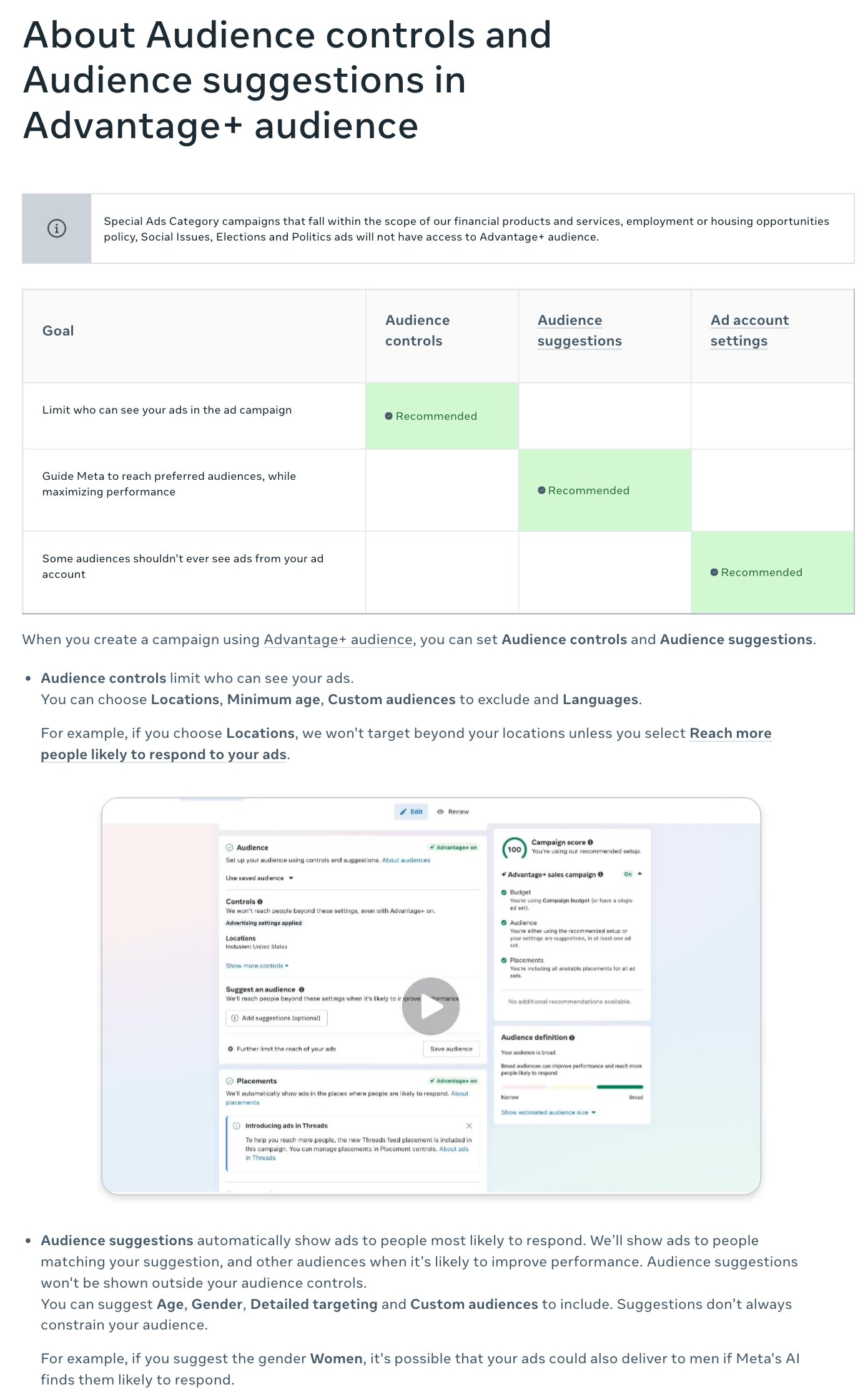
- This is the fence. Meta will not show ads outside these limits.
- Four hard limits: where, minimum age, who to leave out, and languages.
- Check this option. With it on, Meta can show ads outside your area.
- Suggestions are hints, not walls. Meta may go past them.
- Housing, jobs, credit and financial ads follow different rules.
Screenshot of Meta Business Help Center, About Audience controls and Audience suggestions in Advantage+ audience, taken 2026-10-17
Four settings to set by hand on every campaign
- Where Your real service area or shipping countries. Check whether Meta may go past them.
- Who is left out Past buyers, unless they can buy again. Recent visitors go to retargeting.
- What counts as a result The event that pays you: a purchase, a lead, a booked call.
- Legal limits Housing, jobs, credit and financial ads use the special ad category.
Run the Pool Model on your campaign with AI
The prompt below checks your setup against the Pool Model. Paste it into your preferred AI and answer nine questions. It returns your goal, your fence fixes, your audience call, a cost reading and an ad refresh.
It never guesses a number. Missing one? It asks.
This week: first, run the prompt on one live campaign. Second, fix the fence: location, exclusions, goal. Third, give your best ad three new openings and two new images, and keep the body.
Want a second pair of eyes on it? Send us your setup; you are not signing up for anything.
Remember the two million people who never saw your ad? They were never the point. Meta went looking for the buyers, and it found the easy ones first.
You do not choose who sees your ad. You choose the pool, the scent and the bait.
Run the Pool Model on every campaign, then run it again
- Fence Set location, exclusions and legal limits.
- Scent Pick the goal that pays you.
- Bait Refresh openings and images. Keep the body.
- Read Judge cost per result, not labels.
Paste into your preferred AI. It asks nine questions, then gives you your goal, fence fixes, audience call, cost reading and ad refresh.
Act as a careful Meta ads reviewer. Check my campaign setup against the Pool Model below. Use only my answers and these rules. Never invent a number; if one is missing, ask me. If you can browse, first check Meta's current help pages for the learning phase, Advantage+ audience and audience controls, and tell me if anything below has changed.

Ask one at a time, with the example, and wait:
1. What I sell and who buys it. (Example: a $49 kit for home bakers)
2. The one result that pays me. (Example: purchases, or booked calls)
3. The goal my ad set is set to now. (Example: link clicks)
4. My locations, and whether Meta may reach beyond them. (Example: Phoenix plus 25 miles, not sure)
5. Who I exclude now. (Example: nobody)
6. Are my ads for housing, jobs, credit or other financial products? (Example: no)
7. My audience type: broad, interests, or a custom audience. (Example: three interests)
8. Daily budget, cost per result now, and the most I can pay per result. (Example: $100, $62, $50)
9. Frequency over the last 7 days, and how long my best ad has run. (Example: 3.8, six weeks)

Rules:
- The goal must match answer 2. A clicks or reach goal for a business that needs sales or calls gets flagged.
- Fence: locations set by hand; reaching beyond them stays off unless I chose it; past buyers excluded unless they can buy again; recent site visitors excluded from cold ads and sent to a separate retargeting campaign.
- If answer 6 is yes, tell me to use the special ad category and accept its limits.
- Audience: default is broad inside the fence. Suggest a tight audience only if my buyer is a small group I can name in two words, or if broad already failed a fair test.
- Cost: if cost per result is over my limit, do not blame the learning label. Check the goal, the fence and the ad first. If cost rose right after a budget increase, step back to the last budget that worked and raise it in smaller steps, a few days apart.
- Ad: if frequency keeps rising or the best ad is old, keep the body copy. Write 3 new openings that name the buyer in the first words, and 2 new image ideas. No fake scarcity, no teases.

Show your reasoning, then use exactly this format:
GOAL:
FENCE FIXES:
AUDIENCE:
COST READING:
AD REFRESH:
NEXT THREE ACTIONS:

Filip Kovacevic is the founder of Anar Agency in Phoenix. He spent five years running SEO, Meta ads, email, and content for medical practices across the United States, and now does the same work for healthcare, home-service, legal, and professional-service businesses, alongside AI implementation. More from Filip →
Talk it through in 15 minutes
Bring one question from this article. We will tell you what we would do, whether or not you hire us.
Book a 15-Min Chat →