The Page-2 Problem: Why Your Impressions Get No Clicks, and the Fix

Lots of impressions (times Google listed your page) with almost no clicks usually means the page ranks on page two or lower. Searchers rarely look that far. The fix is not more articles.
Give the pages Google already lists better titles, more links and more substance, then judge them after 90 days.
Seen 1,745 times in Google, clicked 5 times
We published eleven careful articles about putting AI to work. Ninety days later, Search Console said Google had shown them 1,745 times.
People clicked them 5 times. Five. One click for every 349 appearances.
The articles were fine. Their page 2 Google ranking was the problem. They sat on pages two to four, where almost nobody looks.
So lots of impressions and almost no clicks means your page is listed too low to be seen.
More articles will not fix it. You fix the pages Google already shows, in five steps, and you judge them after 90 days.
We call those five steps the Page-2 Playbook. Each step below comes with the numbers we used on our own pages.
Our eleven articles were shown 1,745 times and clicked 5 times
- times Google listed the eleven articles 1745
- clicks in the same 90 days 5
- appearances for every click 349
Source: Google Search Console, anaragency.com, July 13 to October 11, 2026 (90 days).
Why do I have impressions but no clicks?
You have impressions but no clicks because your link is listed where searchers do not look. An impression is not a person reading your link.
Search Console counts an impression each time your site appears in the results. A link on a page the searcher never opened still counts.
Average position is the spot of your highest link, averaged over many searches. Roughly ten regular results fit on one page.
So position 18 is page two. Position 29 is page three. Position 35 is page four.
Our three most-seen articles sat at 35, 18 and 29. Together they drew 1,457 impressions and 5 clicks.
We call this the Page-2 Problem. Your report says you are visible. The searcher never knew you existed.
Why does it feel like progress? Impressions keep climbing. A climbing number looks like growth, even when nobody walks in.
The Lean Analytics authors, Alistair Croll and Benjamin Yoskovitz, argue that the most useful numbers are rates, not counts. A rate tells you whether to speed up or slow down.
Impressions are a count. Clicks divided by impressions, your click rate, is the number that tells you to act.
A big count on a page nobody visits is a billboard in a locked basement.
Position 18 is page two, and page two is out of sight
| Average position | Page of results | What the searcher sees |
|---|---|---|
| 1 to 10 | Page one | Your link, if they look |
| 11 to 20 | Page two | Nothing, unless they click Next |
| 21 to 30 | Page three | Nothing |
| 31 to 40 | Page four | Nothing |
Roughly ten regular results per page. Ads, maps and AI summaries push them lower.
Our three most-seen articles drew 1,457 impressions and 5 clicks
Impressions in 90 days, with average position and clicks in each label
- AI governance framework, position 35, 1 click 562
- AI consultant vs in-house, position 18, 1 click 473
- AI maturity model, position 29, 3 clicks 422
Source: Google Search Console, anaragency.com, July 13 to October 11, 2026.
Five steps on pages Google already shows. One: in Search Console, list every page with 100 or more impressions and fewer than 5 clicks in 90 days, positions 11 to 30 first. Two: rewrite each title so the searcher's words come first, under 60 characters.
Three: add two or more links to each from pages that already get clicks, using searcher words. Four: add what the top three results answer that the page does not. Five: change the date only if the content changed, resubmit the sitemap, write the win line, and judge after 90 days with a range: (1 + clicks) / (2 + impressions), and a new low end above the old high end.
How much traffic does page two of Google get?
Page two of Google gets almost no traffic. In one study of 4 million search results, fewer than 1 in 100 searchers clicked anything on page two.
The exact figure was 0.63 percent. The top result alone took 27.6 percent of the clicks.
Our own data agrees. Queries where we ranked between 21 and 50 drew 2,012 impressions. Zero clicks.
Page one is shrinking too. When an AI summary sits at the top, people click fewer regular links, as Pew Research Center found by tracking the real browsing of 900 adults.
The size of that drop keeps moving, so the latest figures sit in the dated box below. The direction is what matters. Fewer clicks reach the regular links.
Page two was near zero to begin with. More searches now end before anyone scrolls, so where buyers ask the question matters as much as where you rank.
Close enough? Not even close. Page two is the storage room of the internet.

Most of our impressions sat on pages three to five and earned no clicks
Impressions by the average position of each query, 90 days
- Positions 1 to 3 (1 click) 153
- Positions 4 to 10 (0 clicks) 301
- Positions 11 to 20 (1 click) 172
- Positions 21 to 50 (0 clicks) 2012
- Positions 51 and lower (2 clicks) 613
Source: Google Search Console, anaragency.com, whole site by query, July 13 to October 11, 2026.
The top result took 27.6% of clicks; all of page two got 0.63%
- of clicks went to the first organic result 27.6
- of searchers clicked anything on page two 0.63
Source: Backlinko, We Analyzed 4 Million Google Search Results.
Should you write more content or fix old content?
Fix old content first when Google already shows it. Write new content when Search Console shows almost no impressions.
The check takes two minutes. Open the last 90 days and look at impressions per page.
Hundreds of impressions and almost no clicks means a Page-2 Problem. Google has already matched the page to real searches. It just ranks it too low.
Our reasoning: a page Google already matches starts ahead of a page that does not exist yet. Moving it from 18 to 8 is a shorter trip than going from nowhere to 8.
Almost no impressions is a different problem. There is nothing to move up, so you need pages, starting with searches you can win and that pay.
So why does most advice say publish more? Publishing is easy to sell and easy to count. Our take: a content calendar is the industry's favorite way to look busy.
How to stay on page two forever in four easy steps:
1) Publish a new post every week.
2) Never open Search Console.
3) Give every post a clever title nobody searches for.
4) Link to nothing. Wait.
That is not a strategy. It is a hobby with a hosting bill.
Being outranked is not permanent. In Hacking Growth, Sean Ellis and Morgan Brown tell how Zillow lost traffic to a rival, Trulia, that ranked its listings higher in Google.
Zillow made search the whole company's focus for its 2008 growth push. Every team found ways to improve. Zillow caught and passed Trulia, and seven years later bought it for $3 billion.
Our reading: ranking got fixed when it became everyone's job for a set stretch. Not a side task. The main one.
Many impressions and few clicks means fix; few impressions means write
- Page-2 Problem Google shows it and nobody clicks. Run the Page-2 Playbook.
- Working Protect it. Use it to link to the pages stuck on page two.
- Nothing to rank There is nothing to move up. Write new pages for searches you can win.
- Small but sharp Few see it, but the ones who do click. Widen the topic it covers.
Anar's rule. Many impressions = 100 or more in 90 days; few clicks = fewer than 5.
Steps 1 and 2: find the seen-not-clicked pages and retitle them
The Page-2 Playbook is five steps run on pages Google already shows: find, retitle, link, deepen, then date and wait. Steps 1 and 2 take one afternoon.
Step 1: find the pages. In Search Console, open the Performance report, set the last 90 days, and sort pages by impressions.
List every page with 100 or more impressions and fewer than 5 clicks. Then click each one and note its top three queries and their positions.
Start with pages at positions 11 to 30. They are closest to page one. They move first.
Step 2: rewrite the title for the search. Google builds the blue link mostly from your page title. So the searcher's words go first.
Our top query for one article was "ai maturity assessment." Our title led with "AI readiness assessment." Close, but not what anyone typed.
Our rule: the query first, under 60 characters, and the same promise as the page. The clever headline can stay on the page itself.
No Search Console yet? Our free SEO audit tool gives you a first look while you set it up.
A clever title nobody searched for is a sign written for nobody.
Five steps, all on pages Google already shows
- 1. Find 100+ impressions and under 5 clicks in 90 days. Positions 11 to 30 first.
- 2. Retitle The searcher's words first, under 60 characters, same promise as the page.
- 3. Link Two or more links from pages that already get clicks, in searcher words.
- 4. Deepen Add what the top three results answer and you do not.
- 5. Date and wait New date only for new content. Resubmit the sitemap. Judge at day 90 with a range.
Anar's method.
Put the words people typed at the front of the title
| Title written for us | Title written for the search |
|---|---|
| Leads with our phrase: "AI readiness assessment" | Leads with the query: "AI maturity assessment" |
| The clever headline is the title | The clever headline moves to the page |
| Long enough to get cut off | Under 60 characters |
| Promises something the page only half covers | Promises exactly what the page delivers |
Our top query and old title for one article; the other rows are Anar's rules.
Steps 1 and 2 fit on one sheet: filter, sort by position, rewrite the title
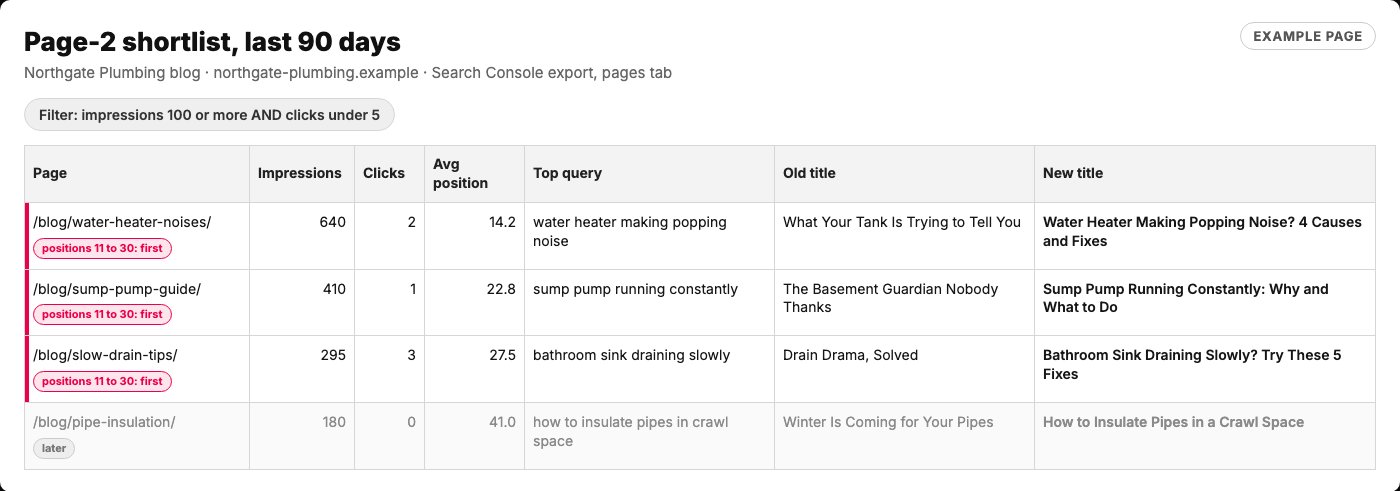
- Step 1: only pages Google shows a lot and almost nobody clicks.
- Positions 11 to 30 go first. They are closest to page one.
- The words people actually typed.
- The query first, under 60 characters, same promise as the page.
Example page built for this article with a made-up business and made-up numbers, 2026-10-18. The filter (100 or more impressions, under 5 clicks, 90 days), the position 11 to 30 priority and the title rule (query first, under 60 characters) are the method in this article.
Steps 3 and 4: link to each page and give it what the results above it have
Pages climb when other pages point to them and when they answer more than the results above them. Those are steps 3 and 4.
Step 3: link to it. Google finds and understands pages through links, and it reads the words inside each link.
Add at least two links to each listed page from pages that already get clicks. Use words a searcher would type. Never "click here."
Ours had almost no links. Now each article sits in a topic hub and links to its neighbors, the method in our hub-and-spoke SEO guide.
Step 4: deepen it. Search the top query yourself and read the three results above you. List what they answer that you do not.
Then add the missing pieces: a worked example, named sources, the doubt a buyer would raise. Google's guide to helpful content asks if a page gives substantial value next to other results.
Eight of our eleven had four sections and few sources. Each now has seven sections and twelve or more linked sources.
Proof of who wrote the page matters too. Our E-E-A-T checklist covers that part.
Thin pages do not get promoted. They get skipped.
Add what the results above you have and you lack
| What the top results have | What to add | Why it helps |
|---|---|---|
| A worked example | One real example with numbers | Readers can copy it |
| Named sources | A link to the research behind each claim | Readers can check it |
| The buyer's doubt | A short, honest answer to the main doubt | The reader has no reason to go back |
| A clear author | Who wrote it and why they know | Trust before the first line |
Anar's checklist, built on Google's helpful content questions.
Link words should say what the page is about
| Weak link | Strong link |
|---|---|
| "click here" | "how to set a page title for search" |
| "read more" | "our hub-and-spoke SEO guide" |
| One link from the footer | Two links from pages that already get clicks |
Google Search Central, SEO link best practices; Anar's rule for the count.
Step 5: date it honestly, wait 90 days, and judge with a range
Change the updated date only when the page truly changed, resubmit your sitemap, and wait 90 days before you judge. That is step 5.
Google looks at several signals to estimate a page's date, including the date you show. Our rule: a new date means new content. Then resubmit the sitemap.
Before the 90 days start, write down what counts as a win. Croll and Yoskovitz call this drawing a line in the sand. You decide the action before you see the data.
Our line has two parts. The page reaches positions 1 to 10 for its top query. And its click rate clearly beats the old one.
What does clearly mean with 5 clicks? Small counts swing a lot. So we judge them with a range, not one number.
Douglas Hubbard and Richard Seiersen, in How to Measure Anything in Cybersecurity Risk, show a simple way to turn hits and misses into a range. You give the count one free hit and one free miss.
Your best single guess is then (1 + clicks) divided by (2 + impressions). For the range, a spreadsheet does the work: =BETA.INV(0.05, 1+clicks, 1+impressions-clicks) gives the low end, and 0.95 gives the high end.
Counting each impression as one try is our own use of the method, not the book's. The book counts hits and misses in security samples. The math is the same.
Our 5 clicks on 1,745 impressions give a range of about 0.15 to 0.60 percent. Say the next 90 days bring 12 clicks on the same impressions: 0.44 to 1.11 percent.
Those ranges overlap. Not proof yet. Twenty clicks would give 0.81 to 1.66 percent, clear of the old range.
Our rule is strict on purpose. The new low end must sit above the old high end. Overlap means keep working or keep waiting.
Why not wait for statistical significance? The same authors point out that significance does not answer the question you care about: how sure you can be now.
Two weeks of data is a coin toss with a damn chart attached.
Judge small click counts by their range, not one number
| Clicks on 1,745 impressions | Best single guess | 90% range | Verdict |
|---|---|---|---|
| 5 (our start) | 0.34% | 0.15% to 0.60% | Baseline |
| 12 (example) | 0.74% | 0.44% to 1.11% | Overlaps the baseline: not proof yet |
| 20 (example) | 1.20% | 0.81% to 1.66% | Clear of the baseline: a real move |
Best guess = (1 + clicks) / (2 + impressions); range from BETA.INV with one free hit and one free miss, the method in Hubbard and Seiersen, How to Measure Anything in Cybersecurity Risk. Rows 2 and 3 are examples.
Ninety days from change to verdict, with one check in between
- Ship and write the win line Day 0 New titles, links and sections live. Date updated, sitemap resubmitted. Win line written down.
- Check it is indexed Day 7 Run URL Inspection on each changed page. Fix only what blocks indexing.
- Look, do not touch Day 30 Note positions. No edits. An edit now restarts the clock.
- Score it Day 90 Top query in positions 1 to 10? New low end above the old high end? Then it worked.
Anar's method.
The day-90 verdict: the new low end clears the old high end
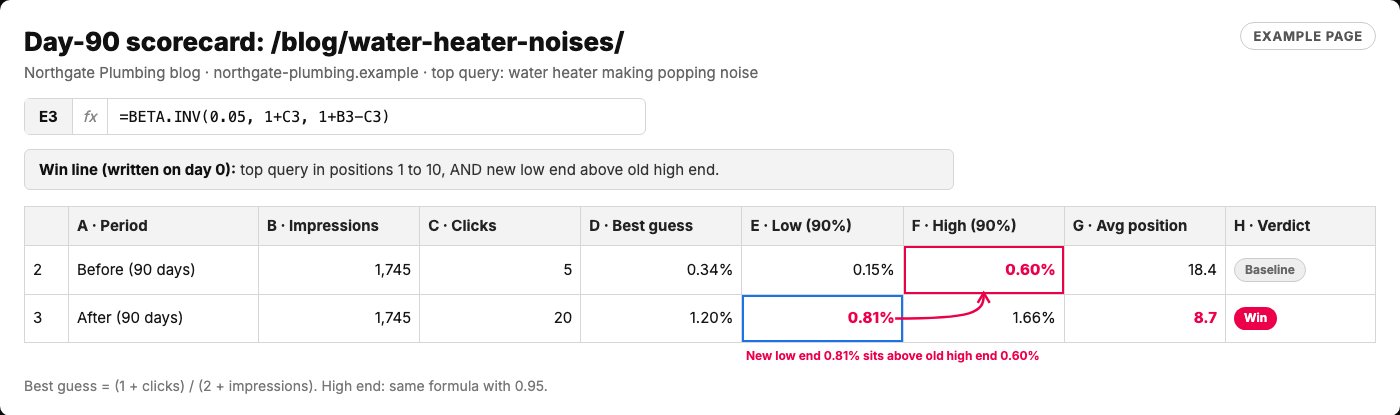
- The low end of the range: one free hit and one free miss, then the 5th percentile.
- The new low end (0.81%) sits above the old high end (0.60%). That is a real move.
- The top query reached page one. Both parts of the win line are met.
- Written before the 90 days started, so nobody moves the goalposts.
Example page built for this article with a made-up business, 2026-10-18; the before row uses the same counts as our own 1,745 impressions and 5 clicks; the after row is the article's 20-click example. Ranges from the beta distribution (alpha = 1 + clicks, beta = 1 + impressions - clicks), the method in Hubbard and Seiersen, How to Measure Anything in Cybersecurity Risk. Positions are made up.
Where people get stuck on page two
Three snags are common. Each one has a plain cause and a plain fix.
Google shows a different title than the one you wrote. Google uses several sources for the title link, including the big headline on the page. Make the title and that headline say the same thing.
The page moved up, but clicks did not. The result may sit under an AI summary, or its description may not answer the search. Google mostly builds that description from your page, so open the page with a two-sentence answer to the query.
Nothing changed after two weeks. Search is slow. The Hacking Growth authors note that organic channels take longer to pay off than paid ones.
Check the page is indexed with the URL Inspection tool. Then leave it alone until day 90.
Editing a page every week restarts your own test. Leave it alone. Patience is part of the method.
Three snags, and the fix for each
| Symptom | Cause | Fix |
|---|---|---|
| Google shows a different title | Google also reads the big headline on the page | Make the title and the headline match |
| Moved up, still no clicks | An AI summary on top, or a description that does not answer | Open the page with a two-sentence answer to the query |
| Nothing after two weeks | Search is slow | Confirm indexing, then wait until day 90 |
Google Search Central title link and snippet docs; Anar's method.
Run the Page-2 Playbook with AI this week
The prompt below runs the whole playbook in your preferred AI. Paste in your Search Console export, and it builds your shortlist, new titles, link plan and 90-day scorecard.
It never invents numbers. It works only from the export you give it. When something is missing, it asks.
This week: export 90 days of page and query data, then run the prompt on it.
Ship new titles and two links for your top three pages. Write your win line, set a reminder for day 90, and move on.
Next problem: getting quoted inside AI answers. Read what AI answer engines actually cite, or ask us about our SEO work.
Our eleven articles were shown 1,745 times and read almost never. Being shown is not being seen. Stop painting new signs, and move the ones you have to where people walk.
Paste into your preferred AI with your 90-day export. It asks a few questions, then builds your shortlist, titles, link plan and scorecard.
Act as an SEO analyst running the Page-2 Playbook on my website.

Ask me for these one at a time. If I paste everything at once, skip the questions.
1. A Search Console export of the last 90 days: each page with clicks, impressions and average position. (Example: a CSV from the Performance report, Pages tab.)
2. For my top pages, their top queries with positions. (Example: the Queries tab after clicking one page.)
3. My buyer, in one line. (Example: "owners of small plumbing companies.")

Then:
1. Shortlist every page with 100 or more impressions and fewer than 5 clicks. Put pages at positions 11 to 30 first.
2. If the whole site has almost no impressions, stop and tell me I need new pages, not this playbook.
3. For each shortlisted page, write a new title: the top query's words first, under 60 characters, the same promise as the page. Show old and new side by side.
4. Name two pages on my site that already get clicks and should link to it, with link words a searcher would type.
5. List what the top three results for its query likely answer that my page may not. Mark each [CHECK], because you cannot see my page unless I paste it.
6. Build a 90-day scorecard per page: clicks, impressions, best guess = (1 + clicks) / (2 + impressions), low = BETA.INV(0.05, 1 + clicks, 1 + impressions - clicks), high = BETA.INV(0.95, same inputs). Win line: top query in positions 1 to 10, and the new low end above the old high end.

Rules:
- Use only numbers from my export. Never invent clicks, impressions, positions or search volumes. If something is missing, ask.
- If you can browse, check Google's current Search Console help for any report name that changed, and tell me.
- Never suggest a new updated date unless the content really changed.

Output: A. Shortlist table. B. Old and new titles. C. Link plan. D. The [CHECK] list. E. Scorecard with your math shown. F. My next three actions.

Filip Kovacevic is the founder of Anar Agency in Phoenix. He spent five years running SEO, Meta ads, email, and content for medical practices across the United States, and now does the same work for healthcare, home-service, legal, and professional-service businesses, alongside AI implementation. More from Filip →
Talk it through in 15 minutes
Bring one question from this article. We will tell you what we would do, whether or not you hire us.
Book a 15-Min Chat →