How to Get a Google Knowledge Panel for Yourself or Your Firm
You cannot apply for a Google knowledge panel. Google builds one when many sources agree about who you are. Help them agree.
Pick one home page about you. Use the same short description on every profile. Link each profile back to that page.
Add hidden code that lists them. Earn mentions elsewhere. Claim the panel when it appears.
How to get a Google knowledge panel: make Google sure who you are
Search a famous author's name on Google. A box sits on the right side. It shows photos, an age, and a short label for what they do.
Now search your own name. You get your LinkedIn page, an old directory listing, and a stranger with the same name. No box.
That box is a knowledge panel. It is the sign that Google knows who you are and what you do. This guide shows how to get a Google knowledge panel for yourself or a small firm.
Here is the short answer. You cannot apply for one. Google builds it when many sources agree about you.
So your job is to make it easy for every source to say the same thing. The Home-Base Path is our six-step routine for making a person or small firm easy for Google to recognize. It has six parts: one home base, one description, linked profiles, hidden code that lists them, outside mentions, and a claim when the box shows up.
Nobody controls the box. Not you, not an agency. But you can steer what goes into it.
Six steps that make you easy for Google to recognize
- 1. Pick one home base A site on your own name, or the firm's home or about page.
- 2. Write one description Two sentences: field, buyer, topics, place.
- 3. Paste it everywhere Same words on every profile, each linking back home.
- 4. Add sameAs markup Hand-built, listing every profile and article.
- 5. Earn outside mentions Directories, press and guest pages that use your words.
- 6. Claim it When the box appears, verify and fix the sources.
The Home-Base Path, as set out in this guide.
A knowledge panel is not your Google Business Profile
A Business Profile and a knowledge panel look alike. They are two different boxes with two different sets of rules.
A Business Profile is the local listing with a map pin, hours, reviews and a call button. You create it and verify it yourself. It is for firms that serve customers at a place or in a service area.
A knowledge panel is about an entity: a person, a company or a brand. Google's help page on knowledge panels says they are generated automatically from sources across the web. Nobody fills in a form.
Serve local customers? Set up the Business Profile first. It is free, you control it, and it follows Google's rules for listing a business.
Want people and machines to know who you are beyond your street? That is the panel. The rest of this guide is about the panel.
You build a Business Profile; Google builds a knowledge panel
| Google Business Profile | Knowledge panel |
|---|---|
| You create and verify it | Google generates it |
| For a place or a service area | For a person, a firm or a brand |
| Map, hours, reviews, call button | Name, short label, facts, profiles |
| You edit it directly | You suggest changes; Google reviews them |
| Free, and you control it | No form to fill in, and no timeline |
Google Business Profile Help; Google Knowledge Panel Help, About knowledge panels.
The panel is built for you, from what other sites say
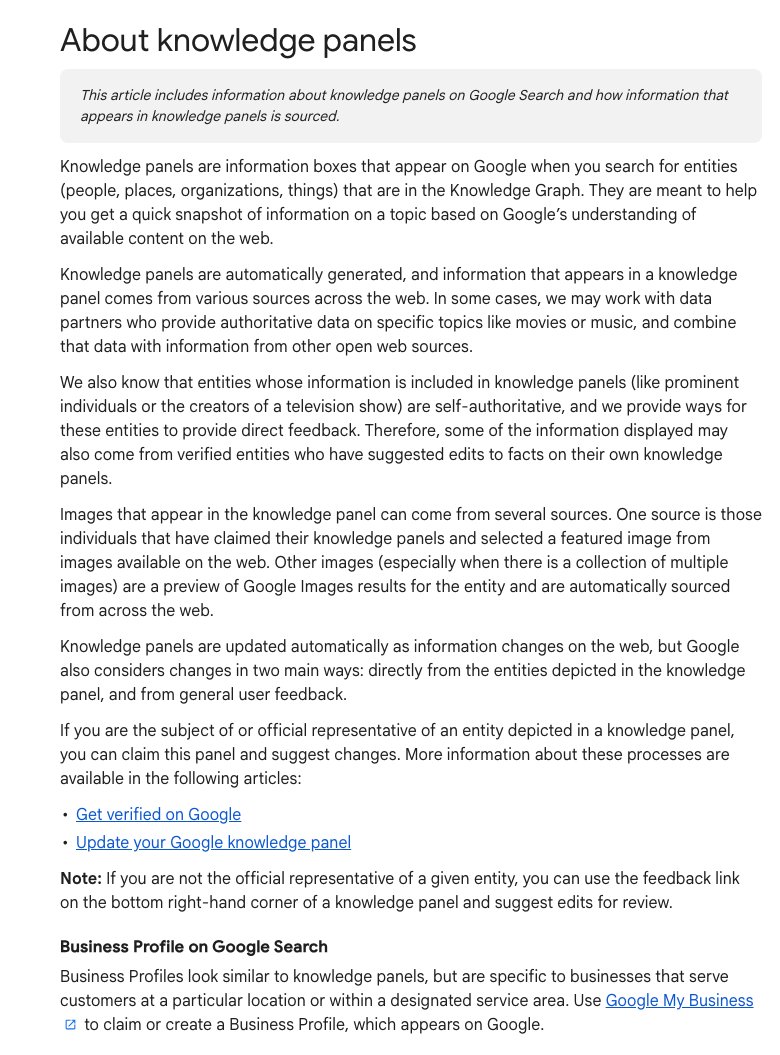
- Google builds the panel. There is no form to apply.
- The facts come from other sites. That is why one description everywhere matters.
- Once it exists, the person or firm can claim it and suggest fixes.
- A Business Profile is a different box, for local customers. You make that one yourself.
Screenshot of Google Knowledge Panel Help, About knowledge panels, taken 2026-10-17
The Home-Base Path makes a person or small firm easy for Google to recognize, which is what a knowledge panel needs. Pick one home base (a site on your own name, or the firm's about page). Write one two-sentence description and paste it on every profile.
Link every profile back home. List them all in hand-built sameAs markup. Earn mentions on sites you do not own.
Claim the panel when it appears, then fix the sources, not the box.
Why can't you just request a knowledge panel?
Google does not hand panels out. It builds one when it is sure you are one distinct thing.
The idea goes back to Google's 2012 Knowledge Graph announcement, which called it "things, not strings." Search would stop matching letters and start tracking real things: people, places and companies.
It started with more than 500 million things and 3.5 billion facts about them. The panel is the public face of that database.
Now think about the job from Google's side. For example, it finds your name on 40 pages. Is that one person, or four?
It gets sure when the pieces match: the same name, the same description and the same links, page after page.
A firm that describes itself six ways on six sites looks like six small firms. When Google is confused, it does not build a box.
This matters past Google too. AI assistants have the same problem: who wrote this, and can we trust them?
Our view: the work that earns a panel is the same work that gets you named in AI answers. More on that in what AI answer engines actually cite and where buyers ask the question.
Google built a database of things; the panel is its public face
The Knowledge Graph at its launch
- Things in the Knowledge Graph 500
- Facts about those things and how they relate 3.5
Source: Google, Introducing the Knowledge Graph: things, not strings, May 16, 2012.
Six versions of you look like six small firms
| Six descriptions | One description |
|---|---|
| "Consultant" on LinkedIn, "CFO" on a directory | "Fractional CFO for dental practices" everywhere |
| Profiles that never link back | Every profile links to the home base |
| No markup, or plugin defaults | sameAs lists every profile |
| Google sees six small things | Google sees one entity |
Example, ours. The name and firm are made up.
Step 1: pick one home base Google can trust
Your home base is the one page that is the source of truth about you. Every profile points back to it.
For a person, use a website on your own name. For you as a person, a domain like yourname.com is a better home than your company site.
For a firm, use the firm's own site. The home page or the about page. Google's Organization markup guide points to the same two pages.
No personal site? An author page on your company site can work. It is weaker for a person, but it works when the other steps are done.
Have neither? Then Google picks for you. Very often that means your LinkedIn profile becomes the main source.
Is that a disaster? No. But you did not choose it, and you cannot add the hidden code from Step 3 to it.
Keep the name identical everywhere too. "Dana Reyes" on one site and "Dana Reyes-Lopez" on another give Google two puzzles instead of one.
Put five things on the home base: who you are, what you do, your field, your credentials, and links to every profile and article about you. Our E-E-A-T checklist covers what a strong author page holds.
A site on your own name is the strongest home base
- LinkedIn, by default What Google often uses when you give it nothing better. You cannot add markup to it.
- Author page on your firm's site Works, but weaker for a person. Fill it with credentials and links.
- A site on your own name Strongest for a person. A firm uses its own home or about page.
Our ranking of home base options for a person.
Step 2: write one description and paste it everywhere
Write your description once. Then copy and paste it, word for word, on every profile you own.
Most SEO advice says never repeat text across sites. This is the exception. Google is checking whether your profiles match, and identical words match best.
Name your field in it. Use the words your industry uses for the topics you work on. That ties you to a subject, not just a name.
For example: "Dana Reyes is a fractional CFO for dental practices in Arizona. She helps practice owners plan cash flow, price treatments and prepare a practice for sale." Field, buyer, topics, place.
Two sentences. That's it.
Then paste it on the profiles that matter: LinkedIn, YouTube, X, Facebook, trade directories and association listings. Niche directories in your own field count too.
Every profile links back to your home base. A profile with no link back does not tie you together.
Every profile gets the same words and a link home
| Where | Paste the description? | Link to your home base? |
|---|---|---|
| Yes, in the About section | Yes | |
| YouTube channel | Yes, in the channel description | Yes |
| X and Facebook | Yes, as much as fits | Yes |
| Trade and niche directories | Yes | Yes |
| Association member page | Ask them to use it | Ask for it |
| Podcast or conference page | Send it to the host | Ask for it |
Our checklist.
Step 3: tie your profiles together with sameAs markup
Markup is code on your page that tells Google what the page is about, in a format it reads. Visitors never see it. Google's intro to structured data explains the basics.
The key part here is the sameAs property. It says: this home base and these profiles describe the same entity.
The list can run long. Add every profile, every article you wrote on another site, and every page with a photo of you.
For a person, use ProfilePage markup on the home base, with you as the main subject. For a firm, use Organization markup on the home or about page.
Google lists no required fields for Organization markup. It suggests adding every field that fits, such as name, logo and sameAs.
Write the profile list by hand. A plugin's default settings fill in the basics, but a plugin does not know where your profiles live.
Then paste the page into Google's Rich Results Test. Errors? Fix them before you move on.
The markup says in code what your links say in words
| Field | Person (ProfilePage) | Firm (Organization) |
|---|---|---|
| name | Your full name, same as every profile | The firm's name, same as every profile |
| url | Your home base | Your home page |
| description | Your two sentences | Your two sentences |
| image or logo | A clear photo of you | Your logo file |
| sameAs | Every profile and article about you | Every profile of the firm |
Google Search Central, Organization and ProfilePage structured data; Schema.org.
Every link points home, so every page agrees
- Home base Lists every profile in sameAs.
- Profiles Carry your description and link home.
- Other sites Mention you and link to your home base.
- Google Sees the same facts everywhere and gets sure.
The Home-Base Path, as set out in this guide.
What the page says in words, the markup says in code
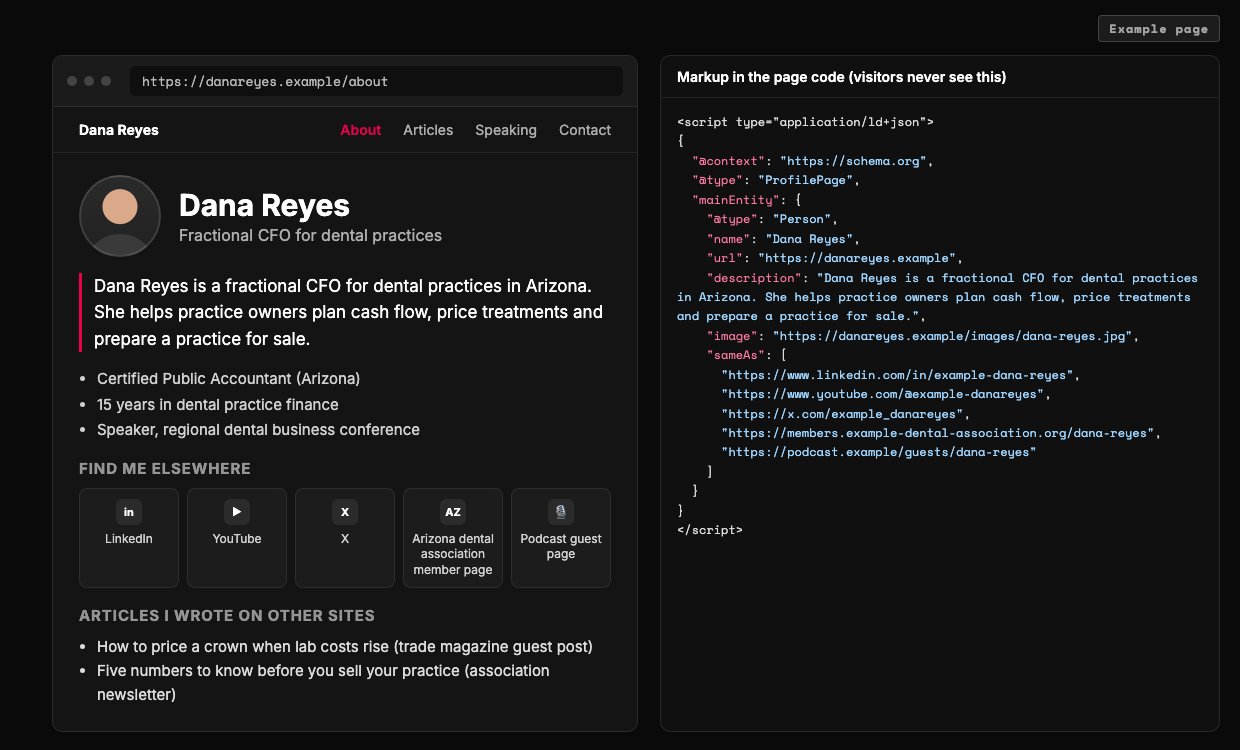
- The same two sentences go on every profile, word for word.
- The home base links out to every profile. Each profile links back here.
- A person's home base uses ProfilePage, with the person as the main subject.
- sameAs lists the same profiles the page links to. Written by hand, not by a plugin default.
- Articles on other sites go in the list too. They are outside proof.
Example page built for this article with a made-up brand. Dana Reyes and every URL are made up.
Step 4: get mentioned on sites you do not own
Your own pages make the claim. Other sites confirm it. Google believes the claim when enough independent places say the same thing.
Good sources are boring. Trade directories, association member pages, local press, podcast guest pages, conference speaker pages, and articles you wrote for someone else.
Ask each one to use your description and link to your home base. Ask for the link every time.
Already mentioned somewhere without a link? Ask the site to add one. It is the easiest win on this list.
What about Wikipedia? It feeds many panels, but its notability rules want coverage from independent sources. A page you write about yourself tends to get deleted.
Wikidata has its own bar. An item must be clearly identifiable and backed by serious public sources.
How to never get a knowledge panel, in four easy steps:
1. Describe yourself a different way on every profile. Keep Google guessing.
2. Let a plugin write your markup. Never look at it.
3. Pay a service that promises a panel in 30 days.
4. Write your own Wikipedia page. Wait for the deletion notice.
Nobody outside Google can issue a panel. So anyone selling a guaranteed one is selling bullshit.
On a small budget? We cover which search fights a small firm can win in bootstrapped SEO for a productized service.
Do the top-left this week; the top-right decides the outcome
- Do first Home base, one description, sameAs markup.
- Decides it Directories, press, association pages, guest articles.
- Skip Extra profiles nobody links to, keyword-stuffed bios.
- Avoid Paid panel packages. Nobody outside Google issues a panel.
Our judgment, based on how Google says panels are sourced.
How do you claim a knowledge panel when it shows up?
Claim it the day it shows up. Search your name, and look for a link to claim the panel.
Claiming tells Google a real person stands behind the box. It also lets you get verified and suggest fixes. Google checks you through an official profile it already ties to you.
What can you change? A few things directly, like links to your social profiles. Most things you can only suggest, and Google checks them against public sources.
The description works differently. Google says it cannot be edited. You fix it at the source site, and the panel usually follows.
No claim link yet? Google says not every panel can be claimed. Check back from time to time.
The exact buttons change, so the current steps sit in the dated box below. The method does not change.
Google gives no timeline, and neither should anyone selling you a panel
| Question | Google's help pages | Our method | What to do |
|---|---|---|---|
| Can you request a panel? | No. Panels are generated automatically. | No. Make Google sure, and it builds one. | Spend the time on steps 1 to 5. |
| Can you control it? | Verified people suggest changes; Google reviews them. | You steer it. You never own it. | Claim it, then fix the sources. |
| Where does the description come from? | Other sources. It cannot be edited. | From the places that describe you. | Use one description everywhere. |
| How long does it take? | No timeline given. | No timeline given. | Ignore anyone who quotes one. |
Google Knowledge Panel Help pages; the Home-Base Path as set out in this guide.
Build your home base with AI: the copy-paste prompt
Paste the prompt below into your preferred AI. It asks about you one question at a time. Then it writes your description, your profile checklist and your markup.
It never invents a link. Every URL in the markup comes from you.
Test the markup before it goes live. Want a second pair of eyes? Send us the result.
Paste into your preferred AI. It asks you seven questions, then writes your description, profile checklist and sameAs markup.
Act as an entity SEO helper. Build my knowledge panel home base with the Home-Base Path.

If you can browse, first check Google's current help pages for knowledge panels and for Organization and ProfilePage structured data, and tell me if anything has changed.

Ask me one at a time, with the example:
1. Is this for a person or a firm? (Example: a person)
2. The name, exactly as it should show. (Example: Dana Reyes)
3. What you do, for whom, and where. (Example: fractional CFO for dental practices in Arizona)
4. The 3 to 5 topics you want to be known for. (Example: practice cash flow, treatment pricing, selling a practice)
5. Your home base URL, if you have one. (Example: https://danareyes.example)
6. Every profile URL you own. (Example: LinkedIn, YouTube, an association listing)
7. Articles you wrote on other sites, interviews, and pages with photos of you. (Example: a guest post on a trade site)

Rules:
- Home base: a person uses a site on their own name. A firm uses its home or about page. No site? Use an author page on the firm's site and tell me it is the weaker choice.
- Description: two sentences, under 45 words, plain words. Name the field, the buyer, the topics and the place. The same text goes on every profile, word for word.
- Markup: JSON-LD. A person gets ProfilePage with a Person as mainEntity. A firm gets Organization with name, url, logo and description. Put every URL I gave into sameAs. Never invent a URL, a credential, an award or a date. Leave out anything I did not give you.
- Profiles: list each one with two checkboxes: "description pasted" and "links to home base".
- Mentions: suggest 5 kinds of sites in my field that could mention me. Never suggest fake reviews, paid panel services, or writing my own Wikipedia page.

Output:
Home base: [URL and why]
Description: [two sentences]
Profile checklist: [table]
Markup: [code block]
Mention targets: [5 kinds of sites]
Next three actions: 1. 2. 3.
What to do this week
1. Pick your home base. Rewrite its about text so a stranger knows who you are in one read.
2. Run the prompt. Paste the description on every profile you own, each with a link home.
3. Add the markup and test it. Then ask three sites that already mention you to link to your home base.
Once Google knows who you are, the next job is pages that rank. Start with how to structure a blog that ranks, or what to change when a page sits on page two.
Remember the stranger with your name? He had a head start. You have a home base.
Google does not give panels to the loudest firm. It gives them to the clearest one.
Do the parts you control this week; the rest has no set end
- Pick the home base Today A site on your own name, or the firm's about page.
- Description and profiles This week The same two sentences everywhere, each with a link home.
- Markup This week Add sameAs by hand and test it.
- Mentions Every month Ask sites in your field to mention you and link home.
- Claim it When it appears Verify, then fix the sources, not the box.
The Home-Base Path, as set out in this guide. Google gives no timeline for panels.

Filip Kovacevic is the founder of Anar Agency in Phoenix. He spent five years running SEO, Meta ads, email, and content for medical practices across the United States, and now does the same work for healthcare, home-service, legal, and professional-service businesses, alongside AI implementation. More from Filip →
Talk it through in 15 minutes
Bring one question from this article. We will tell you what we would do, whether or not you hire us.
Book a 15-Min Chat →