AI-Generated Short-Form Content: How to Make One Talking-Head Clip a Day
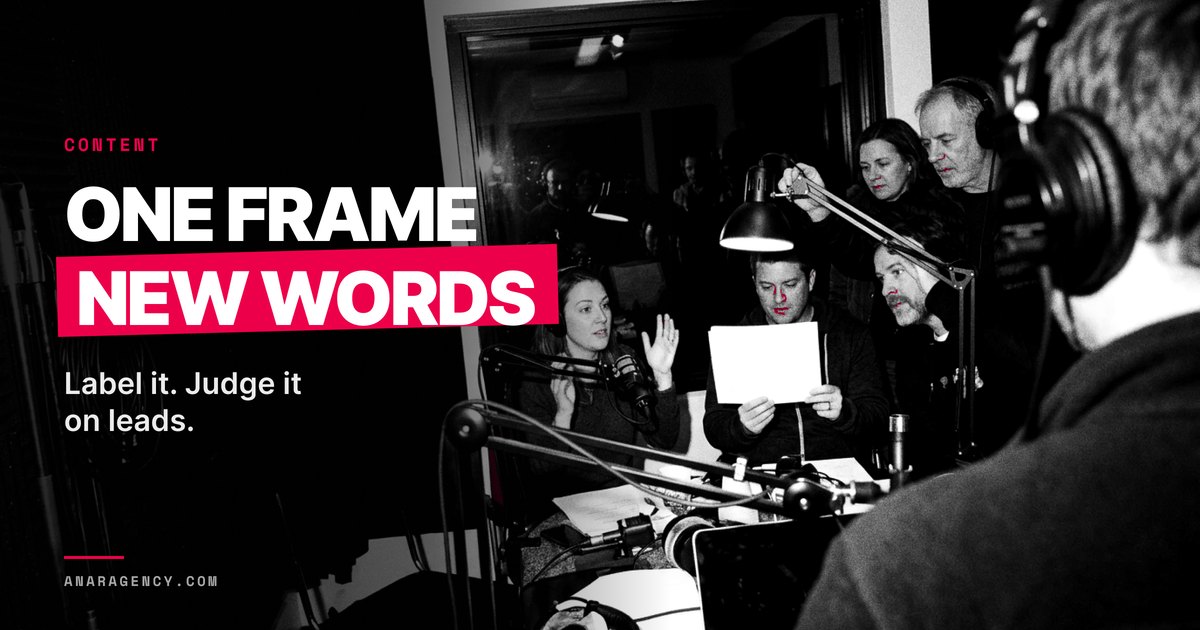
AI-generated short-form content is easiest as a talking-head clip. Lock one AI presenter, one frame and one prompt. Cut the script into lines of 120 to 130 characters, one line per clip of about eight seconds.
Make two takes per line, keep the one with clean sound, join them, label the video as AI, and judge it on leads.
AI-generated short-form content is easiest when nothing moves
Picture a woman at a podcast mic. She explains three questions to ask a roofer, in just over a minute.
Her voice is steady. Her lips match every word. She does not exist.
That video is ten short clips joined together. Each clip is about eight seconds long, and only the words change between them.
This guide covers AI-generated short-form content of the talking-head kind. One AI presenter looks at the camera and explains one thing, in about a minute.
Why this kind? Most AI video is hard. Scenes change, faces drift, hands grow extra fingers, and no shot matches the one before.
The talking head skips all of that. One face, one room, one camera angle.
We call the method the Clip Line. You lock three things once, and after that each new video is mostly typing.
Who should skip it? A firm whose whole pitch is one real, named expert should put that expert on camera instead. An AI face in their place costs more trust than it saves in time.
A talking head removes almost everything that goes wrong in AI video
| Most AI video | AI talking-head clip |
|---|---|
| Scenes change every shot | One room, one camera angle |
| Many faces to keep the same | One face |
| Every shot needs its own prompt | One prompt, only the line changes |
| Joins rarely match | Same start and end frame, so joins line up |
Our comparison.
Lock three things once: the presenter, the frame and the prompt
The Clip Line starts with setup you do one time. Get it right and every video after it gets cheap.
The presenter. Design one character and save the reference image. Make it plainly a character, never a copy of a real person.
The frame. Pick one opening picture and one closing picture. Every clip starts on the first and ends on the second, so the joins line up.
The prompt. Write one clip prompt that sets the room, the voice and the camera. Then add one spoken line to the end of it, and change nothing else.
Same start frame. Same end frame. Same prompt.
Want a handheld look instead of a tripod? Give the tool the start image only. When both images are locked, the clip must return to where it began, so camera movement in the prompt gets ignored.
Our rule: lock both frames for a calm podcast look. Use the start frame alone when the camera should move, and say so in the prompt if the presenter walks.
The look is the easy part. What the presenter says matters more, and we cover finding real material in collect, don't invent.

Lock three things, then only the words change
- 1. The presenter One designed character, saved as a reference image. Never a real person.
- 2. The frame One opening picture and one closing picture for every clip.
- 3. The prompt One clip prompt for room, voice and camera. Add the spoken line at the end.
Our method.
Lock both frames for calm; use the start frame alone for movement
| Start and end frame locked | Start frame only |
|---|---|
| Calm tripod look | Handheld, moving look |
| Clips join cleanly | Joins need more hiding |
| Camera moves in the prompt get ignored | Camera moves in the prompt work |
| Best for podcast-style clips | Best for selfie-style clips |
Our rule.
The Clip Line is a way to make short AI talking-head videos every day by holding everything fixed except the words. Lock one designed presenter, one start and end frame, and one prompt. Write each line at 120 to 130 characters for a clip of about eight seconds, make two takes, listen before you look, trim and switch the zoom at the joins, label the video as AI, and judge it on leads, not views.
The presenter explains and never poses as a customer.
Write every line at 120 to 130 characters
Most AI video tools make short clips, often about eight seconds each. So the script has to be cut into lines that fit one clip.
Our length is 120 to 130 characters per line, spaces included. That is about 20 words.
Why so exact? A typical English speaking rate is about four syllables a second. At that pace, about 20 words fill eight seconds without a rush.
Shorter lines leave dead air at the end of the clip. Longer lines make the presenter rush, so the pace jumps from clip to clip.
Same length. Same pace. Viewers stop seeing the cuts.
Ten lines make one video. After you trim the joins, ten clips run a bit over a minute.
Keep the script in a spreadsheet. Use one row per video, one cell per line, and a column that counts the characters for you.
Name the downloaded clips 1, 2 and 3 in line order. Then you never hunt for which clip goes where.
Ten lines of about 20 words make a video of just over a minute
- one clip, in many AI video tools 8
- characters per line, spaces included 120 to 130
- lines, and clips, per video 10
- takes per line, a third only if needed 2
Our method. Clip length depends on your tool; see the platform box.
Example: every line lands between 120 and 130 characters
| Clip | Line | Characters |
|---|---|---|
| 1 | Before you hire a roofer, ask three questions. Most people ask none, and they find out what they skipped the day it rains. | 122 |
| 2 | Question one. Will you put the full price in writing before any work starts? A good roofer says yes without a single pause. | 123 |
| 6 | Question three. What does your warranty cover, and for how long? Ask for it in writing, on the same day you get the price. | 122 |
Example script written for this guide. Counts include spaces.
One video, ten lines, each counted to 120 to 130 characters
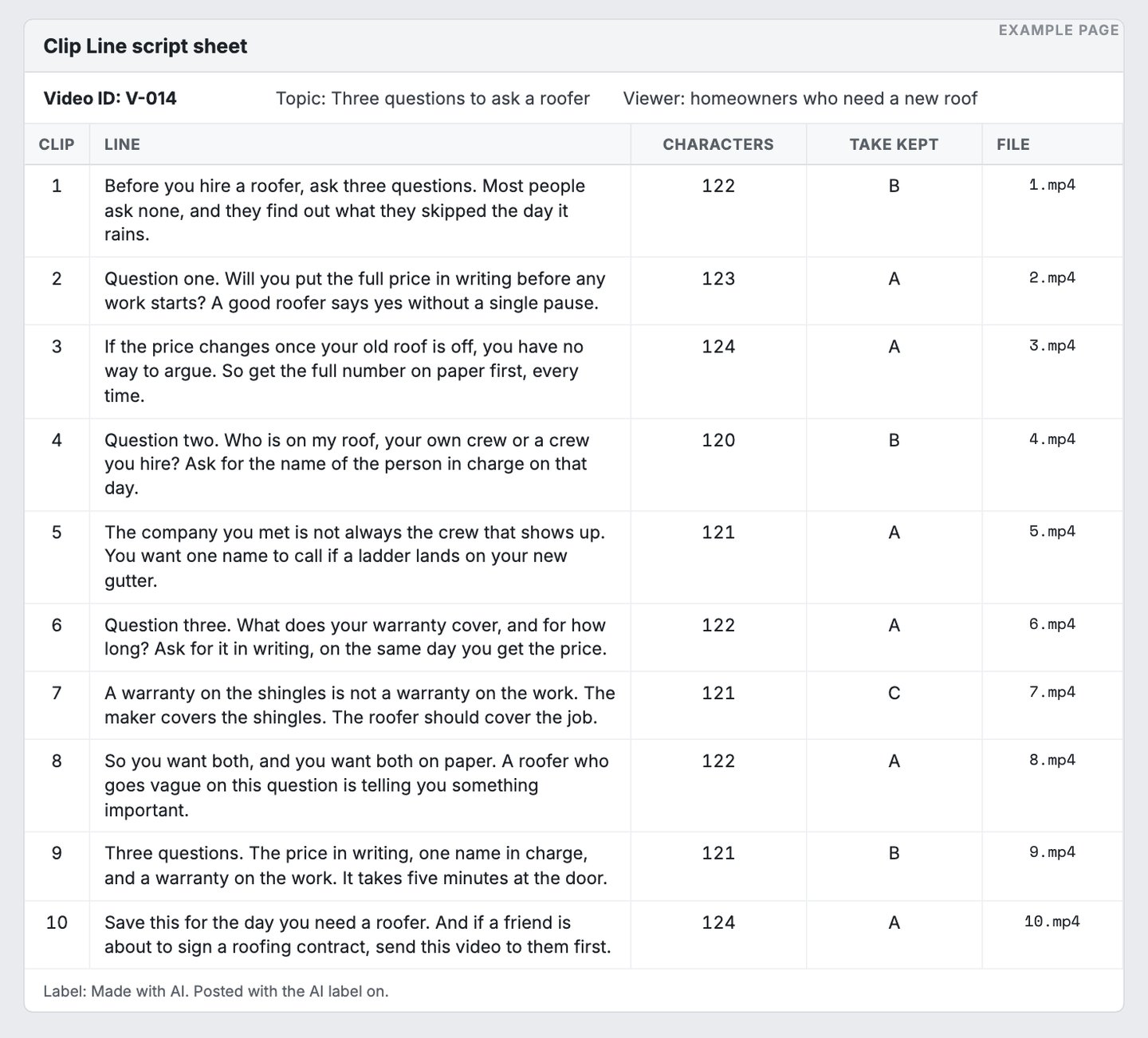
- One ID per video, so you can find it a month later.
- Every line is 120 to 130 characters. Same length, same pace.
- The floor. Shorter lines leave dead air at the end of the clip.
- Two takes per line. A third only when neither worked.
- Clips named in line order, so the edit is drag and drop.
Example page built for this article with a made-up brand. Character counts computed with Python len() on each line, spaces included, 2026-10-17.
Make two takes per line, and listen before you look
Generate two takes of every line. Keep the better one, and make a third only if neither works.
How do you pick? Listen first. Two takes of the same line differ most in the sound, not the face.
One take has a muffled voice. Another has background music that nobody asked for.
Some podcast-style takes add a second voice, an off-screen host who keeps talking. Cut that voice out in the edit.
Only then look at the face. Check the lips against the words, and check that the expression fits the line.
Last, watch the whole joined video from start to end. A still frame hides a jump in the face that playback shows at once.
Should you automate this check? Not yet. Building a tool to grade takes can eat more hours than checking a hundred videos by hand.
Listen first, then look, then play the whole thing
- 1. The voice Muffled or thin sound loses, whatever the face does.
- 2. Extra sounds Background music or a second voice. Cut it or drop the take.
- 3. The lips Do they match every word?
- 4. The face Does the expression fit the line?
- 5. Full playback Watch the joined video start to end. Stills hide jumps.
Our checking order.
How do you make an AI voice sound like it is in the room?
Add the sound of the room. AI voices often sound too clean for where the presenter sits.
She is in a big open room, but her voice has no echo. It sounds like she is speaking into a studio mic.
Some voices even pop on the p sounds, like a person talking right into a microphone. When no mic sits that close in the shot, the ear knows something is off.
The fix is cheap. Add room tone, the quiet hum a real room makes when nobody talks.
A soft air conditioner hum works well. Set it about 20 decibels below the voice, so you feel it more than you hear it.
Two more fixes help. Mix in some real footage, like hands, a product or a street, and the AI parts stand out less.
Then test whether captions help, instead of guessing. For example, two brands found their videos did better without captions in split tests. Your audience may differ, so test both.
Most AI talking heads give themselves away through sound
| What gives it away | Why | Fix |
|---|---|---|
| The voice is too clean | No echo in a big room | Room tone about 20 dB below the voice |
| Pops on p sounds | Sounds like a close mic, but none is in shot | Redo the take |
| A frozen camera | Both frames locked | Start frame only, or a slight drift added in the editor |
| Everything is AI | Eyes find the flaws | Mix in real footage |
| Captions by habit | Nobody tested it | Split test with and without |
Our checklist.
Hide the joins, and leave B-roll for later
Every join between two clips is a small jump cut, a cut where the picture skips ahead. Two small edits hide most of them.
First, trim about 0.4 seconds off the start and the end of each clip. That removes the pause where the presenter waits to speak.
Second, switch the zoom. Odd clips run at 100 percent and even clips at 115 percent, so each join looks like a new camera angle.
Export the shape each kind of post needs. Use 9:16 for full-screen phone video, 4:5 for feeds and 1:1 for a square.
Then skip B-roll on your first videos. B-roll is the extra footage you cut to while the voice keeps talking, and it is the slow part.
For example, one creator timed his work. A one-minute talking head took about 30 minutes once the script was written, and about 90 with B-roll.
Your first video will take longer. Plan two to three hours for everything, and expect the second one to go faster.
Example: B-roll tripled the time per video
Minutes per finished video, as one creator timed it. The first video shows the top of a 2 to 3 hour range.
- Talking head, script ready 30
- With B-roll added 90
- First video ever, all-in 180
Example from another creator, self-reported. Not our result, and not verified by us.
Label it as AI, and never let it pose as a customer
Cheap video makes it tempting to cut corners. We keep four rules, and none of them bend.
Label it. YouTube requires creators to disclose realistic AI-generated content when they upload it. TikTok requires a label on AI content with realistic images, audio or video.
Meta shows an AI info label when it detects AI signals or when you disclose. Your clip shows a realistic person saying words nobody said, so label it every time.
No real people. Never use a real person's face or voice without their written consent. That is the line between a character and a deepfake.
No fake customers. The presenter can explain a product. It cannot say it tried one.
For example, one AI supplement ad had its presenter describe a tingle on her lips after a dose. Nobody felt anything. There was no real person in the ad.
The FTC rule on fake reviews covers reviews by someone who does not exist, such as AI-generated fake reviews. An AI face reading a testimonial is still a fake review, just with good lighting.
Check every claim. A script line is an ad claim. The FTC's truth standard applies whether a person or a model says it, and our guide to FTC risk drivers covers the claims that get flagged.
The presenter explains; it never claims it used anything
| The presenter may say | The presenter may never say |
|---|---|
| Here are three questions to ask a roofer. | I hired a roofer and it saved me thousands. |
| Here is what the label says is inside. | I take one every morning. |
| Our clients often ask about price first. | I was a client and I loved it. |
| This video was made with AI. | Nothing, and hope nobody asks. |
Our rule. FTC fake-review rule and Advertising FAQs, cited below.
YouTube requires a label on realistic AI video, and you add it at upload
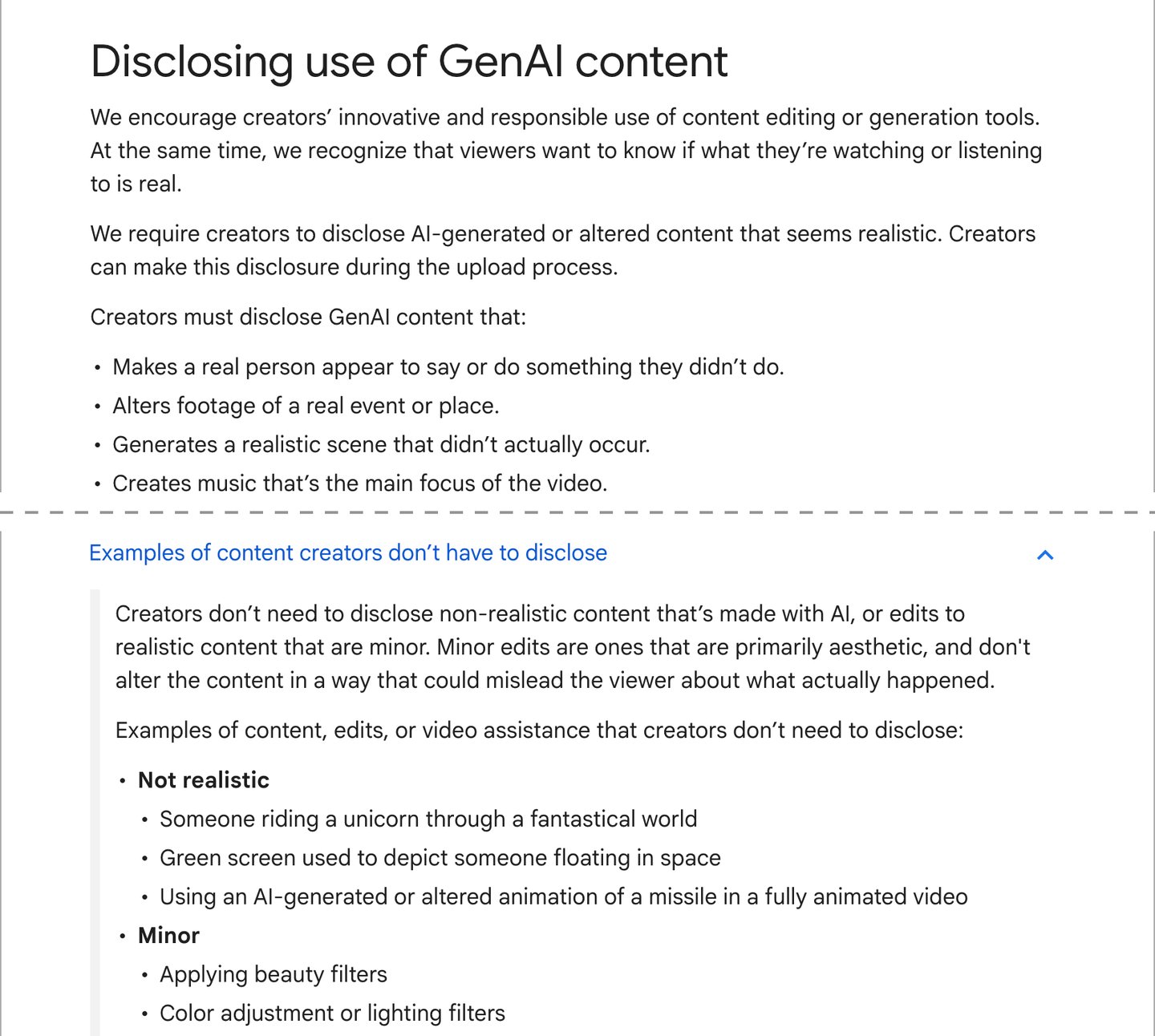
- Realistic AI video needs a label. Your talking head counts.
- You tick it when you upload. It takes seconds.
- Using a real person's face or voice is the riskiest case. Never do it without written consent.
- An AI presenter in a realistic room falls here.
- Small edits like filters do not need the label.
Screenshot of YouTube Help, Disclosing use of GenAI content (answer 14328491), taken 2026-10-17.
Does AI short-form content get leads, or just views?
It gets views more easily than leads. A new page can rack up big numbers and still sell almost nothing.
For example, one brand-new page reported about a million views in its first two weeks. Its ebook earned about $130 in that time.
What went wrong? The audience liked the videos. It did not want the ebook.
So count what pays. Track the leads and sales that come from the clips, against the hours spent making them.
Put the offer after the help, and label it, the way we set out in where to put the offer in your content.
Read the right numbers before you call a channel dead. Our guide to Meta results versus leads shows which column to trust, and reading ad data covers the rest.
Where does this format fit best? Explaining. A short answer to a common question, in one steady voice, every day.
A virtual presenter is not new, as the history of the virtual influencer shows. What is new is that one person can make a clip a day.
Views are the bottom rung; sales are the only rung that pays
- Views The platform showed it. Says nothing about buyers.
- Follows People want more. Still not buyers.
- Comments and messages Someone raised a hand. Now you can talk.
- Leads A name and a need. The first number worth counting.
- Sales The only number that pays for the hours.
Our model.
Where people get stuck with AI talking-head videos
How to make AI video nobody believes in four easy steps:
1. Write the script as one long paragraph, and let the tool cut it wherever it likes.
2. Keep the first take of every line, background music and all.
3. Have the presenter swear the product changed her life.
4. Skip the AI label and hope nobody notices.
Each step saves ten minutes. Together they make a channel look fake as hell.
Stuck point one: the pace jumps between clips. The lines are different lengths. Count the characters and rewrite every line to 120 to 130.
Stuck point two: the voice sounds fake. It is too clean for the room. Add room tone about 20 decibels below the voice, and redo any take that pops on the p sounds.
Stuck point three: lots of views, no leads. The clips entertain people who will never buy. Pick one buyer, answer that buyer's questions, and put one labeled offer after the help.
Three stuck points and the fix for each
| Symptom | Cause | Fix |
|---|---|---|
| The pace jumps between clips | Lines of different lengths | Rewrite every line to 120 to 130 characters |
| The voice sounds fake | Too clean for the room | Room tone 20 dB below; redo popping takes |
| Lots of views, no leads | Clips entertain non-buyers | One buyer, their questions, one labeled offer after the help |
Our checklist.
Write your ten lines with AI
Paste the prompt below into your preferred AI. It asks about your viewer and your topic, one question at a time.
Then it writes ten lines at 120 to 130 characters and counts each one. It also flags every claim you need to check.
It will not write a testimonial for the presenter. Ask for one, and it writes the honest version instead.
Want a second pair of eyes on your first script? Send it to us.
Paste into your preferred AI. It asks about your viewer and your topic, then writes ten counted lines and flags the claims to check.
Act as a script writer for short AI talking-head videos. Help me write one video with the Clip Line method.

Ask me one question at a time, with the example:
1. Who is the viewer? (Example: homeowners who need a new roof)
2. What one question does the video answer? (Example: what to ask a roofer before hiring one)
3. What true facts or rules can you give me? (Example: get the price in writing, ask who is in charge on site)
4. Is there an offer, and what is the next step? (Example: a free roof check, booked on our site)
5. How long is one clip in your video tool, in seconds? (Example: 8)

Rules:
- Write 10 lines. Each line is one clip.
- For an 8-second clip, every line is 120 to 130 characters, spaces included. For other clip lengths, use about 15 to 16 characters per second.
- Count the characters of every line and show the count. Rewrite any line outside the range.
- One idea per line. Plain words. No line depends on seeing the screen.
- The presenter explains. It never claims it used the product, never gives a testimonial and never says "I tried". If I ask for that, refuse and write the honest version.
- Never invent facts, numbers, results or reviews. Use only what I give you. Mark every factual claim with [CHECK] so I can verify it.
- If there is an offer, it goes in line 10 only, after the help, and says plainly that it is an offer.
- Remind me to label the video as AI-generated on every platform where I post it.

Output:
Lines: 1 to 10, each with its character count
Claims to check: [list]
Take check: listen first (muffled voice, background music, a second voice), then the lips, then the full playback
Caption label: [exact words that say the video was made with AI]
What to measure: leads and sales from this video, and the minutes it took to make
Post your first clip this week
1. Lock the presenter, the frame and the prompt. You do this once.
2. Run the prompt and get ten lines. Make two takes of each, and listen before you look.
3. Trim, switch the zoom, label it as AI and post it. Then post one a day and count the leads.
Turning one long piece into many clips? Read one article, twenty pieces.
Writing the first line of each clip? See the first three seconds.
Back to the woman at the podcast mic. She never existed, and her label says so.
What made her worth watching was the script. The face came from a tool. The words have to come from you.
Write, make, listen, edit, label, count, repeat
- Write ten lines 120 to 130 characters each.
- Make two takes A third only if needed.
- Listen, then look Sound first, face second.
- Trim and zoom 0.4 seconds off each end, 100 and 115 percent.
- Label and post Mark it as AI everywhere.
- Count leads Against the minutes spent.
Our method.

Filip Kovacevic is the founder of Anar Agency in Phoenix. He spent five years running SEO, Meta ads, email, and content for medical practices across the United States, and now does the same work for healthcare, home-service, legal, and professional-service businesses, alongside AI implementation. More from Filip →
Talk it through in 15 minutes
Bring one question from this article. We will tell you what we would do, whether or not you hire us.
Book a 15-Min Chat →