VSL Retention: What Each Viewer at Your Offer Really Costs
VSL retention is the share of viewers still watching your sales video at each moment. Divide your cost per click by the share still watching when the buy button appears. At $1 a click and 20 percent left, each viewer at the button costs $5.
To lower it, cut the video so the reason to buy comes sooner.
VSL retention: what each viewer at the offer really costs
Picture 100 people clicking your ad. You pay $1 for each one. Thirty minutes later, the buy button finally shows up on your sales video.
Twenty people are still watching.
You paid for 100 viewers. Only 20 of them can buy. So each person who saw your offer cost you $5, not $1.
That gap is what VSL retention measures. A VSL, or video sales letter, is a video that sells one offer, usually on its own page. It grew out of the printed sales letter.
Retention is the share of viewers still watching at each moment. Most guides treat it as a content score. We treat it as a price.
It tells you what each viewer at your offer really costs. It also tells you where your buy button belongs.
Example: $100 buys 100 clicks, but only 20 people see the button
One sales video with the buy button at minute 30
- Spent on 100 clicks at $1 100
- Still watching at minute 30 20
- Real cost per viewer at the button 5
Example curve: 100 paid clicks at $1. The cost math is ours.
Divide your cost per click by the share still watching
The formula is one line. Cost per viewer at the button = cost per click divided by the share of viewers still watching when the button appears.
Your cost per click is what you pay each time someone clicks your ad. Every click counts. That includes the people who leave in minute two.
Run it on the example curve in the table below. 100 people click at $1 each, so you spend $100. About 70 of them press play.
That alone makes each viewer who presses play cost $1.43. By minute 15, 40 people are left, at $2.50 each. At minute 30, only 20 remain.
Five dollars a head. Same ad. Same click price.
Nothing about the ad got worse. People just left as the minutes went by.
Why does this matter so much? Most sales videos sell to a small share of the people who watch. Every viewer who leaves before the button is a click you paid for and can never sell to.
So the first number we check on any sales video is not the click price. It is the cost per viewer at the button.
Example: the same $1 click costs $5 per viewer by minute 30
| Point in the video | Share still watching | Math | Cost per viewer |
|---|---|---|---|
| Press play | 70% | $1 / 0.70 | $1.43 |
| Minute 5 | 50% | $1 / 0.50 | $2.00 |
| Minute 10 | 45% | $1 / 0.45 | $2.22 |
| Minute 15 | 40% | $1 / 0.40 | $2.50 |
| Minute 20 | 35% | $1 / 0.35 | $2.86 |
| Minute 25 | 30% | $1 / 0.30 | $3.33 |
| Minute 30 | 20% | $1 / 0.20 | $5.00 |
| End | 15% | $1 / 0.15 | $6.67 |
Example curve: 100 paid clicks at $1. The cost math is ours.
Example: four in five paid clicks are gone before a minute-30 button
- Paid clicks 100
- Pressed play 70
- Watching at minute 15 40
- Watching at minute 30 20
Example curve: 100 paid clicks at $1. The cost math is ours.
The Intent-Then-Button Rule says the buy button goes right after the viewer has a reason to buy, never before. Cost per viewer at the button equals cost per click divided by the share still watching when it appears. If most viewers leave before the button, do not just move it up: cut the video so the reason to buy lands sooner, then put the button right after it.
Match length to what the market already wants and to the ads viewers came from, and test button times in steps.
Time raises intent and shrinks the crowd
Intent is how ready a viewer is to buy. It grows the longer someone watches, as they move through the steps every buyer takes before a purchase.
The crowd does the opposite. Every minute, a few more people leave.
So every sales video sits between two forces. Too short, and viewers leave before they want anything. Too long, and almost nobody is left to buy.
Is longer better, then? Sometimes. A longer video can earn a higher price from the people who stay.
But it loses everyone who left along the way. The right length keeps enough viewers watching, and ready to buy, when the button shows.
There is no magic number. Your own chart tells you.

A longer video raises intent and lowers the number of people left
| Short video | Long video |
|---|---|
| Most viewers are still there at the end | Few viewers are still there at the end |
| Many leave before they want anything | Those left want it badly |
| Cheap viewers, low intent | Expensive viewers, high intent |
| Works when the market already wants it | Works when the want has to be built |
Our summary of the time trade-off in this guide.
Should you move the buy button earlier? Not on its own
Moving the button earlier is the first fix everyone tries. It is also the laziest one.
A button that shows up before the viewer wants the offer is useless. They can see it. They just have no reason to press it yet.
On mass-market offers it can also backfire. Show the button too soon, and viewers see a sales pitch before they want the thing. Many of them start to push back.
So we follow one rule, the Intent-Then-Button Rule. The buy button, or call to action, goes right after the viewer has a reason to buy. Never before.
Waiting is not hiding. Tell people up front that the video ends with an offer; our guide to placing and labeling an offer shows how. You delay the ask, never the truth.
For example, one business had an upsell video where the average viewer watched about 9 minutes. The button showed at minute 13. Most viewers left before they ever saw it.
Moving the button to minute 8 would not fix that. Those viewers would see a price before they saw a reason.
The better fix was to cut the video so the reason to buy landed by minute 6 or 7, with the button right after. The business forecast that this would about double the results. That was an estimate, not a measured result.
How to make a sales video expensive in four easy steps:
1. Make it 45 minutes long because someone online said long videos sell.
2. Put the button at the very end.
3. Notice that most viewers leave before it. Move the button to minute 5 without changing a word.
4. Blame the ad, raise the budget and hope like hell.
The button is late because the reason to buy is late
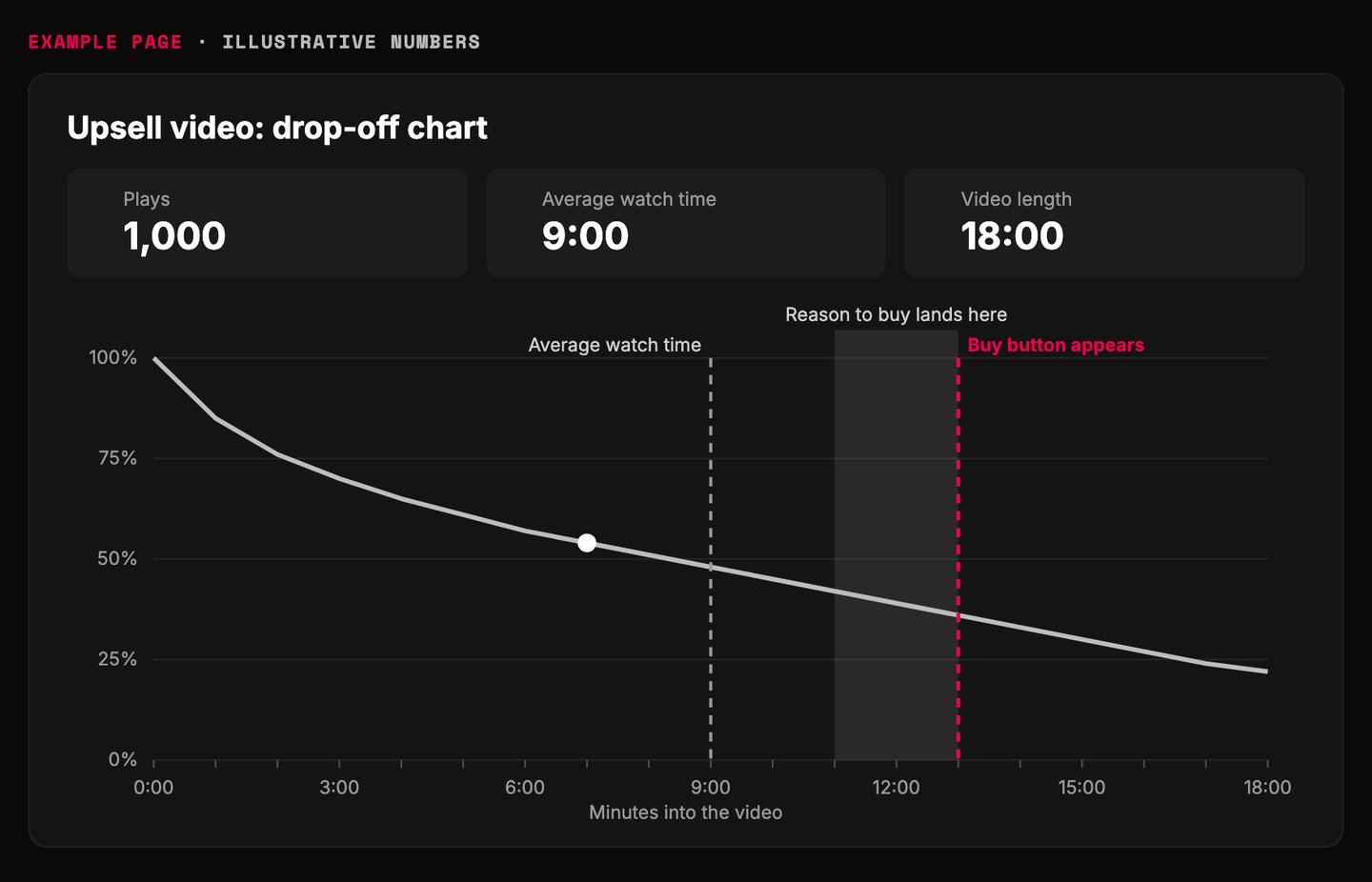
- On average, viewers watch about 9 minutes.
- The button shows at minute 13. Only 36 percent are still watching.
- The reason to buy comes too late. Moving the button alone would show a price before a reason.
- Cut the video so the reason lands here, at minute 6 or 7, then show the button.
Example page built for this article with illustrative numbers
Move the reason to buy earlier, not just the button
| Move the button up | Move the intent up |
|---|---|
| Button shows before the viewer wants it | Button shows right after the reason to buy |
| Viewers see a price before a reason | Viewers see a reason, then the price |
| Mass-market viewers push back | Viewers are ready when the ask comes |
| Same video, new timestamp | Shorter video, new timestamp |
The Intent-Then-Button Rule, as set out in this guide.
How to cut a VSL so the reason to buy comes sooner
Cutting is the real fix, and it is harder than writing. Being clear and short takes more skill than being clear and long.
Step 1: read your drop-off chart. Every video host has one. YouTube's audience retention help page explains the shapes: a flat line means people keep watching, and a dip means they skip or leave.
Write down two times. How long does the average viewer watch? When does your button show?
Step 2: find the intent point. That is the first moment a viewer has a clear reason to buy. It usually comes right after they see that the result is possible for them, and how it works.
Step 3: list every part before it. Story, proof, explanation, side notes. Next to each one, ask a single question: does the viewer need this to want the offer?
Step 4: cut or shorten every part that gets a no. Aim to land the intent point before the average watch time.
Step 5: put the button right after the intent point. Then go straight into the close. Our guide to the stacked close covers what comes after the button.
Step 6: run the math again. Read the new share still watching at the button. Divide your click price by it.
Where do the best cuts hide? Usually in the opening. You cannot win back a viewer who already left, so start with the first 90 seconds of a VSL.
Flat lines, slow slides and dips each mean something different
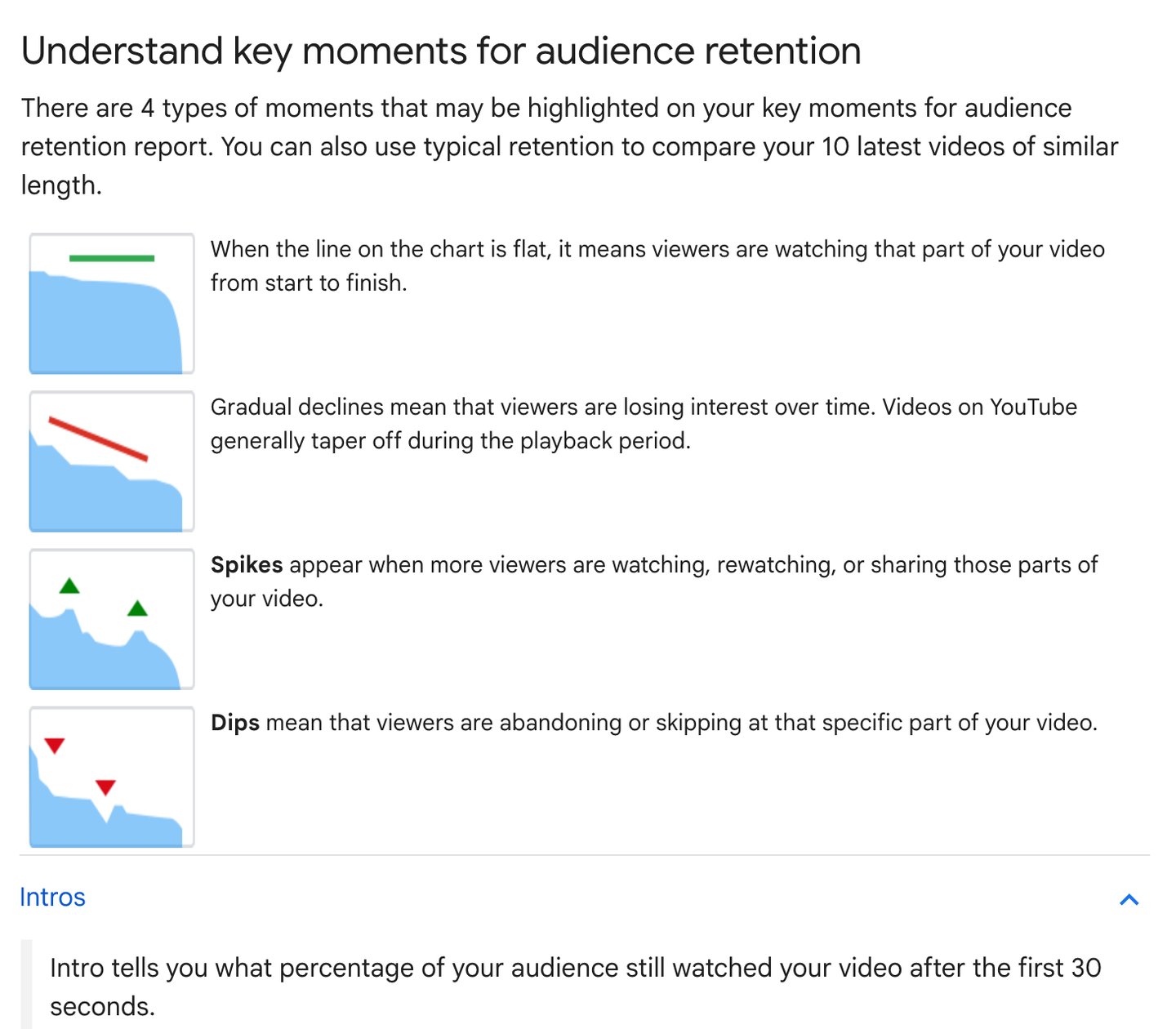
- Flat line: nobody leaves here. Keep this part.
- A slow slide is normal. Every video loses people.
- A dip before your button is a cut candidate.
- The first 30 seconds lose the most. Start your cuts in the opening.
Screenshot of YouTube Help, Measure key moments for audience retention, taken 2026-10-17. Intros section opened on the page
Six steps to land the reason to buy before viewers leave
- 1. Read the chart Write down the average watch time and the button time.
- 2. Find the intent point The first moment a viewer has a clear reason to buy.
- 3. List what comes before it Story, proof, explanation, side notes.
- 4. Cut every no Keep only what the viewer needs to want the offer.
- 5. Button right after Then go straight into the close.
- 6. Rerun the math New share at the button, new cost per viewer.
The Intent-Then-Button Rule, in six steps.
Example: the upsell button came four minutes after the average watch time
- Video starts Minute 0 Everyone who pressed play is here.
- New intent point Minute 6 to 7 After the cut, the reason to buy lands here, with the button right after.
- Average watch time Minute 9 On average, viewers stop watching around here.
- Old button Minute 13 Most viewers never saw it.
Example from another business. Not our result, and not verified by us.
How long should a VSL be? Match the market and the ad
A VSL should be as long as your market needs to reach intent, and no longer. Two things set that: what buyers already want, and the ad they came from.
The market. Buyers who already know the problem and want a fix need a short video. A big market that does not know the problem yet, and wants nothing, needs a longer video or a webinar.
Long-form selling on a screen is older than the internet. A long infomercial usually runs about half an hour. Like a long VSL, its job is to build the want from zero.
For example, one high-ticket sales training company tested many versions, and a 5-minute video beat every longer one. The copy was not the reason. Competitors ran long, teaching-heavy sales processes, so buyers arrived already sold on the idea.
Where you sell, meaning the market you sell into, matters more than what you sell. If competitors already taught the market, you can skip the teaching.
The ad. Length should match where the viewer came from. A 15-second ad trains people to expect something quick, so sending them into a 40-minute video is a mismatch.
Some buyers need hours and several rounds of contact with you before they decide. No single video can do that, so build follow-up around it. For the inside of one video, see the twelve-beat VSL.
Price alone does not set the length. Intent does.
Length follows the market's intent and the ad viewers came from
- Short video Buyers are ready and expect speed. Get to the reason and the button fast.
- Short to medium video Buyers are ready and will watch. Do not pad it.
- Change the ad first Sending quick ads to a long video is a mismatch. Use longer ads or a smaller first step.
- Long video or webinar The want has to be built from zero, and viewers expect depth.
Our decision grid for VSL length.
Test the button time in five-minute steps
You will not find the right button time by thinking about it. You find it by testing.
Make versions of the video that show the button at different times. On a long video, try 15, 20, 25, 30 and 35 minutes. On a short one, use smaller steps.
Compare cost per buyer and average order value, which is the average amount each buyer spends. Do not compare views or clicks. Those move with length and say nothing about money.
For example, one company selling a debt offer tested its button at 15, 20, 25, 30 and 35 minutes. Average order value changed a lot from one version to the next.
Change only the button time. Same ad, same audience, same page. A fair A/B test splits the same traffic between versions, and our guide to testing one variable at a time explains why.
Example: a button at minute 15 costs half as much per viewer as one at minute 30
Cost per viewer at the button, by button time, on the example curve
- Button at 15 min 2.5
- Button at 20 min 2.86
- Button at 25 min 3.33
- Button at 30 min 5.0
Example curve: 100 paid clicks at $1. The cost math is ours. Cost per viewer only; test cost per buyer too.
Teach the ad platform to find viewers who stay
Most ad accounts optimize for purchases, meaning they tell the platform to find buyers. The platform hunts for people who look like your past buyers.
For cold traffic, people who have never heard of you, there is another option. Find the average time your buyers watch before they buy. Then fire a tracking event at that minute of the video.
A tracking pixel, also called a web beacon, is a tiny piece of code that tells the ad platform something happened. Here it says: this person watched long enough to want it.
The platform then looks for more people who watch that long. Watchers outnumber buyers, so it gets more signals and learns faster. Our guide to how Meta finds your buyers explains more.
Check one thing before you trust it. Your checkout page must keep converting at about the same rate.
More watchers but fewer buyers? Go back to optimizing for purchases.
For example, one advertiser faced a $20,000 minimum test on a native ad network. They paid for viewers first, cut the sites that sent nobody to the pitch, then optimized for purchases. The test cost $2,000.
If viewers never see the pitch, they cannot buy it.
Firing an event at watch time gives the platform more signals than purchases
| Optimize on purchases | Optimize on watch time |
|---|---|
| Event fires after checkout | Event fires at the minute buyers usually reach |
| Few signals, slow learning | Many more signals, faster learning |
| Finds people like past buyers | Finds people who watch long enough to want it |
| Safe default | Only while checkout keeps converting at the same rate |
Our comparison. Check that your checkout rate holds before you trust watch-time results.
Find your button time with AI: the copy-paste prompt
Paste the prompt below into your preferred AI. It asks for your click price, your drop-off chart and your button time. Then it builds the cost table, a cut list and a test plan.
It never guesses a number. If you do not have one, it asks how to find it.
Want a second pair of eyes? You can send us the result. To see how much you can spend to win each buyer, read our guide to max allowable CPA.
Paste into your preferred AI. It asks for your click price, drop-off chart and button time, then gives you a cost table, a cut list and a test plan.
Act as a sales video analyst. Use the Intent-Then-Button Rule to find what each viewer at my offer costs and where my buy button should go.

Ask me one at a time, with the example:
1. What do you pay per click, or your ad spend and clicks? (Example: $1 a click)
2. What share of visitors press play? (Example: 70 percent)
3. From your video host's drop-off chart, what share is still watching every 5 minutes? (Example: 50, 45, 40, 35, 30, 20)
4. When does the buy button appear, and what is the average watch time? (Example: button at 13:00, average 9:00)
5. At what minute does a viewer first have a clear reason to buy? (Example: minute 11)
6. Where does the traffic come from, and how long are those ads? (Example: 15-second ads)
7. Do buyers already know the problem and want a fix? (Example: yes, competitors teach it)

Never invent a number. If I do not know one, ask me how to find it.

Rules:
- Cost per viewer at the button = cost per click divided by the share still watching at the button.
- The button goes right after the reason to buy, never before it.
- If the average viewer leaves before the button, do not just move the button up. Cut the parts before the reason to buy that the viewer does not need, so the reason lands before the average viewer leaves.
- Length: aware buyers who already want a fix get a shorter video. A big market with no intent needs a longer video or a webinar. Length should match the ads the viewers came from.
- Test button times in steps (15, 20, 25, 30, 35 minutes on a long video). Compare cost per buyer and average order value, never views.
- Tell viewers honestly that the video ends with an offer.

Show your math, then answer:
Cost per viewer at each checkpoint: table
Cost per viewer at my button: $
Verdict: button is early, right or late, and why
Cut list: parts to cut or shorten
New button time: minute
Test plan: two button times to compare
Next three actions: 1. 2. 3.
What to do this week
1. Pull your drop-off chart and run the prompt.
2. Mark the intent point. Cut every part before it that the viewer does not need.
3. Set up two button times one step apart. Compare cost per buyer.
Remember the 100 people who clicked? You cannot make all of them stay. You can make sure the ones who stay get the reason first and the button right after.
Move the reason to buy earlier. Then put the button right after it.
Measure, cut, place, test, then measure again
- Measure Cost per viewer at the button.
- Find intent The first clear reason to buy.
- Cut Everything the viewer does not need before it.
- Place Button right after the intent point.
- Test Two button times, compared on cost per buyer.
The Intent-Then-Button Rule as a weekly loop.

Filip Kovacevic is the founder of Anar Agency in Phoenix. He spent five years running SEO, Meta ads, email, and content for medical practices across the United States, and now does the same work for healthcare, home-service, legal, and professional-service businesses, alongside AI implementation. More from Filip →
Talk it through in 15 minutes
Bring one question from this article. We will tell you what we would do, whether or not you hire us.
Book a 15-Min Chat →